Now available: Geocortex Essentials 4.6.3 & Geocortex Viewer for HTML5 2.7.2

Geocortex Essentials 4.6.3 and Geocortex Viewer for HTML5 2.7.2 are now available on the (https://support.geocortex.com/essentialsGSCDownloads?productTitle=Essentials&sub-nav=downloads&main-nav=essentials) Downloads page or from your local Geocortex vendor.
Essentials 4.6.3 and the 2.7.2 HTML5 viewer have been tested with, and are fully compatible with, ArcGIS 10.5, which is anticipated sometime this month.
This release also addresses a number of issues that have affected customers, including:
Geocortex Essentials 4.6.3
- CORE-1573 Distinct failure messages if request is unauthorized or forbidden
- GE-8306 Removing the overview map causes printing to fail
- GE-8494 Unable to submit HTML format strings as Search Table feature descriptions
- GE-8548 Excessive logging in workflows can lead to high CPU usage
- GE-8551 Unable to refresh access tokens for ArcGIS Online/Portal
- GVH-4200 Remove calls to deprecated FileError API
- GVH-12262 Session expiry warning appears for ArcGIS Online/Portal (requires Essentials 4.6.3)
- GVH-12472 Last tool in the list can't display on the compact toolbar
- GVH-12480 Maximum call stack size exceeded when using the time slider
- GVH-12596 Geocortex Bookmarks stops working after clearing cache in Chrome 54
- GVH-12696 Load/Save Projects not working after clearing cache in Chrome 54
0
-
Hi Jordan,
Yesterday I've posted a question regarding a potential issue with feature hyperlinking in the HTML5 Viewer ( HTML5 Viewer 2.7.1 - hyperlink to PDF not working). Just looked at the issues addressed in the new version ( 4.6.3/2.7.2) and didn't see anything about the hyperlinking...Am I the only one experiencing such issue? Could you please confirm the hyperlinking works for you in both viewers (SLV & HV). I need to know if this is a bug or not.
Thanks!0 -
Hi Liviu,
I did see your question; I just haven't had a chance to circle back around to it.
The HTML5 and Silverlight viewers are different animals when it comes to displaying HTML in the interface, because the Silverlight plugin doesn't run HTML or JavaScript as code, whereas the HTML5 viewer does, necessarily. This causes some security concerns that force us to be very careful about how we handle markup. I don't know if what you're seeing is a bug or simply a limitation -- I'll take a closer look at what you've reported and see if I can't provide a more specific answer there.0 -
Hi Jordan,
I just wanted to let you know I tested with a HTML5 v2.5 and the hyperlink is working as expected. :)
Additonal info: I have installed ( clean install) 4.6.1 with HTML5 v2.7.0 initially ( on a new server) and I don't remember if this issues existed. This is the version I've upgraded from.
Thanks for looking into this!0 -
Geocortex Essentials 4.6.3 and Geocortex Viewer for HTML5 2.7.2 are now available for download. 0 -
Will the uprade resolve the issue mentioned above? Thanks! 0 -
Jordan,
I've completed the uprade to GE 4.6.3 ( HTML5V 2.7.2) from GE 4.6.2 ( HTML5V 2.7.1) and I can confirm hyperlinking to files( PDF) on a file server ( file://servername/folder/pdfname.pdf) is not working . You can click on the hyperlink but it doesn't do anything. I would appreciate it if you could confirm.
Thanks!0 -
Jordan,
Does the bug GE-8551 "Unable to refresh access tokens for ArcGIS Online/Portal" also apply to ArcGIS Server services? Some of the users got errors occassionally (one user said once in couple of weeks) saying "There was a workflow error running activity: The current user cannot access the desired resource." However I could never reproduce the issue myself. I am wondering if this is related to the token issue as well? We do not use ArcGIS Online nor portal, but ArcGIS Server only.
Thanks.0 -
I got the same error too Masao after a while (not idle) "The current user cannot access the desired resource."
I think this is related to the token expired and not renew. There is a knowledge base article but it does not resolve my issue. Set the token duration for Essentials: https://support.geocortex.com/essentialsGSCkba?sub-nav=kba&main-nav=essentials&feedtype=SINGLE_ARTICLE_DETAIL&criteria=BESTANSWERS&id=kA360000000GqowCAC0 -
I upgraded our test server to Essentials 4.6.3 from 4.6.2, however when I go to upgrade the HTML5 viewer to 2.7.2 from 2.7.1 it SKIPS every single viewer in the upgrade. I keep selecting the 'Upgrade Viewers" button in manager but it just keeps skipping the upgrade for all of our viewers! What's going on? Anybody else running into this? 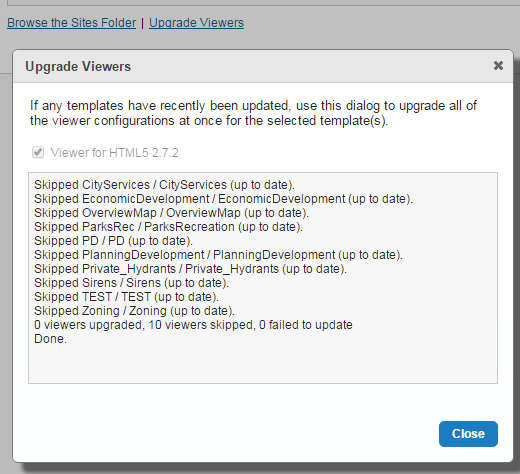 0
0 -
Laura: viewer configurations are major/minor only, so they won't upgrade across a maintenance release. For example, if you were upgrading from HTML5 viewer 2.6.1 to 2.7.2, your viewer configurations would upgrade, but going from 2.7.0 or 2.7.1 to 2.7.2, the viewer configurations are skipped. As far as the upgrader is concerned, they're all 2.7 configurations.
Masao: GE-8551 related only to services hosted in ArcGIS Online or Portal. You can run into issues with ArcGIS Server, though, if the token time-out is reduced in ArcGIS Server without updating the token refresh duration in Essentials. This sometimes crops up if different people or organizations are managing ArcGIS Server and Essentials. If users are only seeing it very intermittently, it may be that the refresh duration has been set to the same value on both the service and the site so that the token is occasionally expiring before the next request is made. If this is the case, you can try setting the refresh duration to be lower on the Essentials side than the token expiry time on the ArcGIS Server one.
Husen: if you're still seeing token expirations after setting the token request duration to a value lower than the token expiry on ArcGIS Server, there may be another factor at play, here. You may want to run this by the (To: support@aamgroup.com) support team at AAM.0 -
So does that mean our HTML5 viewers are stuck at version 2.7.1, and we don't get the bug fixes & benefits from the 2.7.2 maintenance release? 0 -
Not at all, but I can see where it's confusing. Within Manager, and when referring to sites, we often say that a site "contains a viewer", e.g., "The LA County demo site has a Silverlight viewer and an HTML viewer." Strictly-speaking, this isn't actually the case. What the site actually contains is a set of configuration files. The schema of these configuration files don't change across maintenance versions; it's only between major or minor versions of the viewer that they change. So when you upgrade your viewer from 2.7.0 or 2.7.1 to 2.7.2, the viewer application is upgraded (via the post installation utility) and you benefit from all the bug fixes, but the viewer configuration files don't need to change, and are therefore skipped when you run Manager's upgrade utility. 0 -
Is the new version still compatible with ArcGIS 10.3? 0 -

Yes, from the installation guide Supported Versions of ArcGIS Server Geocortex Essentials 4.6.3 supports ArcGIS Server 10.1 and newer.0 -
Hi Jordan,
Will the last version of the Silverlight viewer (2.5.1) still work if I upgrade to this version of Geocortex Essentials? I have one viewer that is running in HTML5 and one that I'm still running in Silverlight.
Thanks!
Grant0 -
Yes, it should continue to work with Essentials 4.6.x and 4.7.x. We have had people report some issues with ArcGIS Server 10.4 and 10.5, and (https://blogs.esri.com/esri/supportcenter/2014/11/10/final-release-and-support-plan-for-the-arcgis-apis-viewers-for-flex-and-silverlight/) as of June of last year , Esri's not providing any fixes for issues with Silverlight. 0
Please sign in to leave a comment.
Comments
16 comments