Allow some form items to run javascript methods?

Would it be possible to restrict the form value scrubbing to only input type form items (textboxes, etc)? I am not totally clear on the extent of the xss threat posed by doing so, but my impression is that it applies for client entered content that can be run maliciously, not for workflow generated content outside of the client users control like the description sections of the group/groupbox form items, but could be wrong.
For lack of any other option, I use to be able to put in custom html with javascript calls for api actions in the description section of a group or group box form item. This worked well and opened up a whole new area of possibilities for dynamic display of workflow content without have to push it to a static report pdf. It also allowed for interaction of the report content with the map like zooming to a feature, or contextually opening up content related to a result.
If there is a better way to go about this, I would be open to try that out as well. It seems like the only options for entering custom html/javascript are in the display form and workflow container activities, but maybe I am missing another option?
-Marc
0
-

I discussed this with our viewer team lead, and yes, we do currently disallow embedded JavaScript on the forms. The problem on the viewer's end is that it has no way to differentiate scripts introduced by the administrator from scripts that may have been introduced at runtime (e.g., by a user). Because it can't tell "safe" scripts from potentially harmful ones, it will disable any script before displaying it.
What are you looking to do in your forms dynamically?0 -
Hi Jordan,
Thanks for the follow-up.
The kind of intereaction I was looking for was to toggle map layers, zoom to an area of interest and have a popup display in an output report view along these lines.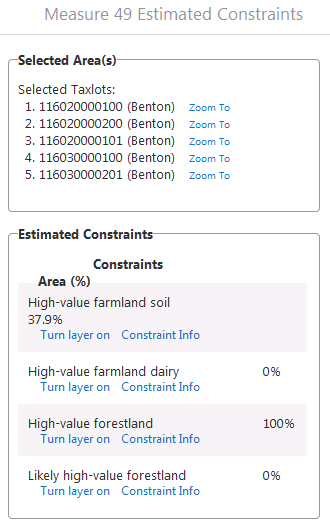
I was able to find a work around solution by creating a custom form by calling a dynamic external activity in a workflow that gets handled by a custom module added to the viewer that takes the inputs and returns the outputs in the workflow with the embedded javascript calls which are essentially just calling other workflows to run when clicked. This works, though it requires creating a custom module to add to the viewer to match the workflow activity.
It would be preferable to keep it all within the workflow vs having to match a custom module in the viewer with a dynamic external activity in the workflow. Conversely, the custom module approach does provide for better tooling in the display and logic side of things versus hard coding in strings with javascript calls. In an ideal world there would be a workflow activity that lets you create a custom output, wouldn't need to be a form, with dynamic results from workflow analysis and integrated embedding of possible commands to run based on those results.
Regards,
Marc0
Please sign in to leave a comment.
Comments
2 comments