Set Report Map Extent from Workflow

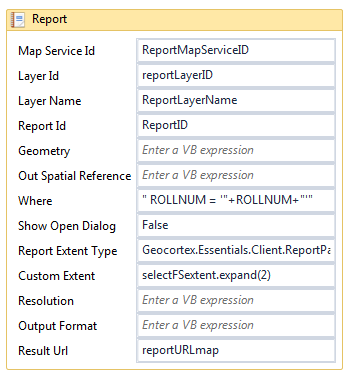
I have a workflow that selects a parcel, gets the extent of the parcel and sets the map extent to the parcels extent. It then generates a report with a map of the parcel. The problem is that in the report the extent always ends up using the previous extent instead of the current extent. The extent is correct in the workflow but wrong when the report runs. I'm not sure where the issue is.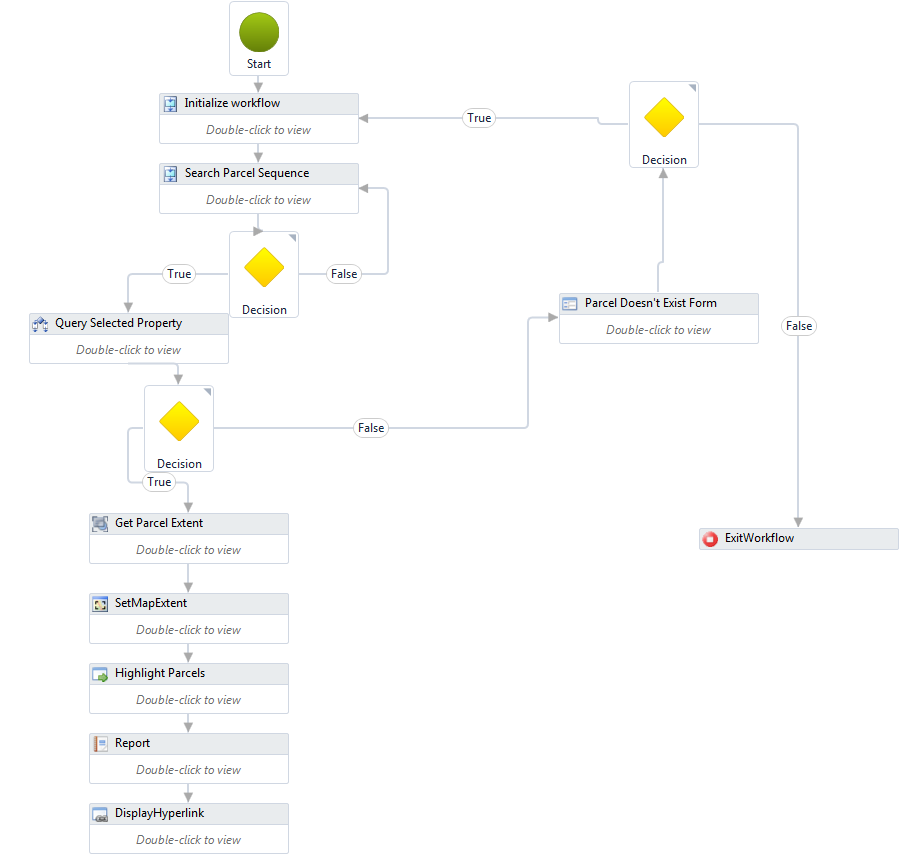
0
-
Hi Andrew,
The logic of your workflow looks right so I'm not sure we can determine the issue from the images attached.
However, I would add a RunExternalCommand before the Report to add a markup of the extent to the map so we can see what the extent is and then work your way backwards. Your RunExternalCommand is set like this:
Command Name: "AddTemporaryMarkupGeometry"
Command Parameter: selectFSextent.expand(2)
If the extent is wrong, then you know that somewhere along the way, it has been assigned the wrong value. I would also look into your projection as well and make sure everything is projected into the same projection as your viewer. You can easily use the "Project Single Geometry Task" activity to reproject your geometry into the correct projection.
I hope this helps.
Carmen0 -
Hi Carmen,
Thank you for your response. I added the markup layer and the 'selectFSextent.expand(2)' is being set to the correct value. I also reprojected the geometry and that wasn't the issue either.
Out of curiousity, after I set the map extent to 'selectFSextent.expand(2)', I added a "Get Map Extent' activity and assigned that a different variable. When I tested that value using the markup activty, it showed the previous extent. So the 'Set Map Extent' isn't working properly and I'm not quite sure why
Thanks,
Andrew0 -
Hi Andrew,
I'm not sure why that is happening. Why do you need 2 "Get Map Extent" activities? This activity is suppose to get the current map extent of the viewer. So unless you have somehow zoomed in/out, then regardless of how many "Get Map Extent" activities you use, you should always get the same extent back. I would consider revising your workflow to use this activity only once and see if that resolves the issue.
I hope this helps
Carmen0 -

Is there a reason you can't use a feature map for your parcel instead? 0 -
This may have absolutely nothing to do with your issue, but I'll add it just for the sake of those looking around for any information on Map Extent issues.
I've just spent DAYS trying to figure out why my map zoomed to the correct extent but the map image exported to my report was not the correct extent (not the same extent as viewed on the map).
Turns out the variable that my extent was based upon had a scope that was too small. My extent variable had a scope of the sequence it was in, rather than a larger scope (flowchart) so that the "Display Hyperlink" could access it. That's the best way I can describe it. Don;t know if that had anything to do with your issue, but maybe this will help someone down the road.0 -
does anyone else have any solutions for this? all of my variables are scoped to the whole flowchart 0 -

What is wrong, Chelsea? Also, I wouldn't make a habit of scoping all of your variables this way. There are amny kinds of variables which won't serialize properly with the workflow and will break your workflow if you do not have them properly scoped (not that you would need any of these classes to deal with a map extent), plus it makes a mess of your variables list. 0 -
Hi Zack, I just scoped them that way to troubleshoot since that was the solution for Lisa. I'm having the same issue as the original poster, the report activity does not use the current view extent. I'm going to try reworking the whole workflow to use datatables added to a dataset used in the TemplateReport activity instead of just using the Report activity since it seems to work better in my other workflows. 0
Please sign in to leave a comment.
Comments
8 comments