Handheld viewer loads with Toolbar window shown and error in logs about missing Basemap switcher

Hi,
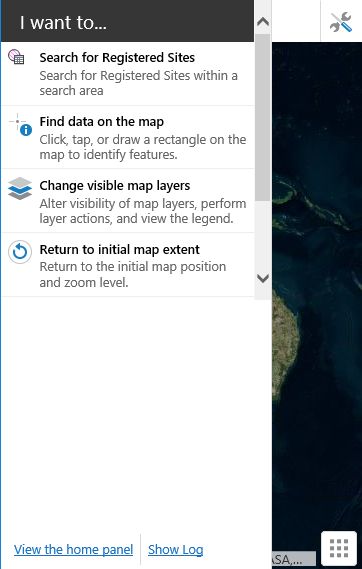
Is anyone seeing an issue with the handheld viewer not loading correctly and showing a toolbar window similar to screenshot below? This was run on a desktop web browser via the handheld.html page, but I also get the same issue via the preview window in the Site manager.
Then after minimising the toolbar window and showing the I Want To... menu there is a link to a log.
And in the log there is the following warning:
ActivateView: Could not find view 'BasemapSwitcherButtonView'.
We are running the standard HTML5 viewer without any modifications.
0
-

Hi Andrew,
The logs regarding BasemapSwitcherButtonView might prove to be a red herring in this case. We have an issue filed internally for this, GVH-7123, where that particular warning is logged in the handheld shell even when the viewer is functioning as expected.
If you have the toolbar in the handheld shell configured as a tabbed toolbar rather than a compact toolbar, it would open below the map like this, but unless it contains no tools at all it shouldn't be completely empty. Here's a few ideas for troubleshooting:
-clear your browser cache
-triple check the configuration in the handheld tab on the Toolbar page in Manager
-if you create a new empty site, does it do the same? What about a new viewer for the same site?
This might be a case where taking a close look at the configuration would be required, in which case you would want to contact support at AAM.
Hope that helps,
Amanda0 -
Hi Amanda, thanks for the reply.
I have contacted AAM in the meantime and they have confirmed that this issue only occurs when the handheld viewer has the compact toolbar. When it has the tabbed toolbar the issue goes away. They have raised this with Latitude and I'm waiting to hear back.
I have already tried this in multiple viewers, including one that was a new empty site, and I see the same issue.
Also, I have found a workaround for the BasemapSwitcherButtonView error. I copied the following from the Config\Desktop.json.js file and changed 'visible' to false. The error went away and the handheld loaded better (the screen faded in whereas before it didn't).
{
"id": "BasemapSwitcherButtonView",
"viewModelId": "BasemapSwitcherViewModel",
"type": "geocortex.essentialsHtmlViewer.mapping.modules.basemap.BasemapSwitcherButtonView",
"markup": "Mapping/modules/Basemap/BasemapSwitcherButtonView.html",
"region": "BasemapRegion",
"visible": false,
"configuration": {
"hideIfNoBasemapsAvailable": true
}
},0
Please sign in to leave a comment.
Comments
2 comments