Why the search on new OOTB Layer Catalog doesn't work properly

We have recently upgraded to Geocortex Essentials 4.6.3 with Geocortex Viewer for HTML5 2.7.2.
I'm finding search on new OOTB Layer Catalog doesn't work properly. It find the layer with the search key but doesn't locate that layer under the folder.for user to select that layer? How can this be fixed?
0
-

Just confiriming that I'm seeing this behavior too in my viewer. 0 -

Hi Dibya and John,
I'm not seeing that behaviour on my end and I don't see anything filed internally for it yet either. Would either of you be able to provide a screenshot of the issue so I can confirm that I'm understanding it correctly? Also, does this happen for every layer in the layer catalog or just for some?
Thanks,
Amanda0 -
Here's what it looks like. You can run a search and get autocomplete options. When you choose one and hit enter, the list of matching layers is blank. 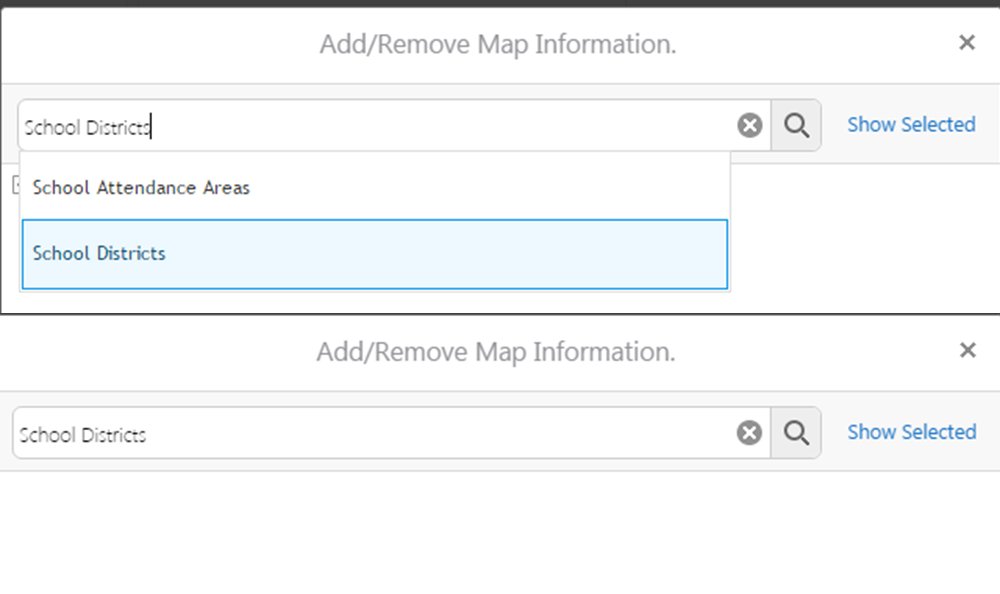 0
0 -
Hi John,
Thank you for including the screenshot, it did help to clarify the issue. I still couldn't find a way to reproduce this problem on my end, so I think this may be a case where we would have to take a closer look at the site/viewer configuration and maybe the layers in question as well. If you'd like to contact support, we would be happy to look into this.
One other idea for troubleshooting on your end would be to make a new barebones site and layer catalog with just a couple public services (eg, from https://sampleserver6.arcgisonline.com/arcgis/rest/services) to see if that's any different than using your own services on you existing site/viewer
Thanks,
Amanda0 -

Hi,
I am seeing this problem as well, was a solution found?0 -
Hi,
We found a solution for this, and I think we might know why it happened.
Why it might have happened
We have several layer catalogs setup, and we have some where the folders are named the same in the different layer catalogs, so that the folders merge together. We often do work in the xml files, and this might have caused us to delete a layer that was referenced in the layer list. What we found was that there was a null reference exception, when we searched through the layers in the layer catalog, I therefore suspect that the error was caused by us deleting one of the layers in one of the xml files and it then tried to loop over it, when it was in fact null.The way we solved it
We did manage to solve the issue before we found the possible cause. As I mentioned earlier, there was a null reference exception being thrown, what we did was to add a null check before the error might occur. I have added the steps to solve the issue below.This is a bit advanced, and should be done with care:
1. in wwwroot\{YourHtml5Viewer}\Resources\Compiled find LayerCatalog.js
2. find where it says this.displayName.toLowerCase().indexOf(
3. just before the text found in 2, add this.displayName&&
4. verify that it looks like e?this.displayName&&this.displayName.toLowerCase().indexOf(e
5. save the file0
Please sign in to leave a comment.
Comments
6 comments