Anybody have fast HTML5 sites?

There has been a lot of discussion recently about how HTML5 performance is much worse than Silverlight. What I would like to know is if this is universal, or If you have public HTML5 sites that you are proud or and think show what is possible with HTML5. It is clear that HTML5 is a much more server intensive technology than Silverlight, but It is where we are, and we need to make the best of it. I would like to see what is out there that you think is Best of Breed, and can help show the rest of us what is possible, and maybe how to get there...
0
-
I also added a loading bar to our site. Unfortunately Mike it's also a little jerky but it's gives a bit of an indication that the site is loading. Here's what to add to the index.html (C:\inetpub\wwwroot\Html5Viewer\Index.html)
In the <head> section under the splash.css refernce add a style tag as follows<link rel="stylesheet" href="Resources/Styles/splash.css" /> <style> #myProgress { width: 100%; background-color: #ddd; } #myBar { width: 1%; height: 10px; background-color: #4CAF50; } </style>In the <body> section in the splash screen div add the myProgress div<!-- Splash Screen Markup --> <div class="splash-overlay"> <img class="splash-pre-loader" src="Resources/Images/loader-small.gif" alt="" /> <div class="splash-plate splash-invisible"> <img class="splash-image" alt="" /> <p class="splash-paragraph">This application uses licensed Geocortex Essentials technology for the Esri<sup>®</sup> ArcGIS platform. All rights reserved.</p> <div id="myProgress"> <div id="myBar"></div> </div> </div> </div>And finally in the script section of the page add the following function and call it.<script> ... function move() { var elem = document.getElementById("myBar"); var width = 1; var id = setInterval(frame, 10); function frame() { if (width >= 100) { clearInterval(id); } else { width++; elem.style.width = width + '%'; } } } .... .... new move(); </script>You may need to adjust the id = setInterval(frame, 10); to a higher value if the bar moves to quickly.
Hope this helps.
Cheers,
Bryan0 -
Do any of you play with the Pooling tab in ArcGIS Server? In particular, the Min and Max number of instances? I found that upping these values on more heavily used services can help speed up sites. It uses more RAM this way, but that's quite a bit cheaper than adding more Cores and paying for the licensing. In general, if I see the number of instances go above my minimums, I tend to raise both the Min and Max values - generally I raise the Minimum to what is being used, and then have the Max double that. On my heaviest services, I'm setting them to 15 and 30. This is likely overkill, but seems to help. I've seen little documentation on this, and I would be interested what others are doing. 0 -
Hi Mike
just out of curiosity how many services do you have running in total?
And what is the total amount of RAM that your have on your server(s)?
To be able to have a minimum of 15 instance implies a big pile of RAM if you have any number of services at all.
Regards
Ralph0 -
About 60, but most are set to the 1 and 2 min and max - only my most used services have more instances reserved. 32 GB of RAM. This was one of the first things I tried to speed up my sites when I switched to HTML5. I noticed a difference then, but don't know if it still helps now that I've made a number of other changes... 0 -

We set our lightly used services to 1 and the higher used to 2 or 4 (maybe 6 out of 80 we have) This should really depend on the number of servers in your cluster, since these numbers are per server and not per cluster. The higher the number the more instances are sitting idle waiting for a request, so your sites will definitely work better. I do not think there is any benefit to setting the max to anything other than the lesser of: the actual max you want the server to create OR the number of cores plus one.
Also, setting the isolation to high made our services much more stable. When set to low, if one had issues they all did and it would cascade into other problems. Lots of 'failed to create instance' in the server logs.
We currently have 80 total instances minimum, with 4-core 32GB RAM servers. Servers are handling it fine, our issues are typically due to network congestion. Most of our services simply display features and have light identify/query usage, very little geoprocessing of any kind.
One of our viewers:
https://maps.cuyahogacounty.us/Html5Viewer/?viewer=greenprint0 -
Dan,
We only have a single server. All services are set to high isolation.
Are you saying that a core can only have a single instance? or why the cores + 1?0 -
So I was being hasty, because it depends on the type of service and not everyone has the same setup or requirements as us. :)
The n+1 is geared toward geoprocessing services and is conservative for normal web services. Normal web services would be 3-5 instances max per core. We use n+1 for all our services since we currently have a cluster of four 4-core servers and it seems to work well. When I set my instance to 1 min and 5 max, we actually have 4 min and 20 max available.
But the gist of it is that the server can only do so much, increasing service instances beyond server capacity will slow response times. You are seeing better performance because your minimum is high and you probably have a lot of idle instances waiting for requests.
Have you been monitoring the server statistics to see how many instances are typically in use? You should use that to set your minimum and then your hardware setup to set your maximum.
In your environment, I would start at 1-4 (depending on popularity of service) and the max at 16.
Most of my tuning was based on this wiki, which is has been a fantastic resource for us:
http://wiki.gis.com/wiki/index.php/Server_Software_Performance
Section 2.5 gives a much more in depth explanation of what I am trying to explain.0 -
You also have to keep in mind that 'max' can be a loaded term sometimes, especially for basic web services. What are the chances you have 20 instances getting hit non-stop at the exact same time on more than one service? Most transactions are so quick it is probably rare the max instance number gets met unless something is wrong. By the time the server spools up another instance, an existing instance becomes available.
But this is why the max should be lower for geoprocessing services; their transactions take longer and the instances are more likely to all be busy at the same time.
..I sure am rambling today!0 -
Thanks Dan, nice resource. Not sure I understand why more instances slows display response times, though... And they say to only use 1 min for most services? again, not sure I understand that. Having more min instances uses more RAM, but I've seen improvement by increasing this... Where are you looking at the server statistics? I go into AGS Manager every so often to see if the Instances Running is more than my minimum. If it is, I've been raising the minimum, thinking that I would be saving spin-up time. 0 -
It's not just more, it's too many. You get diminshing returns at a certain point. The server is using up resources to maintain too many instances and this slows everything down. You put in a max instance number to prevent this from happening. Just because an instance is running doesn't mean it is actually getting used at that moment. But it still uses server resources and will stay active until it times out (which you can set in the properties).
And 1 is usually fine because basic transactions are so quick. But if your service is very popular (or complex) 1 may not cut it. We don't use 1 for our top services, we use 2 or 4. We also default to 2 for dynamic services with a lot of layers. And the services that almost never get used are sometimes 0.
Your performance is improved because you have more instances available by default. There is no waiting for the server to create more under load. Maybe you have too many, but as long as you are fine with your current CPU and RAM utilization that may not matter.
ArcGIS Server Manager>Logs>Statistics. You can see max instances, average response time, etc.
If you set a service to 1 minium, but the max instances report regularly shows 4, then you probably want to change the min to 4.0 -
Very nice tool (statistics) - how long has that been around? So, just to be clear. Setting Min level higher, reserves more RAM up front, but when the number of instances grows towards your Max and goes above your Min, then you begin to use more RAM? I've been setting the Min values too high, and have been using almost all of my RAM. I had some slow-downs the last couple of afternoons, and I'm guessing maybe some services were getting starved with the growing usage. So, having a single server, I have been lowering my Mins to at most 4 for my most used services, and setting the max at 4x Min (16 for most used). My thought is that I will look again after a few days to see what response times are using the Statistics tool, and see which services are still taking too long.
Dan, you mentioned that yo have a cluster of 4 servers. Are the virtual or real? Can you tell me why you opted to go with multiple servers as opposed to upping the cores on a single box? My CPU is topping out at times, and I will likely need to expand soon...0 -
That statistics tool has been available since at least 10.3, when I took over all this for our department.
Your RAM usage is directly related to the number of instances running. It will go up as more instances are created towards your max.
You can check the average response time of your services to see which are suffering the most.
But it sounds like you are on the right path with your current setup and monitoring plan.
Our current setup is 4 virtual servers clusted through ArcGIS Manager. We also have a single virtual datashare server for all of our static data.
We went with this setup since there were not dedicated physical servers available to us. It worked out because we originally only had 2 VMs, then we added a third a bit later, then the fourth was added a year after that and that's what we have had the past two years. So you can see it is ideal for scaling, but also redundancy. Even though all the virtual servers are identical (and may even run on the same physical server, I think), one of them seems to crash regularly. Currently our datashare is not redundant and that is our weak point.
Most of our web services are sourced by FGDBs that are replicated from our enterprise geodatabase onto the datashare, so when it goes down everything goes down.
I am excited to say we just recently purchased 2 physical servers that are dedicated to our GIS department, along with a flash array for our datashare. Unfortunately we are running a virtual server on the flash array right now, so we are still suspectible to crashes taking everything down. But we are working on that. I am currently setting it all up and it is beyond awesome! It's like having my own supercomputers.0 -
Sounds fun! We have virtual servers with redundent back-up at a different location. Likewise our memory is network-based SAN with back-up. Not something I have to maintain, thankfully! Our server guys seem to know what they are doing, since I can't remember having it go down... I've been told that if my server were to go down, they could have it back within minutes. It has been easy to add RAM, and I gather to add CPU as well. I also use a FGDB for most of my layers on the same box, though I have found that my heavy parcel layer works better coming from SDE with its indexes, even though it is on another "box." 0 -
Dan, my site has been crawling for the last week, particularly under load, so I decided to move my max settings on my sites' two main services. I moved them from 15 to 20 at 11:30 and I saw a huge jump in performance. It started to slow again, so I raised them up to 25 at 1:30, and saw another small improvement. So for these services, it seems like 5x is way better than 4x... 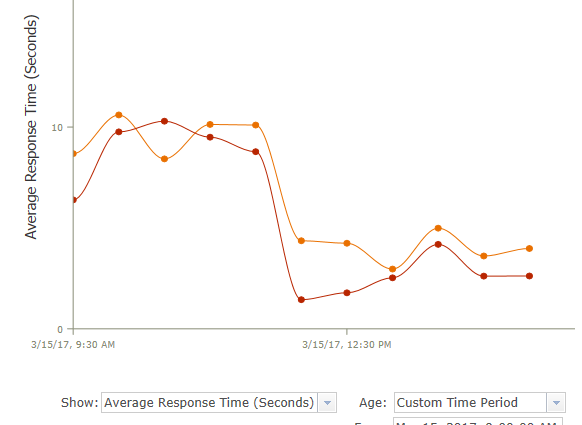 0
0 -
Glad to hear it. There are so many variables when it comes to this stuff, it can be hard to make any progress.
Were they both actually running 25 instances when you increased the max? You can probably go higher if you have to. Like I mentioned before, it is highly unlikely every service is going to get called at high volume all at once, so you can drop the max on other services and add more to these two services.
Maybe restarting the service is what helped, but if you're running high isolation it should not have mattered much.
What kind of traffic do you get at your sites per day?0 -
They are behaving better than they were this last week, but still slower than they were prior to that. This morning they are averaging around 3-4 seconds - which can seem like a long time when you are panning the map...
Those two services each get between 7 and 12 thousand requests a day according to AGS. They are used in multiple sites. Our main internal site accounts for the bulk of the traffic, getting between 250 and 300 sessions a day as defined by Analytics. Many of those sessions get turned on in the morning and are left on all day at various public counters.0 -
Turns out part of my problem was my fault, and part was the fault of my server techs. First off, I would not advise setting your services to support Dynamic Workspaces, particularly on any services that are usually turned on by default. I turned this on for an Open Data service, and then thought it was so great, I would turn it on for most of my services...not a good idea! Second, make sure that any Anti-malware software is not doing real-time scanning on AGS processes and data. When my server tech excluded the critical areas from scanning, my average response time for my two main services went from around 10 seconds to less than 1. The sun came out! 0 -

Hi Mike,
I have been attempting to increase performance for our sites and I was curious what improved when you reconfigured the Anti-malware software. Did your map services draw faster or were you able to retrieve results quicker (map tip, identify, etc.?) or both?0 -
The real-time scanning basically froze my sites. Everything was slow, if it worked at all. 0 -
As an update to this, and I'm not sure why I never tried it before, but I decided to test Chrome and Internet Explorer side by side. I loaded my heaviest site into each browser, one on each monitor. I then refreshed IE and then refreshed Chrome about a second later. Chrome refreshed the site 7 seconds before IE did. I tried this with different sites. It seems Chrome is about 1/3 faster than IE. 0 -
Hello all,
I've been referring to this thread a lot in the last couple of weeks, trying to get the best possible load times for our sites. The gist of what I inherited: we had our main viewer on the same site as the arcgis server install, services were set to 0 mins and viewers had huge floating point grid rasters that were unneccesary. I rebuilt a whole new site on seperate server, changed the min instances and did a lot of other things (using the developer tools) thinking the new site would blow my doors off. Sadly, it doesn't seem much better. :(
Anyone willing to test how it looks from the outside? thanks in advance!
old: https://maps.kpb.us/gc/Html5Viewer/Index.html?viewer=P_BasicParcelViewer
new: https://gisdev.kpb.us/map/index.html?viewer=basic0 -
Hi Bobbi,
I had a quick look. My results were about the same for both sites, 17 seconds each. It's not surprising because we are talking about 17Mb of data and 350+ requests and responses. I am told the next release of Essentials and viewer (4.10 / 2.11) that is due at the end of June has performance enhancements so you may want to hold off any more changes until then.
Regards,
Wayne Richard
Latitude Geographics Group Ltd.
Head Office: 300 – 1117 Wharf Street Victoria, BC Canada V8W 1T7
Tel: (250) 381-8130 | Fax: (250) 381-8132 | wrichard@latitudegeo.com
Developers of Geocortex web-based mapping software | www.geocortex.com
An Esri Platinum Business Partner0 -
They both took about 8 seconds to load on Chrome from Santa Rosa, California. When I look at developer tools, nothing seems to be taking a huge amount of time by itself. What kind of times are you seeing? What kind of average response rates are your services showing in AGS logs statistics? 0 -
Thank you so much!
Those speeds are about what I was seeing here but with some variability. Some users were reporting upwards of forty seconds, but I can't seem to nail down the cause. Can I just blame it on their hardware and not worry about it? :)
The AGS server logs show most services with an average below 0.5 seconds, the only exception being our tax parcel layer that had a few slow spikes 2.5, 3+ seconds. That's a pretty big dataset so I guess it makes sense. Min instances of that layer are set to 1. I've had it to two before so maybe I'll change that back. We only have one server and a request on that layer could take long enough to cause a wait.
Thanks so much!!0 -
Does the service with parcels load when the site loads? I don't load my parcel service until I'm ready to use it, at 1:9,600, so it won't slow down load time. Is your data in SDE or FGDB? 0 -
It's SDE - scale dependent on the geocortex side. I've been trying to avoid building in visible scale ranges on the services to try to make them more versatile. I didn't test the difference in performance doing it each way though. Have you noticed a big difference?
b0 -
ESRI says that fgdb located on same machine is faster than SDE on another box. I've found this to be true in most cases, unless an index is needed. I generally leave parcels and addresses in SDE.
When you say scale dependent on GC side, are you setting the min/max on the Display tab of Map Services? Are you seeing the parcel service getting called at site open using develpment tools? If it is not getting called, then the 3 seconds won't hurt as much, though it will slow down whenever you pan the map and parcels are visible. Is there a lot else on the parcel service? That is usually a good one to make fast...0 -
Hi Mike,
I had read that, but then read something else that contradicted that idea. (facepalm) and so I was happy to not have to fuss around with two data sources. That said, this is how we had it set up before. So many of the services are set up this way on the old viewer and I created new ones using SDE for the new viewer.
Yes, on the display settings "override minimum scale". Otherwise if I want slightly different things to happen for eg., this site vs. my mobile site or another, I need a bunch of parcel services. Then I'd need to set them all to a constant running instance and start hitting the RAM on the (single) server. I guess that's another thing to explore - What's better? Three services of the same dataset each running one instance or one service with three minimum instances?
No, I don't see it called at startup. Do you mean is the parcel service a map service full of a bunch of other layers? No, it used to be. We used to have one great hulking tiled basemap for our flex viewer and that is what carried over to our first GC viewer. I split everything out and made a tiled intial splash-type map service but everything else is stand alone. The only reason I did that was to maintain a similar look and feel so our users didn't have heart failure when making the change to GC. We didn't decomission the flex viewers when our GC site launched and a lot of people didn't switch. Now we're going to force them (or their browser has forced them) and I would like my phone to not ring off the hook if at all possible. :)0 -
Wow, just updated to new versions GE 4.10 and VH 2.11 and my sites open at least twice as fast, maybe 3x. My heavy public site is loading in Chrome in about 5 seconds, and my fast site in about 2. I would be curious how they are doing out in the real world...
Heavy: https://maps.srcity.org/Html5Viewer/Index.html?viewer=publiccity
Light: https://maps.srcity.org/Html5Viewer/Index.html?viewer=parcel0 -

Hi Mike,
I'm happy to hear that. There was significant development efforts put towards improved performance with the 2.11 release; so glad to hear your experience has been positive.
Stefan
0
Please sign in to leave a comment.
Comments
64 comments