Custom Scale option missing in HTML5 print

We recently upgraded our GE and HTML5 Viewer to the latest (4.6.3 and 2.7.2). Just noticed the 'Custom Scale' option (e.g. allow user entering a scale to print to) is not listed the dropdown when printing from HTML5 viewer. Even in Geocortex site manager I set the the default scale of the print template to 'Custom Scale'. It just not show up in the HTML5. I checked the release notes such not been mentiond. Is that just me or someone else had the same issue?
0
-
Hi Jack,
Which version of the HTML5 viewer did you upgrade from? There has been some changes made to the HTML5 built-in Printing tool, but you can still set your own custom scale options in Essentials Manager under Print Templates > Edit Print Template > Map Scales tab > Add Map Scale. Any additional map scale you add here will be added to the dropdown list so the user can pick your custom scales when they print.
I hope this helps.
Carmen0 -
Thanks Carmen for the help. I'm using 2.7.2 here. I understood I could add custom scales using the Add Map Scale button, however the users require be able to enter any scale and print at that scale without me to manually add all possible scale options. I remember such option used to be there in the dropdown list of the print form, but not anymore : ( Even in the Print Template setting, under Default Map Scale you can set it to Custom Scale, but there's no place in the print form for user to enter a scale. 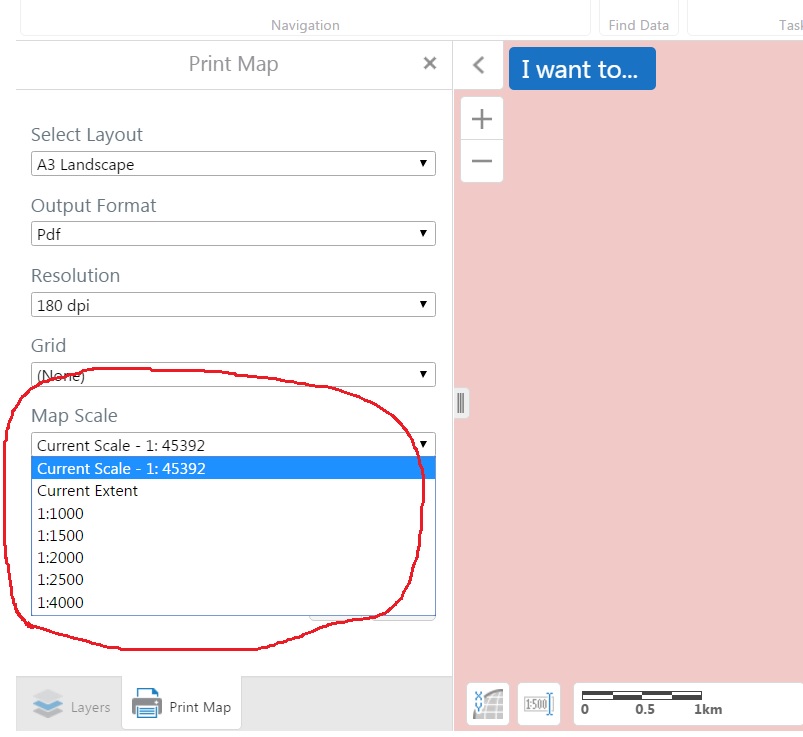
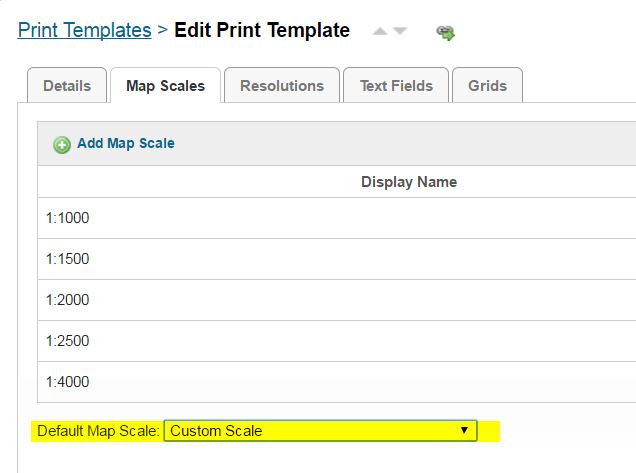
So far I found one work around for this is, first enter a custom scale (only possible for site without tiled map service) or choose a scale from the scale list of the map scale box, then launch the Print tool and choose map scale to Current Scale. in that way it can print to whatever the current map scale is. Is that an expected behaviour?
Thanks0 -
Hi Jack,
Yes, this is expected behaviour. If you have a basemap added to your site, then you can only print at those scales. Even if you input your own custom scales in Essentials Manager, the viewer will still automatically snap to the closest scale and print at that scale.
If you only have dynamic services in your site, then yes, the scale bar will allow you to manually enter in a scale so you can then run the Print tool to print at that scale.
The other option is to create your own printing tool. If you use the Export tool at the Essentials REST endpoint of the site, it allows you to print in between basemap scales. This means you can type in whatever scale you want at the rest endpoint, and it will return a map at that scale. You will have to do this through a workflow though unfortunately if you want to expose this feature.
I hope this helps.
Carmen0
Please sign in to leave a comment.
Comments
3 comments