Identity Server license

I want to install Geocortex essentials on server A and Identity Server on server B. How does the license framework work in this scenario? I would think that I can use a single license as I only a have a single instance of the application?
0
-

Hi,
There would be no licensing concern when intalling the Identity Server seperately from Essentials. You'll need to copy the Geocortex.IdentityServer.msi from the directory below to Server B. When you run the installer it will just install to C Drive, there is no option to change the directory.
C:\Program Files (x86)\Latitude Geographics\Geocortex Essentials\Default\Post Install
Now, the hard part will be actually linking this seperate Identity Server to your Essentials instance. If you've already run the Post Installer then I suggest you uninstall the Identity Server from Server A and then delete the Geocortex.IdentityServer.msi from the Post Install directory (after copying it of course). Now you can run the Post Installer and there should be no section for the Identity Server.
On Server B you will need to get the Identity Server Service Secret and note the proper URL (servername or FQDN). You can get the Service Secret via the Geocortex.IdentityServer.Setup.exe application in the directory below. You'll need to use a Command Prompt Window elevated with Administrator privilages.
C:\Program Files (x86)\Latitude Geographics\Geocortex Identity Server\Web\bin
Geocortex.IdentityServer.Setup.exe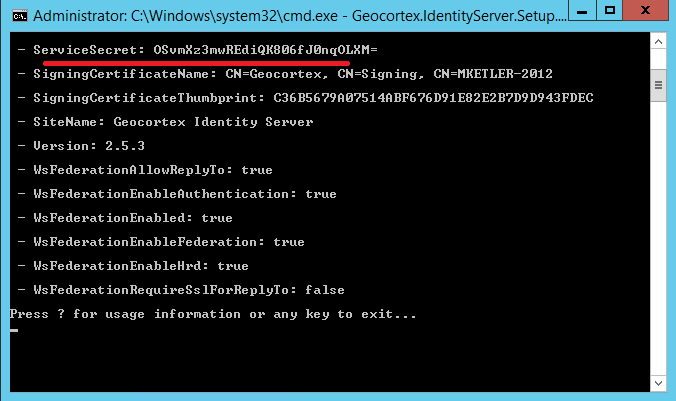
Now you will need to register this Identity Server in Essentials Manager. Login to Manager, go to the Security & Data tab and click "Add Identity Server". In the window that appears, add the display name you want for your Identity Server, add the correct URL, and finally add the Secret obtained through the Command Prompt.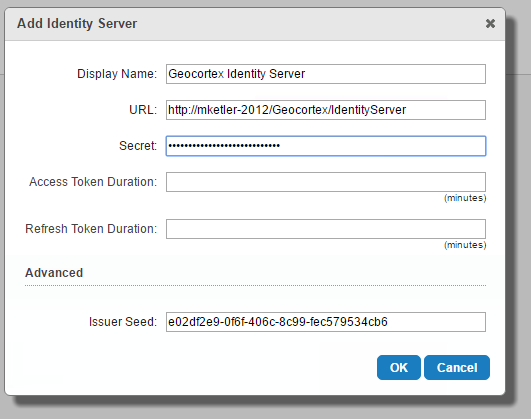
That should be it, you should be able to customize the Identity Server on Server B if needed or just manage Users/Roles through Manager on Server A.
Thanks,
Mike Ketler0 -
Thanks Mike. 0 -
How do I get a copy of that .msi file referenced? I'd like to move our identity server to another machine. 0 -
Hi Anthony,
It should be here, on the server -
C:\Program Files (x86)\Latitude Geographics\Geocortex Essentials\Default\Post Install\Geocortex.IdentityServer
Regards,
Wayne0 -
Hi Anthony,
As mentioned by Mike when you ran the post installer for the first time, the file will install on the c:\ drive located here: C:\Program Files (x86)\Latitude Geographics\Geocortex Essentials\Default\Post Install
You can copy the Geocortex.IdentityServer.msi file and follow Mikes instructions above.
Thanks,
Ali0
Please sign in to leave a comment.
Comments
5 comments