create multipoint in workflow

I have created a workflow that creates a single point and runs through a loop to create another point, then adds those points to a feature.
However I need it to work so the user creates a few points which are then added to a multipoint feature.
I cannot get this to work, it throws an error at the create feature part.
I am wondering if perhaps I should be using addrangetocollection rather than add to collection, however I am unsure how to implement this.
Currently the users create a graphic which is then added to a collection which is then added to the feature service
0
-
I'm not positive at which point your workflow is failing (what is the error that is being thrown?) and I don't have any multipoint geometry datasets to experiment on but...I think creating a multipoint geometry is similar to creating a polyline geometry and I have done that successfully.
To do this, you need 4 variables (which it sounds like you do):
theMapPoint is of type Geometry.MapPoint
thePointCollection is of type Geometry.PointCollection
theMultiPt is of type Geometry.MultiPoint
theGraphic is of type Client.Graphic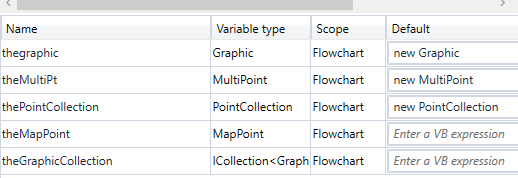
In your loop, you are creating single point features. Each time in the loop, assign the point geometry to theMapPoint and add theMapPoint to thePointCollection. Here I have three map points being created for testing (New MapPoint(-80, 35, New SpatialReference(4326), New MapPoint(-81, 36, New SpatialReference(4326),New MapPoint(-82, 37, New SpatialReference(4326)):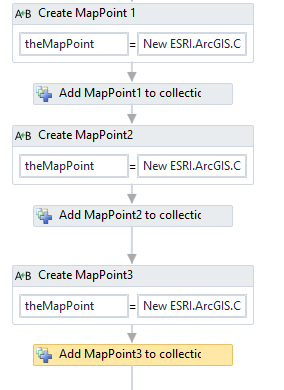
Once you are done creating points, assign thePointCollection to theMultiPoint.points property. Then assign the spatial reference to theMultiPoint (theMultiPoint.spatialReference = new spatialReference(4326)):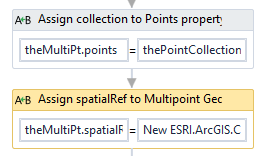
Now you have the proper geometry for a type of 'MultiPoint'. From here, you assign the theGraphic.geometry = theMultiPoint (to verify the proper syntax, run an alert showing theGraphic.geometry.toJSON and it should look like this: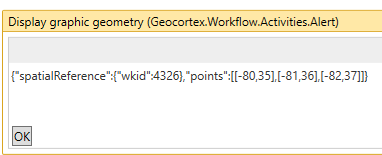
Again, I don't have a way to test this, but this is how I would think it would work.
Marshall0 -
Hi Sylvia,
Perhaps you should add all the points to a feature set using the "Add to Collection<T>" activity. Then you can use the "Union" activity to merge all the features into 1 feature. This activity will return the output in the form of a geometry. So you can then assign that geometry to any graphic (or feature) using this notation:
feature.Geometry = unionGeometry
I hope this helps.
Carmen0 -
hi Carmen
one work around for us was to merge our single point features that are created, however my workflow doesn't work if the singlepoint (mappoint) geometry is replaced with multipoint geometry so we would be unable to merge to one feature.0 -
Marshall I cannot get your method to work, in the create map point are you just using the "assign" task?
the error I get is "the property 'collection' of 'addtocollection<MapPoint> is not initialized
I feel like there should be a step before the "create map point" - but neither does it work with my current capture geometry - assign graphic - assign graphic.geometry0 -
To answer your first question; Yes, for the example, I am just creating 3 mappoints at the set locations i mentioned above. Just so I could manually create a multipoint geometry. Here is the full test workflow (which is too long to post in the forums, so I put it on my github page) https://github.com/marshboyd/Geocortex_workflows/blob/master/supportquestions/createMultiPointGeometry.xaml 0 -
I took a look at your workflow and everything looks right to me. I also set up a test featureclass that is a multipoint feature and hosted it for testing as well and your workflow worked perfectly for me
A couple questions:
1) What is the actual error that you are getting?
2) Is the feature service that you are trying to write to have the datatype of multipoint? (sorry, want to rule everything out)
3) What does your graphic geometry/featureset look like? I added this right after the confirm dialog to see that information: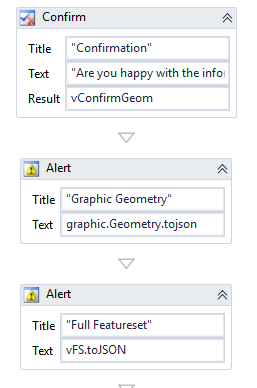
And got this from my result for the featureset containing a 7 point geometry:
{"geometryType":"esriGeometryMultipoint","spatialReference":{"wkid":102100},"hasZ":false,"hasM":false,"features":[{"geometry":{"spatialReference":{"wkid":102100},"points":[[-9577189.4888046682,5324692.74972669],[-9575660.7482389659,5324387.00161355],[-9574743.5038995445,5324845.6237832606],[-9574934.5964702554,5325992.1792075364],[-9575851.84080968,5326297.9273206769],[-9576845.5221773833,5326145.0532641066],[-9576998.3962339554,5325609.9940661108]]}}]}
I'm curious what is causing your issue especially since your workflow works fine for me (at least from what you sent me)0 -
hi Marshall
the error I am getting is just one I have put into the try catch where the feature is created in the workflow.
but you are right, there is an issue with my feature
the .tojson result I am getting is {"geometryType":"esriGeometrypoint"...etc
however, I am puzzled as the feature I am using is definately multipoint, the rest end point says
http://vrtarckew01.roads.vic.gov.au:6080/arcgis/rest/services/Survey_Point_multi/FeatureServer/0
Geometry Type: esriGeometryMultipoint
the feature class is multipoint features in my geodatabase.
I have tested this again with different multipoint features but the same error happens.
Is it something to do with my geodatabase? my organization only has the only geodatabase to test features in, so I cannot try elsewhere. We have never had to edit multipoint features before either, so it is the first time for that too in a workflow.0 -
hi Marshall,
I tested your workflow and it creates a multipoint feature (yay) of 3 points.
I am still stuck with my workflow - this is the error I get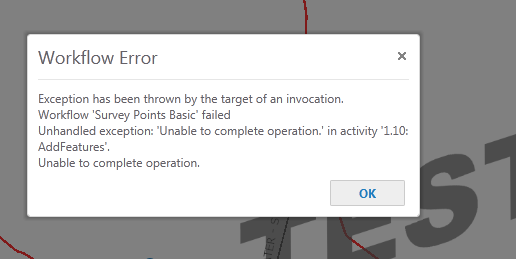 0
0 -
Sylvia,
To my understanding, you aren't able to add a 'Point' feature to a 'Multipoint' geometry. Similar to trying to add a polyline to a polygon, they are different esri.geometry.
It definately sounds like there is something going on in the rest of the workflow that you removed in your post above. Like I said, I tested yours and it worked flawlessly.
I would suggest trying what you posted above and see if that works for you. The two things I did differently is to add the 2 alerts I showed you above and then I added an 'Add Features' activity to the trycatch sequence.
If you're still having issues, I could take a look at the full workflow for you. Just send me an email: mboyd@miottawa.org
Marshall0 -
The problem is multipoint is not supported in silverlight, or at least if it is, not the way my workflow runs. It is able to create a multipoint in html5.
I had tested it previously in html 5, but this time I stripped the workflow to a very basic create point feature and was able to create multipoint.
so to avoid anyone else banging their head against a wall, be aware that silverlight may not support multipoint creation.0 -
Just a follow up. I am having to rebuild my workflow for html5, it works much better as I don't have to bother with the loop. One difficulty I am having though is it is difficult to draw just one point, as you need to double click to finish drawing and it tends to draw another point. Does anyone else have this problem? I don't want to have to put a confirmation box after each point as it will be irritating for my users if they draw a lot of points. 0
Please sign in to leave a comment.
Comments
11 comments