override maximum scale setting

GVH v.2.6.1 - I'm trying to use the Override Maximum Scale setting so users can zoom in further than the base map allows (which is 1:500). I would like users to be able to zoom in to around 1:100 and I don't care that the base map disappears but I can't seem to get it to work. I tried setting it at 100 but nothing changed. What do I setting do I use to do this on the base map layer (or other layer)?
0
-
As far as I can tell, you can not currently make HTML5 zoom in beyond your closest cache scale... 0 -
That really bites! That means I need to maintain 2 of the same base maps cached at different scales....not cool! 0 -
Yes, my folks like to zoom in close as well, so I ended up caching my newest aerial down to 1:75 - beyond its usable resolution and doubling memory... Apparently at some point, HTML5 will act like Silverlight, and allow interpolation of cached layers to non-cache scales... Until then, the overrides are useless for HTML5. 0 -
All this feature parity talk must be one of those alternative facts. 0 -
Hey, there are some REALLY nice features in HTML5 that did not exist in Silverlight. LG always said parity would not mean that they are the same... 0 -
This feature is a big deal in my opinion. It's resulted in more server resources being required so our users can have the same experience which is an added cost to us. 0 -

What I did was build a "blank" cached service (no layers aaded to the mxd) that went down to 1:141.
I then added that service to the bottom of the map service list in GXE Manager.
This allowed me to zoom in beyond the level of my exisitng basemaps down to 1:1410 -
I should add that I just set the zoom levels in the service when publishing, I actually stopped the cache being built in ArcGIS Manager, but adding the blank cached service still allowed me to zoom in to the lowest level. 0 -
Rebecca, this is a problem with ESRI's Javascript, I believe. LG is waiting on them to fix.
Chris, how much memory did that blank cached service take? I'm assuming that you would still have the same problem with displaying real aerials - they won't display at that 1:141 scale since they weren't cached at that level...?0 -
Thanks, Chris I'll try that. I was hoping to avoid having to maintain another dummy service but looks like it's unavoidable at this point. 0 -
Hi Mike
Effectively none! I didn't mention in my original post. But as I manually stopped the actual cache being built after publishing it really didn't take up any memory.
Having that blank cache dummy service also had another benifit of allowing me to create a "No Base Map" option in the base map picker, this basically allowed users to turn off the base maps (which was a requested requirement)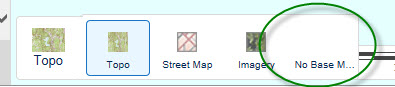 0
0 -
Chris, what about the question of other non-blank cached layers - are you able to see them at 1:141, even if they have not been cached at that scale? 0 -
Mike is correct -- this is a limitation of Esri's 3.X JavaScript API. The good news is that (https://geonet.esri.com/thread/167711) the 4.X API supports this (http://jsbin.com/wotodo/edit?html,output) you can see it running in a sample here , so it will be supported in our 3.X viewer.
Sorry, Rebecca -- I know that's not much help to you right now.0 -
Mike ... No any other basemaps you have that are not cached to the level of the "Blank Cache" turn off, it just allows you to zoom in beyond the level of the lowest basemap. What I did was to create basic dynamic Topo and Street map services that takes over when the last level is reached. It still gives the user some background data but allows them to zoom right in on other dynamic layers. 0 -
Alternatively, to show your imagery beyond the cache, you could serve your raw imagery (usually in the form of a mosaic dataset) through another or a combined service, and just have this turn on when zoomed in beyond the cache.
In my circumstance this works well and, due to the high level of zoom, does not suffer significantly from any performance bottle-neck.0
Please sign in to leave a comment.
Comments
15 comments