Turn on "Find Me" onload?

Hi All,
I would like the Find Me to trigger onload with the application. Is there a way to autorun the Find Me?
0
-
Hi Gordon,
You could do this via a simple workflow that runs at startup: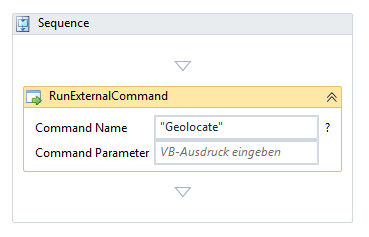
Note that because both Chrome and iOS require SSL in order to allow the browser to share your location, you will need to secure your site if your users are using these environments.0 -
The Command for turning on the Geolocate button? Is is a VB Script one? 0 -
It's a (http://gedemo.geocortex.com/SamplesViewer/#commands.Geolocation) viewer command , which is part of the viewer's JavaScript API. It's effectively the same as clicking the "Find Me" button, but can be called even if the viewer isn't configured to display the button.
0 -
Using the RunExternalCommand activity from within a workflow saves you from having to script anything -- you create the workflow and it does the rest for you.
I've put the workflow for you (http://data.latitudegeo.com/community/WorkflowSamples/FindMe.zip) here . You can copy it to a location within your sites directory and then add it via Manager as I've done below: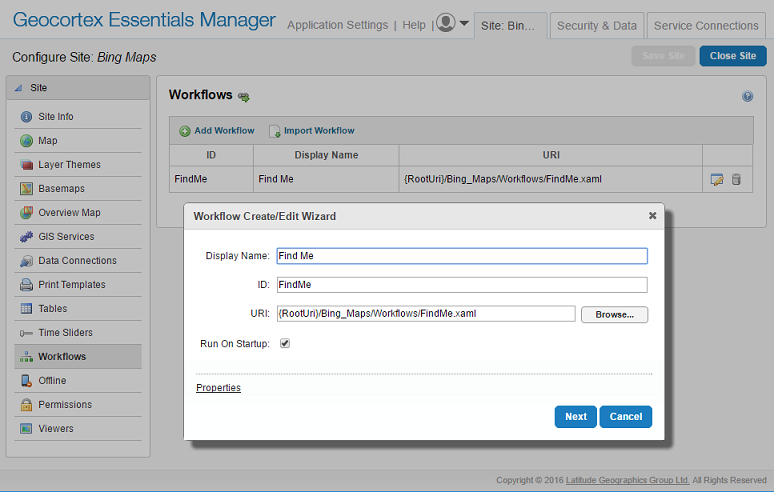
In my example, I've put the workflow in a Workflows folder inside my Bing_Maps site.0 -
Oh, its really simple.
In a new workflow put "Geolocate" in the Command Name (nothing in the Parameter) and "Run Workflow on Startup"0 -
Yes, exactly. 0
Please sign in to leave a comment.
Comments
6 comments