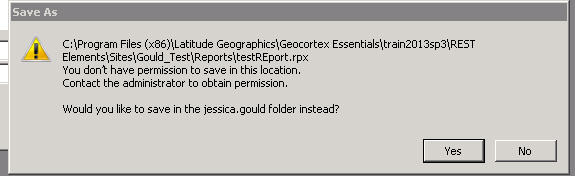
Hi all - I am new to geocortex and am just working through some basics to get a better feel for the software. I am getting a warning when trying to save a .rpx file to ...mysite\Reports\. "You don't have permission to save in this location"

0
-

Hi Jessica, welcome to the world of Geocortex Essentials!
The error you are seeing is a Windows permission error. If you save the report to your desktop instead, and then move it to that folder, it should work. If you then run the Report designer as an administrator (right click the shortcut and select "Run as Administrator"), you should be able to save directly to that folder.
I hope that helps!
Danny0 -

We get that error, too. You are trying to save over a report that is protected. Not sure if it is due to server configuration, Geocortex configuration, or both.
We just save somewhere else (we created folders in the root of C) then copy/paste over the existing in the Sites folder.0 -
Thank you both! Both of those things worked! 0 -
All comes down to server and user configuration. Geocortex is not to blame at all.
Regards
Ralph Price0
Please sign in to leave a comment.
Comments
4 comments