How to do this as in the Pipeline demo (offset and chainage)?

I watched the Geocortex for Energy webinar recently which is a great one. One particular feature interested me is the Pipeline Profile tool in which user could click a pipeline then it created a point snapped to the line. The point could move up and down alone the pipeline with mouse’s movement, it also draws a perpendicular line to the pipeline, and dynamically update the offset and location/chainage on the left panel. I know this is available in the Pipeline Extension which we don’t have. However, I’m still wondering if anyone could point me how to achive what I watched in the demo. Thank you.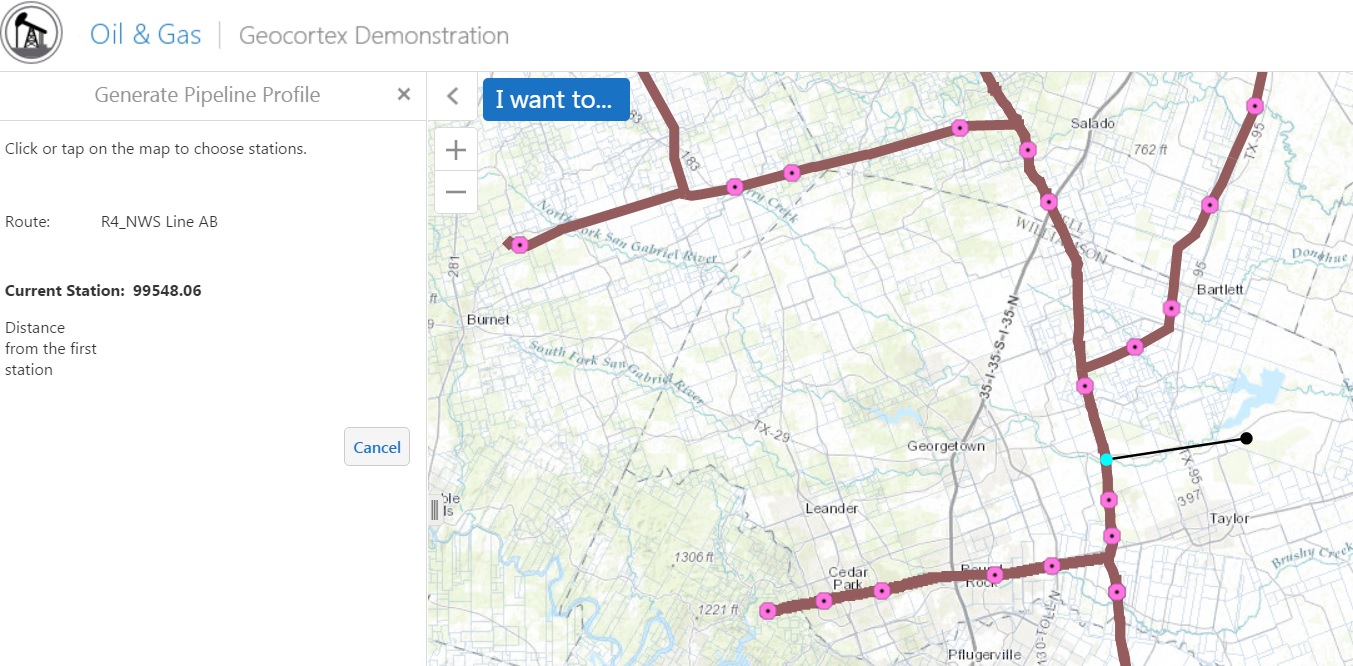
0
-

Hi Jack,
Unfortunately this functionality is included within our Pipeline Navigator solution. Currently, we are unable to provide you with the workflow and custom modules used to perform this. I'd recommend getting in touch with Sam Acheson (sacheson@latitudegeo.com) if you'd like to learn more about it.0 -
Hi Patrick,
Please tell me where to find Pipeline Navigator solution. I looked for it in Geocortex site and get no results.0
Please sign in to leave a comment.
Comments
2 comments