Export Drawing (Markups) to Different Coordinate System

Is there a way to change the default as to what coordinate system a drawing layer is exported to. Using Web Mercator for the overall map but would to export to a different WKID.
Thanks,
John
0
-

Hi John
The markup layer exists in the same projection as your viewer (web mercator in this case). We don't have any out of the box tools that will allow you to reproject the layer while exporting it. If you'd like to see something like that, I would recommend posting to the Ideas section (https://support.geocortex.com/GSCIdeas?c=09a6000000008RsAAI&filter=1&categ=all?-nav=ideas&main-nav=essentials&page=1) so other users can vote for the idea too.
I was able to build a simple workflow that will project your markup, replace the markup layer with the reprojected version, and then export it as a shapefile. The downside to this approach is that it only works for one geometry type at a time (points, lines, or polygons). It also removes the markup from the viewer when its done because when the markup layer is in a different projection than the viewer you won't be able to see it. If you're interested, here is the approach I used: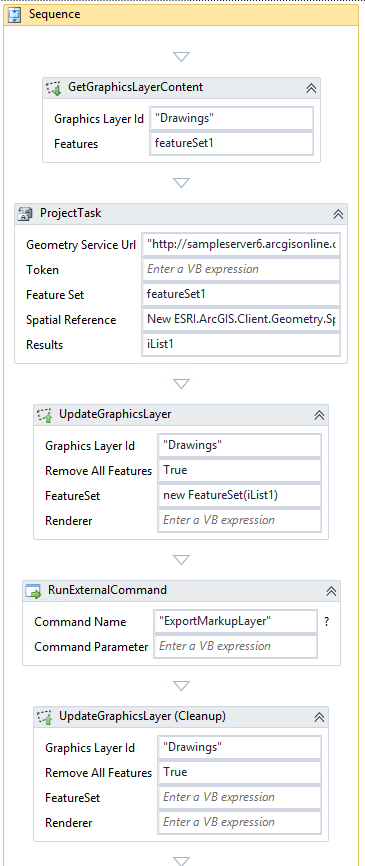
Hope that helps,
Amanda0 -
I was about to set off on a journey to create this function when I found this thread. Thank you, Amanda! I tried to use my own geometry service but for some reason that failed. Using the arcgis online service worked. Now my users can create a drawing, download the zip, and upload the .shp and .prj to the Code Red emergency notification system in the necessary coordinate system. 0 -
One question - how do I test if the Drawings layer exists? If there are no drawings in the map, it currently throws an error but I'm not sure how to use the If condition to test this. 0 -
Figured it out. I added an "If" condition of featureSet1.features.Count = 0, then generated an Alert if True, and if False continued with the export. Sweet! 0
Please sign in to leave a comment.
Comments
4 comments