In View/Edit Attributes, wrong field is displayed under field name

In my sign inventory management app, I've successfully made the sign layer editable in the HTML5 viewer.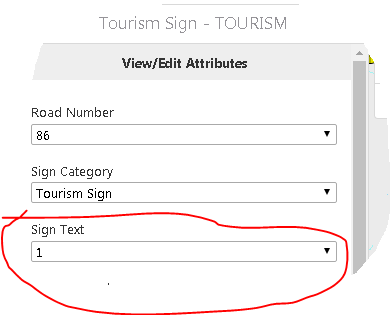
The problem is in the View/Edit Attributes pane, where the Sign Text field, which is simply a free text field, is being displayed with a dropdown list that belongs to the Road Number dropdown shown above (it's got the same list values there when expanded). Sign Text should instead be a plain text box. The numeral 1 in the image for it is the first County Road number in the dropdown list. It's there only because I selected it before capturing it, because it was blank beforehand.
I suspect this is a bug. There should be no dropdown list for Sign Text. And certainly not a dropdown list that belongs to another field. It should just be a text box. I need to find a fix because the Sign Text is an important value for the field crew to capture. How can I correct this?
Thanking you in advance for any suggestions on this,
Justin
0
-
With thanks to Amanda in Latitude support, I've found the problem was due to no bug in software, but apparently in my attention while configuring the sign feature class. When setting domains on the subtypes I must have mistakenly applied the county road number domain to the Sign Text field on the Tourism Sign subtype, rather than to the CR_NUM field. It was applied to the CR_NUM field for all other subtypes. 0
Please sign in to leave a comment.
Comments
1 comment