Capture OBJECTID from click and add to SQL Table

I am working on a workflow that allows a user to click somewhere on the map to capture the point location, fill out a short form, and have that information stored in a SQL table. I believe I'm on the right track but am having issues creating an 'OBJECTID' field from the click and storing that in the SQL table. The Object ID field in the table is the primary key and cannot be null. I feel like this is very simple and I am just missing it...Any advice? My workflow is below...
https://drive.google.com/file/d/0B9MJ7nq1HIUCZ1BZWXVjMXp6bHM/view?usp=sharing
0
-
An update...I realized I am in fact capturing an OBJECTID with my workflow and rows are getting inserted in SQL, however, the info entered by the user doesn't seem to be getting inserted into the table...if anyone has any tips on what step I am missing, it'd be much appreciated! 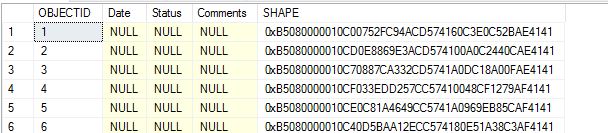 0
0 -

You do not neet a SQLNonQuery activity. You should move the AddFeatures activity to the location where now the SQLNonQuery activity is.
Between the form and the AddFeatures activity you should set the value of the attributes with Assign activities, liketheItem.Attributes("Comments") = outcommentsYou are capturing an OID field with the query task but not using it. ArcGIS generates an Object ID when adding a feature.0 -
Ahhhhhh I see! Got it working! Thanks so much Nico! You da man! 0
Please sign in to leave a comment.
Comments
3 comments