Hide labels tool error after upgrade

I had implemented the Hide/Show Labels tool from the code gallery in 4.5/2.6 and it was working wonderfully! Thank you for that, Marshall Boyd.
Since upgrading to the latest version of Essentials and HTML5 Viewer, it seems my viewer is tripping up loading where it sits at the splash page, based on this information when I hit F12:
Error: scriptError
Stack trace:
f@https://[servername]/Html5Viewer2_8/Resources/Scripts/esri.js:11:382
m.injectUrl/h<@https://[servername]/Html5Viewer2_8/Resources/Scripts/esri.js:36:210
esri.js:37:495
src: dojoLoader esri.js:38:36
info: Array [ "Resources/Compiled/showHideLabels.js", error ]
Does anyone know how to fix this without having to remove this very handy tool?
0
-

Hi,
In the 2.8 release of the HTML5 viewer we changed how modules are loaded. Unfortunately, the code gallery sample you have configured will not work in GVH 2.8, it would need to be rebuilt and compiled.
Thanks,
Mike Ketler0 -

I wrote new version that works with GE 4.9.0. I also added comments to the text file to indicate how to incoorporate it into one of the json.js files. Note: the folder "DNR_Customized" is located within the HTML5 web application folder. //BTS.LabelToggleModules //Last updated by Mike DT on May 29th, 2018 /* Add this library reference to the 'Libraries' section (at the top of the *.json.js file): , { "id": "LabelToggleModules", "uri": "Resources/DNR_Customized/BTS_SEC/LabelToggleModules.js" } Add this configuration section within the 'modules' section (Starting around line 90): , { "moduleName": "LabelToggleModules", "moduleType": "BTS.LabelToggleModules", "libraryId": "LabelToggleModules" } */ dojo.declare("BTS.LabelToggleModules", geocortex.framework.application.ModuleBase, { constructor: function (app, id) { //keep track of when the measure tool is being added and removed this.app.eventRegistry.event("MeasurementMarkupAdded").subscribe(this, this.onMeasurementMarkupAdded); this.app.eventRegistry.event("MeasurementMarkupDeleted").subscribe(this, this.onMeasurementMarkupDeleted); }, initialize: function (configuration) {}, onMeasurementMarkupAdded: function() { //When the measure tool has drawn on the map... if (!this.ToggleLabel_token) { //register a new command. this.ToggleLabel_token = this.app.command("ToggleLabel").register(this, this.executeToggleLabel, this.canexecuteToggleLabel); //Make reference to the graphic layer that contains the measure labels this.GraphicLayer = geocortex.essentialsHtmlViewer.mapping.infrastructure.GraphicUtils.getGraphicsLayer("Drawings_measurement", false, this.app); } this.canexecute = true; this.LabelVisibility = true; this.app.command("ToggleLabel").raiseCanExecuteChanged(); //indicate that any tool referencing this command, it's execution status has changed }, onMeasurementMarkupDeleted: function() { this.canexecute = false; this.app.command("ToggleLabel").raiseCanExecuteChanged(); }, canexecuteToggleLabel: function() { //all tools that use this command will call this method to determine if they are enables (and/or visible) return this.canexecute; }, executeToggleLabel: function() { //Turn on/off the graphic layer. if (this.GraphicLayer) { this.LabelVisibility = !this.LabelVisibility; this.GraphicLayer.setVisibility(this.LabelVisibility); } } }); geocortex.framework.notifyLibraryDownload("LabelToggleModules");It requires one to create toggle button and run the command "ToggleLabel":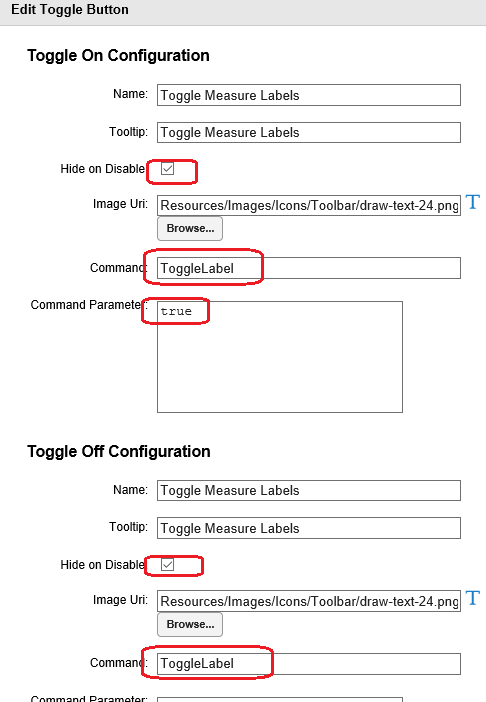
Cheers,
Mike0
Please sign in to leave a comment.
Comments
2 comments