Identify results behaves differently in 4.7

I just upgraded to GE 4.7 and GVH 2.8. Previously, after activating the Identify tool and clicking a single feature, the feature descripton would appear in the results pane. Now, only the layer name appears, and the user must click there (or on the feature in the map a second time) to get the feature description to display.
Is there a way to configure the Identify tool to immediately display the feature description without a second click (as it did in 4.6/2.8
0
-
Hi Mike,
The results list behaves differently starting 2.8 as it will group results by layer. If you are clicking on a single feature though we should be able to display the feature itself without you needing to click on the layer name. The parameter responsible for this behaviour is called automaticDrillInDelay and is covered at page 327 of the Administrator and Developer Guide.
What is that value for you? If it is the default (300), try increasing that to 500, 700 or a 1000 to see if that makes a difference. A layer that is slow to return results might be the reason why that is not working.
Hope this helps,Sergio
0 -

See Majdoleen's post on the same issue here
https://support.geocortex.com/essentialsGSCForum?id=90660000000GtxDAAS
She found a fix herself0 -
Sergio,
I tried changing that value. Increased it all the way up to 4000 but it didn't seem to change the behaviour much. Sometime the feature description would show after selecting a single feature, other times not. Majdoleen's soluton worked beatifully...thanks for the link, Lauren!0 -
we are happy that this is not hardly-coded as it is left at the level of files. We hope that LG manages to get this modified from the manager without the need to touch any file. 0 -
In GVH 2.8 there also seems to be an error with FeatureSetResultsView window. Both the Feature Description and Feature Long Description have to be filled in for anything to display in the FeatureSetResultsView window otherwise only the Feature Label displays not matter what you choose in the Look and Feel -> Results List section of the viewer..... 0 -
Hi Brian,
Thanks for reporting this! I've reproduced it here, and filed it as GVH-15581.
Cheers!
Danny0 -
There is also a crazy gap when you have an icon set for the results? 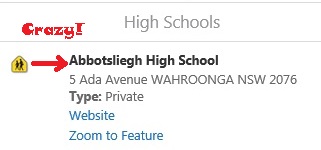
You can remove it by deleting or commenting out the padding-left: 2.5em; under .list-menu-details {} in the common.css file (It's found in your viewer directory e.g.C:\inetpub\wwwroot\Html5Viewer\Resources\Styles).list-menu-details { display: block; /*padding-left: 2.5em;*/ }Zap! Zap! Gone!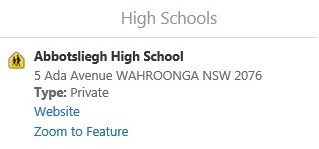
Cheers,
Bryan0 -
As of GVH 2.9 the crazy gap is coded into a CSS RESET after the custom.css is loaded and so custom.css isn't used anymore! Why would you do that?! 0 -

Hi Brian,
I identified this issue. The 2.9 viewer no longer loads any css files from the HTML5 Viewer INETPUB directory. This has been filed with the developers and might be fixed for the 2.9.1 release.
Thanks,
Mike Ketler0
Please sign in to leave a comment.
Comments
9 comments