change menu order

I'm trying to change the order of items in the Panel Action Menu-Results list. I've gone through all of the likely Menus in the Context Menus configuration in the viewer part of Essentials, but I can't seem to make the changes stick. I was able to change the order in the Results Table Actions, but changing the order in any of the Results List actions seems to have no effect.
Anyone else run into this...seems like a bug.
0
-
Hi Mark,
It is possible to change the order of the items in the menus of the Results List.
Are you using the latest version of GVH and Essentials?
From the Context Menus configuration you can change the order of the items in the following menus:- Results List Collection Actions
- Results List Collection Element Actions
- Results List Set Actions
- Results List Set Element Actions
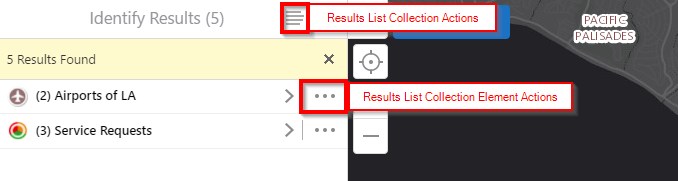
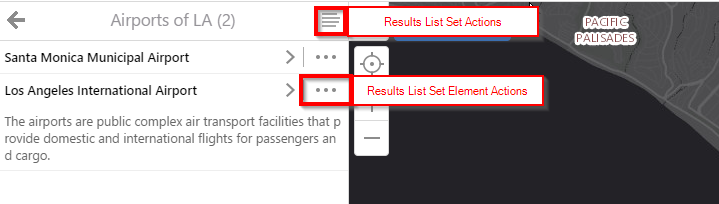
Hope this helps!
- Sergio0 -
Thanks for the reply, Sergio.
I want "Run a Report" to be at the top of all those lists.
As I alluded to in my initial post, I changed the order in all four of the Results List items in the veiwer Context Menu editor.
_img_ alt="Moved "Run a Report" to the top of the list, clicked "Apply Changes" and "Save Site"" src="https://latitudegeo--c.na53.content.force.com/servlet/rtaImage?eid=90760000000GrpR&feoid=Body&refid=0EM60000000Ujvf" _/_img_
But when I check in my viewer, "Run a Report" remains in it's default location.
_img_ alt=""Run a Report" is not at the top of the list" src="https://latitudegeo--c.na53.content.force.com/servlet/rtaImage?eid=90760000000GrpR&feoid=Body&refid=0EM60000000Ujvk"_/_img_0 -
However, if I switch to Table view and open the context menu, the changes I made to the Results Table Actions menu DO appear as expected: 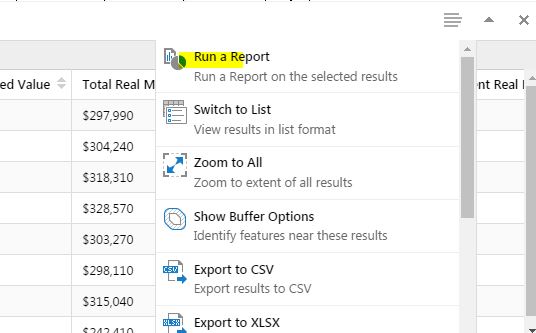 0
0 -
Het Mike, I just tested this in my 2.8 viewer, and it works for me. What version of the viewer are you running? Can you post your desktop.json.js file so we can take a look?
Thanks!
Danny0 -
Hi Danny,
Sorry, didn't see your reply until just now. I'm using very recent versions:
Essentials 4.7.0.566
HTML5 Viewer 2.8
Like I said, I'm able to change the order in every menu except the one I most want: the Reults List Collection Actons.
I can't seem to post my desktop.json.js file here...says there are too many characters. Perhaps I should open a case so I can attach it?0 -
Hi Mike,
I think that would be the best way to go. We should be able to assist you with this soon!
Thanks,
Danny0 -
I'm having a similar problem. Was this resolved? 0 -
Hi Dan,
Not sure if you are still having issues with this or not. But if you are can you please attached your desktop.josn or open up a support case to take a look.
Thanks,
Ali
0
Please sign in to leave a comment.
Comments
8 comments