Data Links Results-Export to CSV or spreadsheet?

Hello,
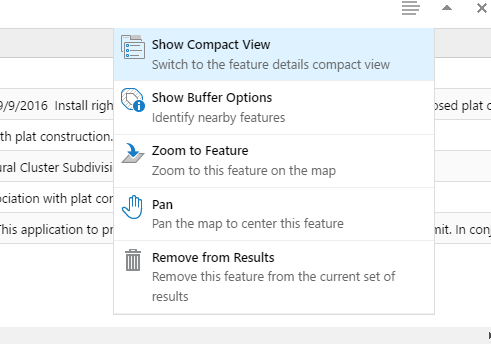
I have built several data links for permit status types and they show up in several tabs after you click the map tip from a parcel. By default, the only options i have for these sql based data links( by way of search tables with a SQL DB) is to "show buffer options, zoom to feature, pan, or remove from results". Is there anyway to add in the "export to CSV or XLS" feature? Our users would love to export out this data link results from this tabular view
0
-

Aparently it is now possible to export datalink information in the latest release (html5 4.8) but before that it isn't possible. We built workflows to export the relevant data to excel as a work-around. 0 -
I just installed 4.8 but not seeing where this option is available. Where is this located? 0 -

I am interested in this functionality as well. Currently Essentials 4.10 and viewer 2.11. I see the same options to switch back to the compact view, buffer results, etc. but nothing to export to csv or xlsx. 0 -

Hi,
I just checked the HTML5 viewer we have deployed on a few VMs, the 2.9.x viewer and the newest 2.11.1 viewer all have these export menu options. See the sample viewer below, if you don't have the same options then I would open a support ticket so we can help you manually fix that context menu via Essentials Manager.
http://gedemo.geocortex.com/Html5Viewer/index.html?viewer=LA_County_.LA_HTML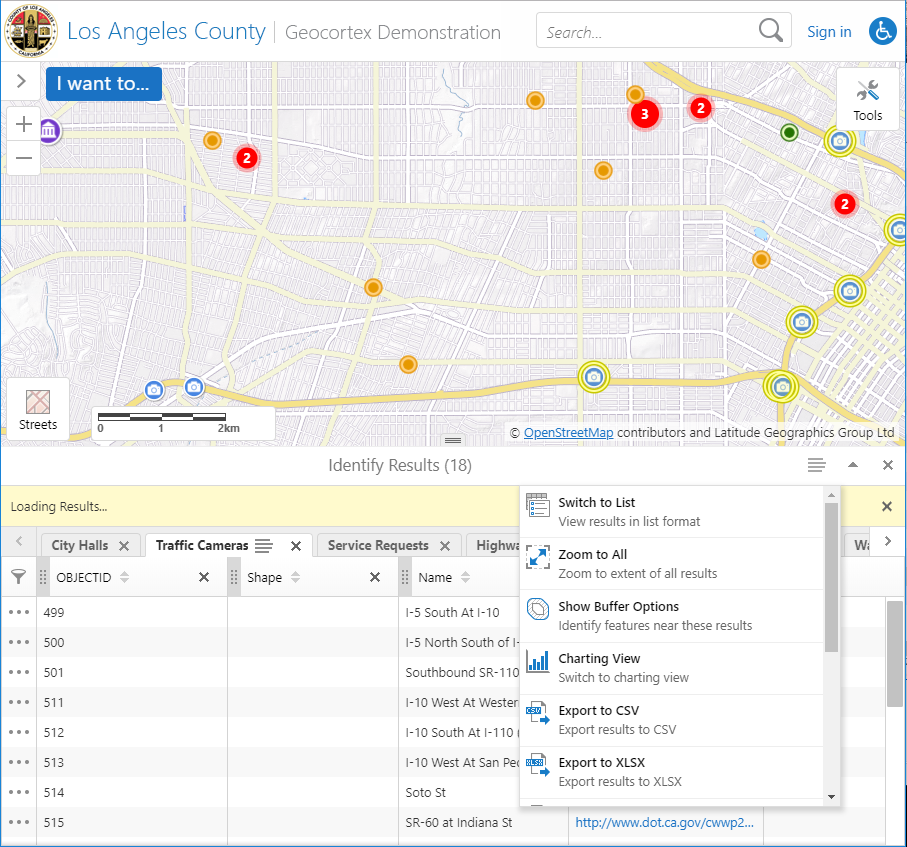
Thanks,Mike Ketler
0
Please sign in to leave a comment.
Comments
4 comments