Quickstart for 2.8.1 Cannot find module

Hi,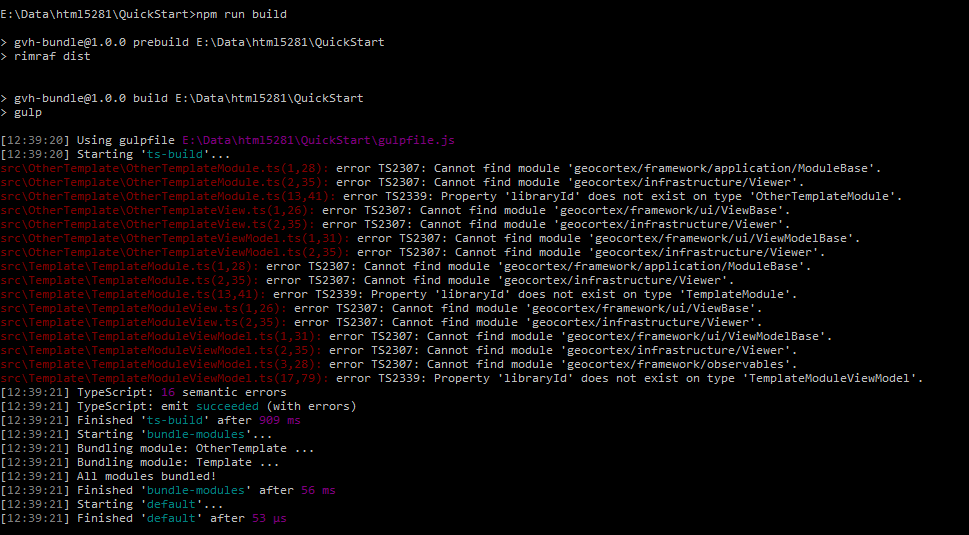
I am starting develop new modules for the 2.8.1 version.
I followed the instrucion on the read.me file but I get on every import "Cannot find module..."
Also when running nmp run build:
0
-
Am I missing something?
Thanks in advance.
Best regards,
Marco0 -

I have the same issue with the 2.9.0 version of the viewer - did you manage to get it up and running? 0 -

Hi Marco and Jesper,
Sorry for the issue.
This issue has been fixed in GVH 2.9.1 version (Ticket ID GVH-15593).
Cheers,
Pairin
0 -
In the 2.9.1 version of the viewer there is a _Definitions folder with the GC modules. Now the quickstart sample modules is building ok. 0 -
I tried 2.9.1 and I get the following error
<folder>QuickStart/_Definitions/kendo.all.d.ts(1190,15): error TS
2430: Interface 'DataSourceTransportWithFunctionOperations' incorrectly extends
interface 'DataSourceTransport'.
Types of property 'create' are incompatible.
Type '(options: DataSourceTransportOptions) => void' has no properties in co
mmon with type 'DataSourceTransportCreate'.0 -
In your packages.json, try changing your typscript version. Compiling with ts 2.5.3 is failing, while typescript 2.4.2 is still working ok. 0 -

node: 8.9.1
npm: 5.5.1
Using viewer 2.10 quickstart
Changed typscript to 2.4.2
npm install
npm run build
Still get errors in Mapping.Infrastructure.AMD.d.ts not able to find react or jsx.
package{ "name": "gvh-bundle", "version": "0.1.0", "private": true, "license": "MIT", "author": "Latitude Geographics", "dependencies": { "glob": "^7.1.2", "gulp": "^3.9.1", "gulp-concat": "^2.6.1", "gulp-typescript": "^3.1.7", "merge2": "^1.0.3", "mkdirp": "^0.5.1", "uglify-js": "^3.0.17", "yargs": "^8.0.2" }, "devDependencies": { "eslint": "^4.0.0", "typescript": "2.4.2" }, "peerDependencies": { "typescript": "2.x" }, "scripts": { "prebuild": "rimraf dist", "build": "gulp --silent" }, "bin": { "gvh-bundle": "./bin.js" } }errorsnoBuilding project Quickstart Starting TypeScript 2.4.2 compile... C:/code/Viewer2.10/_Definitions/Mapping.Infrastructure.AMD.d.ts(29299,24): error TS2307: Cannot find module 'react'. C:/code/Viewer2.10/_Definitions/Mapping.Infrastructure.AMD.d.ts(29363,15): error TS2503: Cannot find namespace 'JSX'. C:/code/Viewer2.10/_Definitions/Mapping.Infrastructure.AMD.d.ts(29375,24): error TS2307: Cannot find module 'react'. C:/code/Viewer2.10/_Definitions/Mapping.Infrastructure.AMD.d.ts(29442,15): error TS2503: Cannot find namespace 'JSX'. C:/code/Viewer2.10/_Definitions/Mapping.Infrastructure.AMD.d.ts(29443,27): error TS2503: Cannot find namespace 'JSX'. C:/code/Viewer2.10/_Definitions/Mapping.Infrastructure.AMD.d.ts(29444,80): error TS2503: Cannot find namespace 'JSX'. C:/code/Viewer2.10/_Definitions/Mapping.Infrastructure.AMD.d.ts(29445,92): error TS2503: Cannot find namespace 'JSX'. C:/code/Viewer2.10/_Definitions/Mapping.Infrastructure.AMD.d.ts(29453,24): error TS2307: Cannot find module 'react'. C:/code/Viewer2.10/_Definitions/Mapping.Infrastructure.AMD.d.ts(29472,15): error TS2503: Cannot find namespace 'JSX'. C:/code/Viewer2.10/_Definitions/Mapping.Infrastructure.AMD.d.ts(29481,24): error TS2307: Cannot find module 'react'. C:/code/Viewer2.10/_Definitions/Mapping.Infrastructure.AMD.d.ts(29503,15): error TS2503: Cannot find namespace 'JSX'. TypeScript compile failed with 11 errors npm ERR! code ELIFECYCLE npm ERR! errno 1 npm ERR! gvh-bundle@0.1.0 build: `gulp --silent` npm ERR! Exit status 1 npm ERR! npm ERR! Failed at the gvh-bundle@0.1.0 build script. npm ERR! This is probably not a problem with npm. There is likely additional log ging output above.0 -
If you are still having issue like the one I listed above the following resolved the issue. - Open a console with admin permissions.
- In the quickstart folder: npm install --save @types/react
- npm run build
{
  "name": "gvh-bundle",
  "version": "0.1.0",
  "private": true,
  "license": "MIT",
  "author": "Latitude Geographics",
  "dependencies": {
    "@types/react": "^16.0.25",
    "glob": "^7.1.2",
    "gulp": "^3.9.1",
    "gulp-concat": "^2.6.1",
    "gulp-typescript": "^3.1.7",
    "merge2": "^1.0.3",
    "mkdirp": "^0.5.1",
    "uglify-js": "^3.0.17",
    "yargs": "^8.0.2"
  },
  "devDependencies": {
    "eslint": "^4.0.0",
    "typescript": "2.4.2"
  },
  "peerDependencies": {
    "typescript": "2.x"
  },
  "scripts": {
    "prebuild": "rimraf dist",
    "build": "gulp --silent"
  },
  "bin": {
    "gvh-bundle": "./bin.js"
  }
}
0 -
A little addition to the information Tyson has provided. I had to specify the version as "@types/react": "16.0.25" because the newest version had compile errors which were not going to jive. I'm also back on "typescript": "~2.3.4" because the next viewer, 2.11, is built using that version and I don't want to be caught out using 2.4.2 functions. 0
Please sign in to leave a comment.
Comments
9 comments