How can I make map tips editable?

I am fairly new to Geocortex and I am trying to determine if I can make the box that pops up (map tip) when you select a feature editable. Ideally I would like to click on a section of road and when the box pops up be able to type into the attribute fields the new data.
Is this possible and if so any tips on where to start, or how to accomplish this?
0
-
Hi Jennifer,
Welcome to the world of Geocortex Essentials! I'm afraid you can't edit the feature details directly from the map tip. This is because the map tip is basically a static frame that is displayed exactly as the administrator defines it. That being said, you can include an option in the map tip to edit the feature (which will open the edit features dialog in the side bar):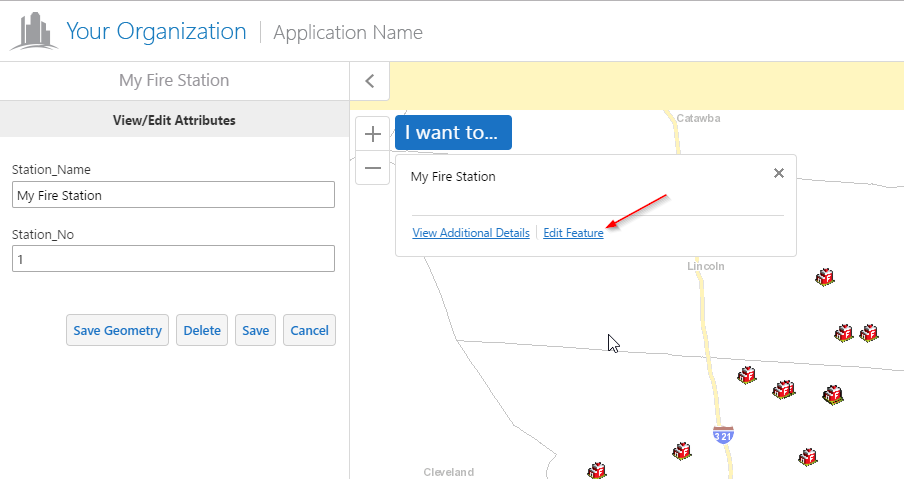
The configuration for that option is in Manager > Viewer > Your Viewer > Context Menus > Map Tip Actions
If you'd like to see that functionality added (letting the whole map tip be editable) I'd suggest posting it to the ideas section of the support center, or reaching out to us so we can help you achieve this with custom development.
I hope this helps! Please let me know if you have any followup questions.
Cheers,
Danny0 -
What I really need to accomplish is to make a feature layer's attributes editable. I have tried finding this in the training materials we have or the developer guide but I cannot find the steps to accomplish this. I have been able to get the map tip to show the View/Edit Attributes but when I click on it a blank box pops up on the side of the screen. 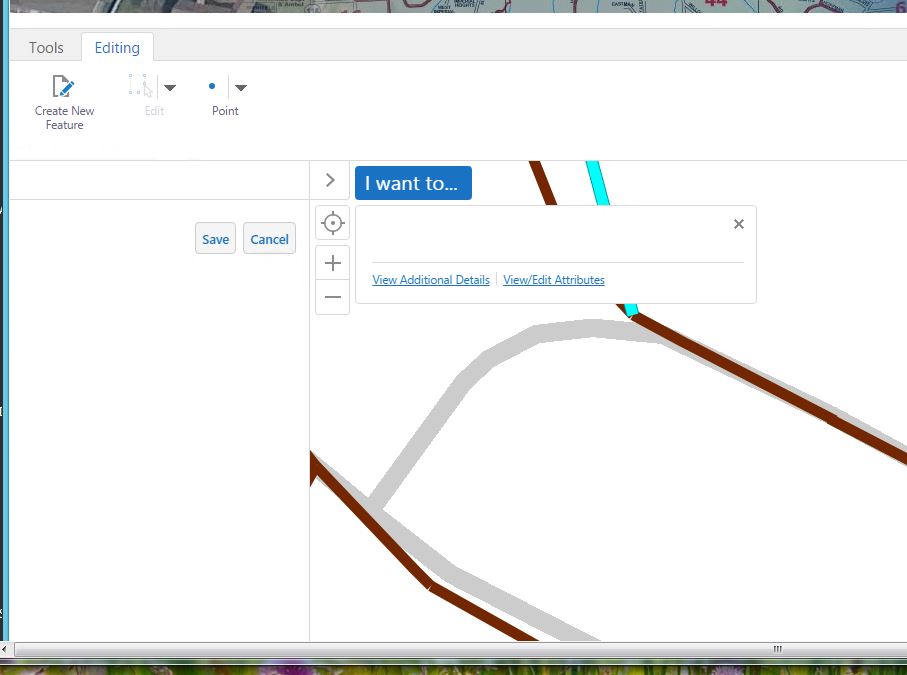 0
0 -

Maybe it is not configured correctly? What did you use for the command? 0
Please sign in to leave a comment.
Comments
3 comments