Changed siteid and viewerid - saved projects are not available

I have changed siteid and viewerid manually and now saved projects are not available.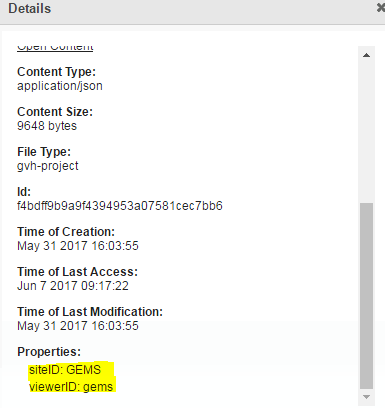
Can the Saved projects be updated?
I can still view the projects in the datastore but they are not available in the viewer but siteid and viewer id are now different.
0
-
Anyone know if it is possible to update a project that cant be opened? 0 -
Thanks Bryan. How did you even come up with something like this?
I almost got there but got denied on the webrequest. Any ideas.
"code": 400, "formalCode": "writer denied",
"formalMessage": "Write acccess to the requested resource has not been granted."
An export json and load json would be a nice addition to how geocortex handles projects.0 -
Are you running the workflow from your PC using the workflow simulator? If so have you pasted your
token into the webrequest? Getting the token is the key to the write access. It should look like.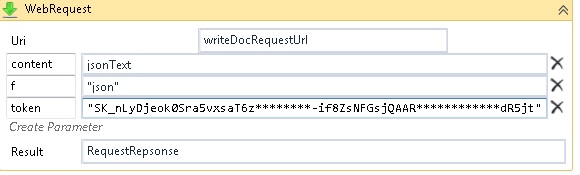 0
0 -
I agree, an export json and load json would be a very nice addition to how geocortex handles projects. 0 -
I was not doing the second part in the simulator. But i did have the token value in there.
Now that I run from simulator I get:
"formalCode": "xsrf blocked",
"formalMessage": "This request did not pass XSRF protection.",
I will do some more testing on my dev server.0 -
Ok so it worked on my dev site. I just changed a project title and it was reflected in the viewer.
But not working on my prod. Must have some different permissions or configs somewhere.
I will mark as answered but if you have any ideas about my "XSRF" error let me know.
I am still amazed at how you even came up with that.!0 -
Hi Brian and Mark,
Thanks for your awesome solution Brian, that's inspired!
There's a new tool in Essentials 4.7 that might make this a little easier. It's called Manager for ElasticSearch, and it can be found in your Core Diagnostics folder (C:\Program Files\Latitude Geographics\Geocortex Core\Diagnostics\Manager for Elasticsearch). Note that this is a third party program, and not supported by Latitude Geographics!
1) Open Manager for Elasticsearch, and click Connect to connect to the local ElasticSearch database
2) On the right hand side, look for the docs_geocortex_essentials_users_documents index
3) Select the document type
4) In the main panel, you can see all the documents contained within that type. This includes Saved Projects, and Collaboration Rooms. The Title column contains a list of the titles of the saved projects. Find the one you are looking for and click on it
5) In the lower panel, you can see the document as a JSON tree. At the very bottom, you can see a siteID property, and a viewerID property. Double click on the field to edit the value. Press Enter on your keyboard when you are finished.
The new values will be written into the database right away. You should see the changes reflected immediately in your sites.
I hope this helps!
Thanks,
Danny0 -
Thanks Daniel, thats great. (I only just ust noticed this. Didnt get an email update.)
That utility is useful. A saved project Import/Export from/to JSON would be better.0 -
Hi Wiley,
Please create a post in the "Ideas" section requesting the ability to export and import saved project data. If the post gets enough attention from other customers and enough up-votes it will get serious consideration from our Products group.
Thanks,
Wayne Richard
Latitude Geographics Group Ltd.
Head Office: 300 – 1117 Wharf Street Victoria, BC Canada V8W 1T7
Tel: (250) 381-8130 | Fax: (250) 381-8132 | wrichard@latitudegeo.com
Developers of Geocortex web-based mapping software | www.geocortex.com
An Esri Platinum Business Partner0 -
Hi Wayne,
I have done so. I up-voted and commented support on Richard Diaz's Idea "Backup & Retrieve Individual Data Store Documents". It is in the "Geocortex Essentials Manager" portion of the Idea page. His idea is the 3'rd most popular idea currently with 230 points. I recommend that all reading this thread up-vote to make it so!
Regarding my last post I was very incorrect in recommending against using Manager for ElasticSearch becuase they may have run out of business. My mistake, their website was not available at that time.
Rintools-Island Codeworks are in business, their website (http://www.rintools.com) is up and running and you can purchase a license for their newly released program. Their licensed program can use ElasticSearche's "Snapshot" backup and restore ability as well as import & export from-to .csv and .json. It is new software; a 14 day trail version 1.1 is included with the Geocortex software. They are also a BC company, go Canada!
Wiley0 -
Whoops I mean his idea is the 3'rd most popular in the "Geocortex Essentials Manager"category, not the 3'rd most popular idea overall.
Wiley0 -

I figured out a method that works. The ElasticSearch program (currently in C:\Program Files\Latitude Geographics\Geocortex Core\Diagnostics\Manager for Elasticsearch) lets you see into the individual projects which are stored within ( C:\Program Files\Latitude Geographics\Geocortex Core\Data\DocumentStore\DocumentStore\<YOUR GECORTEX SERVER>\nodes\0\indices\docs_geocortex_essentials_users_documents )
1. I used it to export the <docs_geocortex_essentials_users_documents/document> tree on the left hand tree in the pic to a json file
2. Then I edited the json file in notepad to replace all the old siteID and viewerID strings with the new ones. If you are unsure of the siteID and viewerID that you have, you can create a new project in Geocortex and save it, then find it in ElasticSearch or in Geocortex (as per Brian's post above) and copy the details.
3. Next I deleted all the old projects incorrectly referenced in the <docs_geocortex_essentials_users_documents/document tree> and then imported the json modified file again to <docs_geocortex_essentials_users_documents> on the tree to replace them.
4. They were back in place after a refresh of my Geocortex browser.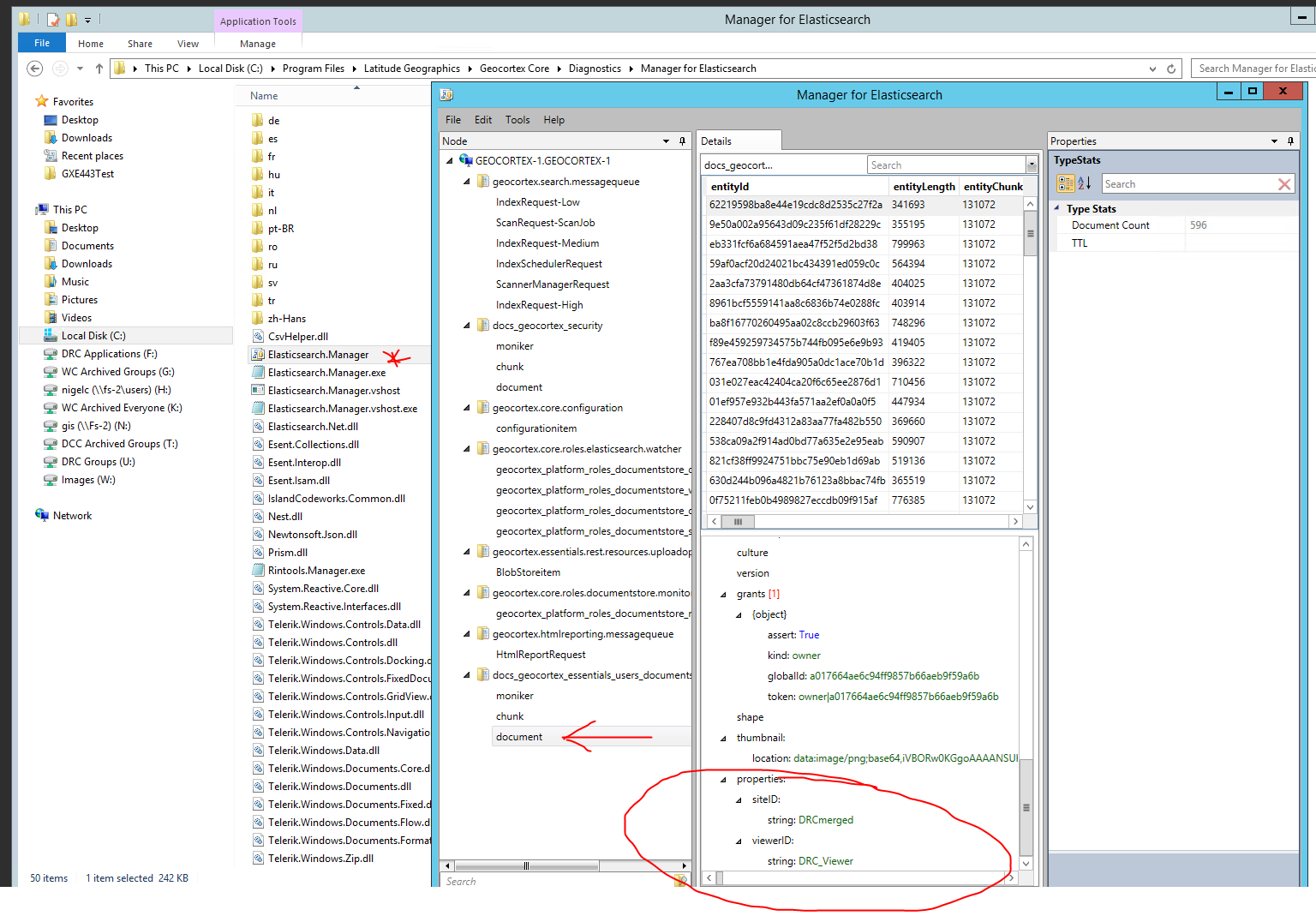 0
0 -
Hi Nigel,
That application will be removed soon from the Essentials installation package, due to licensing concerns.
If you purchased a license from the author feel free to keep using it but we do not expect our users to buy a license.
Regards,
Wayne0 -
Hi there,
In my organisation I am currently having trouble with some project files not loading due to updates we have run on the site. For example we have added and removed some map services. We have noticed however that project files that referenced services that no longer exist cause the project file to not load.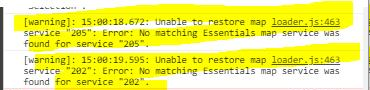
Is this expected behaviour? what is the best process to update these project files? Can I access and edit the json? Could there be an import/export option added to the data store so we can update users project files?
Thankyou,0
Please sign in to leave a comment.
Comments
14 comments