Disable Filter Layers

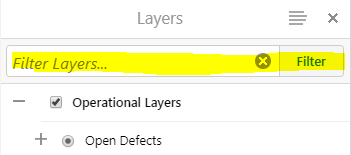
How do I disable filter layers on the HTML5 viewer? My application has 3 layers in it. I don't need this functionality on my site.
0
-

Hi Carlos
In the desktop.css file add this to hide the Filter widget and move the TOC up to the top of the panel
/*Hides the Filter Widget*/
.panel-filter-widget {
display: none;
}
/*moves the layer list up to top of panel*/
.layer-list {
top: 0.5em;
}
Cheers
Chris0 -
This works really well, except when I open the "Identifiable Layers" panel, the top of the layer list is covering the Select All button. I'm using 2.9, if that makes a difference. Is there a way to fix this in desktop.css?
_img_ alt="Image of the folder name covering the Select All button." src="https://latitudegeo--c.na53.content.force.com/servlet/rtaImage?eid=907f2000000fxc1&feoid=Body&refid=0EMf2000000k9kF"_/_img_0 -
Hi Pennie
Good pick up. Try this:
/*moves the layer list up to top of panel*/
.layer-list.bound-visible {
top: 0.5em;
}
Cheers
Chris0 -
Hi Chris,
When I added layer themes to a site, the gap where Filter Layers used to be reappeared. Is there a way to fix this as well? Thanks for all your help!
_img_ alt="Gap between layer themes box and layer list" src="https://latitudegeo--c.na53.content.force.com/servlet/rtaImage?eid=907f2000000fy6f&feoid=Body&refid=0EMf2000000kACx"_/_img_0 -
Hi Pennie
Try this:
/*Hides the Filer Widget*/
.panel-filter-widget {
display: none;
}
.layer-theme-switcher.bound-visible ~ .layer-list {
top: 4em;
}
/*moves the layer list up to top of panel*/
.layer-list.bound-visible {
top: 0.5em;
}0 -

This last code entry worked for me. Thank you, both 0
Please sign in to leave a comment.
Comments
6 comments