DatePicker ToString with format mask causes String-to-Integer error?

I'm trying to use a value from the DisplayForm DatePicker in a Query Task WHERE clause, but when I try to apply a format mask to the DatePicker result, Workflow Designer throws an error stating that implicit String-to-Integer conversions are not allowed. How does applying a format mask to a String create an Integer?
My assignment is: endDate.ToString("DD-MMM-YYYY").ToUpper
endDate is a DateTime object resulting from the DatePicker
I can use the endDate.ToString without error and it produces the date as 6/07/2017 12:00:00
As soon as I add the format mask: endDate.ToString("DD-MMM-YYYY") it throws the error that disallows implicit String-to-Integer conversions.
Of course, the only reason I'm trying to format the string instead of using the native format in my query is that my Query Task WHERE clause will not allow the use of the Oracle TO_DATE function. As soon as I use a function in my WHERE clause, ArcGIS Server says it is unable to perform the query.
So what is up with all of that?
0
-

Ugh! I feel your pain, but I was dealing with SQL Server's date functions.
1) Read this about getting the rest query to work with date functions (disabling standardized queries). Please note, there are risks to doing this with regards to SQL Injection.
http://server.arcgis.com/en/server/latest/administer/linux/about-standardized-queries.htm
2) set the variable for the output argument for date picker to be Nullable<DateTime> (the Nullable part was the tricky part)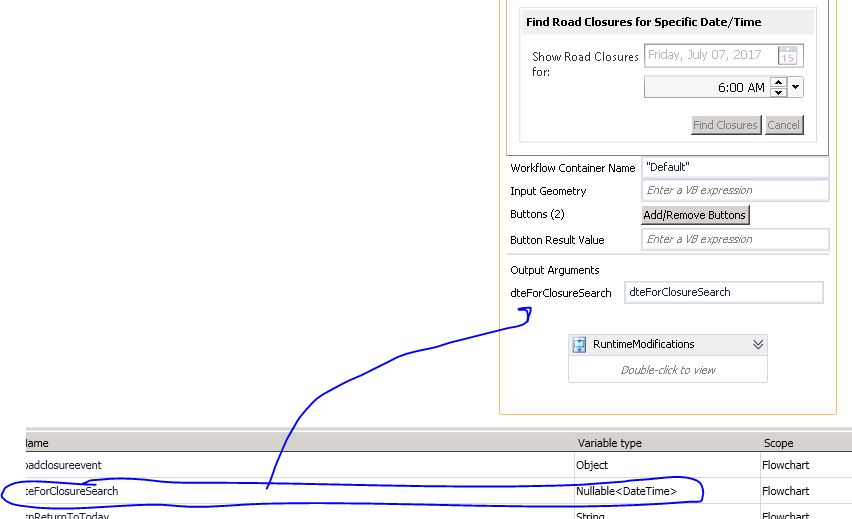
3) My query for the date field against the service:
"PROJFINISHDATE >= '" & dteForClosureSearch.value &"' AND PROJSTARTDATE <= '" & dteForClosureSearch.value &"'"
Now - I was dealing with joined tables which added some quirks. A file geodatabase feature class joined to a Cityworks SQL server table. The workflow finds all the streets that are closed during the specific date/time set using the date picker. I am pretty sure I had to change something in the query when I switched from a SDE feature class to a file geodatabase. It took me FOREVER to get it all worked out. And a call to ESRI (about query not working) and to Geocortex (about the query not working in workflow). Get the query to work against the rest service and then work on the QueryTask.
I doubt this will solve your situation but perhaps give you other things to try.
Carmen0 -
#3 should say "my query task in the workflow for the date field against the service" 0 -
Luckily, Workflow Designer automatically determined the Nullable<DateTime> for me when I hit F3 to create the output variable. My issue is trying to convince Workflow Designer that a String is a String - even with a Format Mask.
I discovered the other day that having an errant feature in my source data that caused the extent of the featureclass to stretch a couple of thousand miles beyond the extent of our world made the Query Task balk at SQL functions, but once the errrant feature was deleted, the SQL functions worked normally. I've got another extent error today, so once it's fixed, I think the Query Task WHERE clause will work as expected and I can format my date mask in the WHERE clause instead of fighting with Workflow Designer about when a String is not an Integer.0 -
Amanda at Latitude Support offered the best answer for formatting the DateTime result from the DisplayForm through a Support Case so I'm copying it here:
The issue has to do with the Nullable<DateTime> object that is returned from the DisplayForm. Try using the "Cast" activity to cast fromDate and endDate to DateTime objects, and then use .ToString("yyyy/MM/dd hh:mm:ss") on the new DataTime variables.
So taking the System<Nullable>DateTime object from the DatePicker in the form, use a Cast activity of type Cast<System.DateTime> and place your new System.DateTime variable on the left and the DateTime Object result from the DatePicker on the right.
Now that the variable is a regular System.DateTime, the Format Mask works as expected so that:
fromDate.ToString("yyyy/MM/dd hh:mm:ss") returns the date in a format the the ESRI Query Task will accept in a WHERE clause.
ESRI stopped allowing regular Oracle DATE functions in the WHERE clause of Query Tasks as they were seen as possible SQL injection sites. So the only DATE syntax allowed in the WHERE clause is:
date 'yyyy/mm/dd' OR timestamp 'yyyy/mm/dd hh:mm:ss'
For example: Date_Field = date '2017/07/11'
OR Date_Field = timestamp '2017/07/11 01:23:32' (if you need the time component)0 -

Thanks for following up, Sean! 0
Please sign in to leave a comment.
Comments
5 comments