Select Features or Identify on multiple layers - show the old way

Hello all,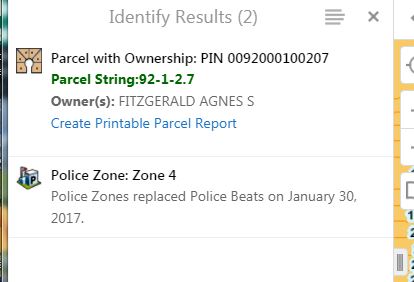
Using HTML Viwer 2.9
So, I really like the results when identifying/selecting features and there are multiple layers with multiple features.
What I don't like is that behaves the same way if there is only 1 feature for each layer selected.
For example, the old way, our Police Officers using the application in their vehicle could identify a point on the map to get the parcel and police Zone information at that location. Because the way they run this, they are always zoomed in and pretty precise about the location (or it could be using an address). Only 1 parcel and 1 police zone are returned immediately.
OLD WAY:
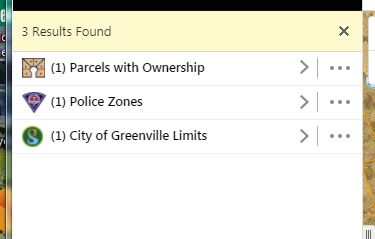
But after the upgrade (see below), they now must click multiple times to see the parcel information and the police zone information that is important to them. They are using this in the police cars while moving. Multiple clicks are not good.
NEW VERSION (they have to now click on a layer to see what could be seen above):
Can anyone tell me a way (workflows are fine as I am using workflows with "SelectFeatures" for this anyway) to display all the information from multiple layers at once like with the older versions???? Like if number of features from each layer is 2 or less, then show the old way? I have a couple of applications like this where I am using a point to select and for the most part, only one record from each layer is returned.
Thanks,
Carmen
0
-
A coworker pointed me to this knowledge based article. I hope this will be the answer.
https://support.geocortex.com/essentialsGSCkba?sub-nav=kba&main-nav=essentials&#!/feedtype=SINGLE_ARTICLE_SEARCH_RESULT&id=kA360000000PPcH
I will also post on the ideas page to make it an "option" in future releases.
Carmen0 -

There is a similar Idea out there already:
https://support.geocortex.com/essentialsGSCIdeasDetail?c=09a6000000008RsAAI&id=087600000008eaAAAQ&categ=&sub-nav=ideas&main-nav=essentials0 -
thanks. 0 -
I tried the following:
https://support.geocortex.com/essentialsGSCkba?sub-nav=kba&main-nav=essentials&#!/feedtype=SINGLE_ARTICLE_SEARCH_RESULT&id=kA360000000PPcH
It worked as I had hoped for the Results list.
However, I cannot seem to make changes in Essentials Manager to the Viewer's "Look and Feel" page such as highlight colors. Well, I can change the color in the dialog, but when I "Apply Changes", the "Save Site" never becomes active so I can never save the site.
But, if I access another item in the Viewer's Table of Contents section (like Home Panel, Toolbar), I can make changes and save the site. Once I save the site in the latter instance, the items I tried to save on the Look and Feel Page will also change.
I am able to make the changes wthin the .json.js file in the Highlights Module and save that file. I make sure this file is closed before I try to change within Essentials.
Has anyone seen this behaviour with these changes?
Thanks,
Carmen0 -

We are in the process of upgrading our Geocortex Essentials to version 4.14.5 (from 4.6.3.24) so I am interested in this topic. I am thinking that people aren't going to be happy having to do extra clicks. But when I click on the supporting links above, it redirects me due to it not being a 'vertigis' link. Does anyone have a link that I can open?
0 -

Reverting results list view back to the non grouped view
https://support.vertigis.com/hc/en-us/articles/11461106673042-Reverting-results-list-view-back-to-the-non-grouped-view0
Please sign in to leave a comment.
Comments
6 comments