Remove Details Section from Feature Long Description

It is possible to remove the Details section from the Feature Long Description? There are fields from the Details that we don't like to make available/visible to the users.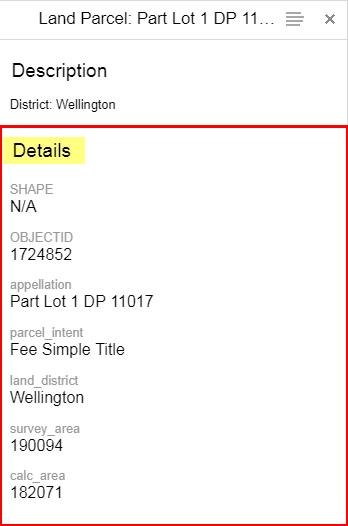
It would be easier if we can just disable this section rather than going through the fields tab of each layer and remove it from there.
0
-

I believe you can just remove the FeatureAttributesProviderView provider in FeatureDetails module in your viewer config. Remove meaning just delete that part of the viewer config (or comment it out if you're feeling sentimental). 0 -
Thanks John, that did the trick. I wasn't feeling very sentimental at the time so I deleted the section. This is the section I removed anyway:
{
"type": "geocortex.essentialsHtmlViewer.mapping.modules.FeatureDetails.FeatureDetailsProviders.AttributesViewModel",
"viewId": "FeatureAttributesProviderView",
"viewType": "geocortex.essentialsHtmlViewer.mapping.modules.FeatureDetails.FeatureDetailsProviders.AttributesView",
"iconUri": "Resources/Images/Icons/Toolbar/details-24.png",
"markup": "Mapping/modules/FeatureDetails/FeatureDetailsProviders/MultiColumnAttributesView.html",
"title": "@language-feature-attributes"
},0
Please sign in to leave a comment.
Comments
2 comments