Understanding the RunWorkflowWithArguments syntax when used in RunExternalCommand

Does anyone know the correct syntax for the command parameters when using RunWorkflowWithArguments in the RunExternalCommand workflow task? Is it the same as when it's used in in a command hyperlink, I tried the command parameter string below, but it doesn't work for me. Any thoughts?
"workflowId=Address_Information&queryAddress=" + addressQueryResult.Features(0).Attributes("LABEL_NAME").ToString + "&queryCity=" + addressQueryResult.Features(0).Attributes("POSTAL_COMM").ToString + "&queryUnit=" + addressQueryResult.Features(0).Attributes("ADDR_UNIT").ToString
Thanks,
Frank
0
-

Hi Frank,
I’m sure you have checked already other posts in this community re this topic for tips… I only used RunWorkflowWithArguments from javascript (client side) …sorry I cannot help for syntax from RunExternalCommand Are you trying to call a workflow from another workflow?
Did you try to use Invoke workflow or Reference workflow? I found those activities very handy as they automatically “sync” arguments between workflows and you can easily handle output arguments as well.0 -

Hi Frank,
If you are using RunWorkflowWithArguments command for a tool, use the following syntax for your input arguments.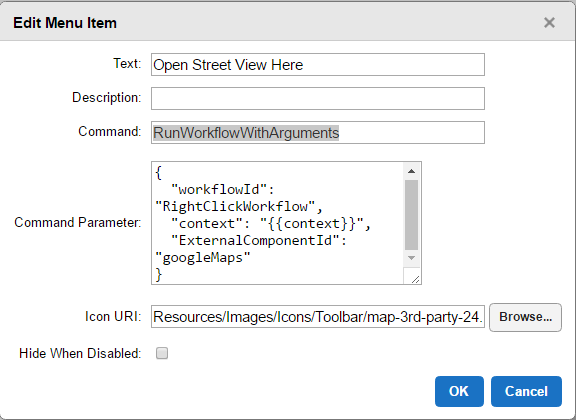 0
0 -
Francesca,
Thanks for the suggestion! Reference workflow was the way to go. Work like a charm. Thanks again for the help!0 -
Peter,
Thanks for your information. If I decide to use RunWorkflowWithArguments is a tool, I will keep this in mind. Thanks again.0 -

For posterity interested in a workflow solution, I just implimented this answer from the always talented Moon One in the thread "Run Workflow with Arguments (https://support.geocortex.com/essentialsGSCForum?sub-nav=forum&main-nav=essentials&#!/feedtype=SINGLE_QUESTION_DETAIL&criteria=ALLQUESTIONS&id=9066000000007Y4AAI) ".
All,
1) What John Nerge suggested is working to set some values to share among different workflows usgin Set/Get External which is stored on client browser.
2) A Command Parameter for a command "RunWorkflowWithArguments" on RunExternalCommand taks the type as Object as you mouse over it. Here is what I did for some custom project I used. I can't add that workflow I implemented since the custom paid it so I just describe the steps below.
2-1 Add one Sequence (named as seq-WFArgs) before 'RunExeternalCommand'
2-2 create a variable say 'wfArgs' as Object type
2-3 on seq-WFArgs, create a var named 'wfArgsIObj' which type is JObject (which is a Newtonsoft.Json.Linq.JObject, which is available with GcxWorkflow as Newtonsoft.Json.dll)
2-4 Assign wfArgsIObj with the values such as
2-4-1 Use Assign: wfArgsIObj("workflowId") = [Your Workflow ID]
2-4-2 Use Assign: wfArgsIObj("otherParm") = [ANother Parameter to pass which another WF expects on Argument]
2-4-3 do 2-4-3 to pass all arguments you want to pass to the callee workflow
2-5 Assign wfArgs = wfArgsIObj
NOTE: keep in mind that wfArgsIObj variable should be in different scope. That is why I create another sequent above. Otherwise, it will give you one error about serialization or so... so Only wfArgs variable (NOT wfArgIObj variable) is exposed to the scope to the RunExternalCommand activity is used.
wish this helps you out to achieve to excute "RunWorkflowWithArguments" inside Workflow by passing the WorkflowID and extra parameter(s) expected on the second workflow.
Munhwan at Latitude Geographics Professional Service Team0
Please sign in to leave a comment.
Comments
5 comments