Layer Visualization: Image Symbology Type - how to add an image

Hello all,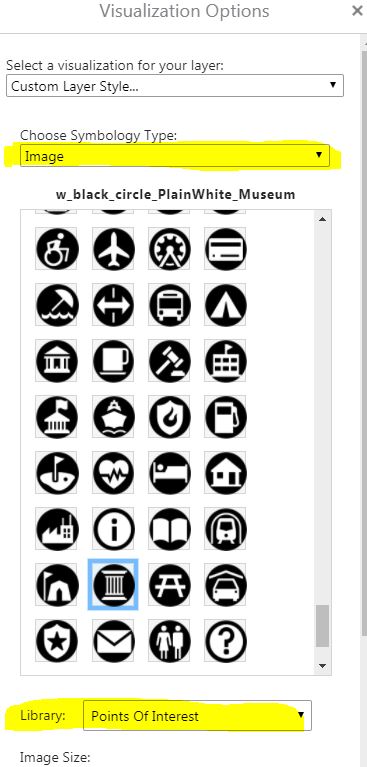
I cannot find anything in the HTML Viewer admin guide about the "Image Symbology Type" that is an option when changing visualization for a layer (see image below).
I found a video that uses this option and the person says "if there is not the exact image you need, you can add an image" or something to that effect.
How can I add an image/icon to one of the "Libraries" or create a whole new library with icons?
Thanks, Carmen
0
-

Hi Carmen,
The process is a little complicated. I've documented it in a new knowledge base article (https://support.geocortex.com/essentialsGSCCodeGallery?sub-nav=codegall&main-nav=essentials&id=kA4f2000000fxSz) here .0 -

Hi Carmen
Heres what I did, its a bit of work but it achieved what i was after!
1. create an mxd with the desired point symbology and published to arcgis server.
2. opened the REST endpoint of layer in the service in a browser eg yourservername/arcgis/rest/services/servicename/MapServer/1
3. clicked non the JSON link to open the json file
4. copied the json scipting for the symbols to a text document and reformatted as per an exisitng image library file to get the syntax and styling correct
5. saved the file as .json to the \Sites\Resources\Symbols\image folder
6. edited the desktop.json file for the viewer and added the library name eg:
{
"id": "PictureSymbolWidget",
"type": "geocortex.essentialsHtmlViewer.mapping.infrastructure.symbology.PictureSymbolWidget",
"markup": "Mapping/infrastructure/symbology/widgets/PictureSymbolWidget.html",
"viewModelType": "geocortex.essentialsHtmlViewer.mapping.infrastructure.symbology.PictureSymbolWidgetViewModel",
"libraryId": "Mapping.Infrastructure",
"configuration": {
"imageLibraries": [
"Shapes",
"Arrows",
"A-Z",
"Basic",
"Business",
"Cartographic",
"Damage",
"Disasters",
"General Infrastructure",
"Hazard Mapping", (added this)
"National Park Service",
"Numbers",
"Outdoor Recreation",
"People Places",
"Points Of Interest",
"Safety Health",
"Transportation"
],
"imageSize": {
"min": 16,
"max": 64,
"value": 32,
"step": 1
}
}
},
_img_ alt="User-added image" src="https://latitudegeo--c.na53.content.force.com/servlet/rtaImage?eid=907f2000000fyka&feoid=Body&refid=0EMf2000000kAgn"_/_img_
Hope that helps. Happy to provide more detail if needed.0
Please sign in to leave a comment.
Comments
2 comments