change the color of cirlce in Draw tool?

Is there any way to the change the color of Circle under draw tool. I want to increase the transparency.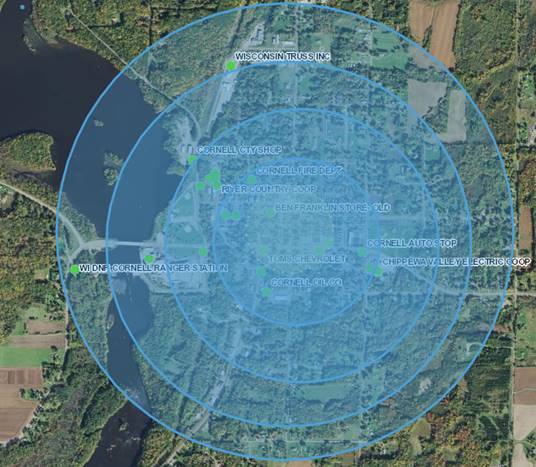
0
-

Search for the "Markup" module in the Desktop.json.js file for the site. Change "polygonFillColor" with your required transparency. Note that his will change all polygon graphic fills. Tested in GVH 2.9.2
_img_ alt="User-added image" src="https://latitudegeo--c.na53.content.force.com/servlet/rtaImage?eid=907f2000000fy0h&feoid=Body&refid=0EMf2000000kA5S" _/_img_
Rick0 -
Thanks Richard!
I was trying to change PolygonFill Color from transparent blue to transparent white but it give me solid white
as result.Do you know how can i make transparent white.
_img_ alt="User-added image" src="https://latitudegeo--c.na53.content.force.com/servlet/rtaImage?eid=907f2000000fy0m&feoid=Body&refid=0EMf2000000kA5X"_/_img_0 -

Be sure to set your alpha channel appropriately in your hex color value. 0 -
This is the way i set up in desktop.json
_img_ alt="User-added image" src="https://latitudegeo--c.na53.content.force.com/servlet/rtaImage?eid=907f2000000fy0w&feoid=Body&refid=0EMf2000000kA5m"_/_img_0 -
The default fill color is set to #4D4CA0D8. That corresponds to 30% (4D) transparency. So for 15%, you would use #264CA0D8.
This chart will help you out:
Transparency table of percentages to hex values. E.g. for 50% white you'd use #80FFFFFF
•100% — FF
•95% — F2
•90% — E6
•85% — D9
•80% — CC
•75% — BF
•70% — B3
•65% — A6
•60% — 99
•55% — 8C
•50% — 80
•45% — 73
•40% — 66
•35% — 59
•30% — 4D
•25% — 40
•20% — 33
•15% — 26
•10% — 1A
•5% — 0D
•0% — 00
Rick0 -
Thank you - Rick! 0 -
I was having the same issue, thanks!!!
Took me a second to figure out that the hex value for the <tool>Color is Transparency, Red, Green, Blue - 2 characters each.0
Please sign in to leave a comment.
Comments
7 comments