autoActivateAncestorVisibility only works on lowest layer

I have many groups under groups and if the top most group is checked off and a user checks on a middle level group under it, the top level will not turn on. For the example below, when the second layer down, Leases, is checked on the Land layer does not turn on. However, if either of the last two layers is unchecked and then checked on, or if they were off and then checked on, the Land layer will turn on. I've activated the 'autoActivateAncestorVisibility' function by making it true in the .json and adding the proper code to the sytles/desktop.css, and it does work properly for the lowest/most child layers in the layer list, but not the rest. Any ideas?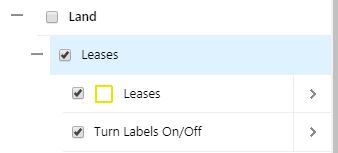
0
-

Hi Max,
I've confirmed this on my end- it looks like the effect is only activating right now for layers that are toggled, and not for folders (group layers in Essentials are technically converted to folders on the layer list). I've documented this as GVH-16776. It looks like something that would have to be fixed in a future release of the HTML5 viewer in order to work for folders or groups.
Thanks,
-Amanda0
Please sign in to leave a comment.
Comments
1 comment