Should Get Layer Property activity work with tables?

-
It does seem buggish or just a miss, and I think you're correct. the fact that the rest url adds "/tables/#" to the end of the url likely is what's breaking the GetLayerProperty activity.
I worked around it by creating a workflow to get property values set on tables. The workflow takes an input "JSONUrl" and "PropertyName" argument. This is the url to the Essentials rest endpoint, and the name of the property who's value you are after. In the workflow, I used a WebRequest activity and passed it the in-bound JSONUrl argument. This returns a byte array representing the JSON. I used an If activity to ensure the byte array has a length, then assigned the byte array into a string variable with this assignment statement: System.Text.Encoding.Default.GetString(wrJsonByteArray). Once it was converted to a string, then I used a GetJsonValue activity, passing in the string we just created, and a JSON Path to get to the property (this path includes the PropertyName argument passed into the workflow). The result I stored into an Out argument of the workflow. This way other workflows can call it, and the result is the value of the property you requested as a string.
0 -

Fellas,
I think you want to use the 'Get Layer Info By Property' if these are properties you are setting in the manager 'properties' tab.
The Get Layer Property<T> is an activity which is rarely used (never seen it used actually). It's for getting at the object model underneath the layers. For example, The property name must correspond to a public property of a layer and the type selected for this activity must match the data type of the property.
We use Get Layer Info By Property on the daily. Press f1 on the activity to see the return type.
-Kevin0 -
We see that Get Layer Info By Property is a way to get EssentialLayerInfo objects and we use it to get our list of layers we've "tagged" with a property. But now we need to set a different value on each table layer to know which field on the layer to look for values to show in a drop down list in a user form. So we added a Custom Property called "DistributionCircuitSource" that we use as the tag as well to find the layer. But we next need to grab the Value from the property, in this case is the field name we need to use for this table to grab the values for the drop down. The EssentialsLayerInfo.PropertyValue doesn't seem to work like the documentation says. It says it should return a Dictionary of property values but doesn't say if it's <String, Object>, <String, String> or what. We would expect it to be <String, String> where the Key is the property name, and Item is the property value as set in the Custom Properties dialog in REST Manager. What is the proper way to grab these custom property values in a workflow? 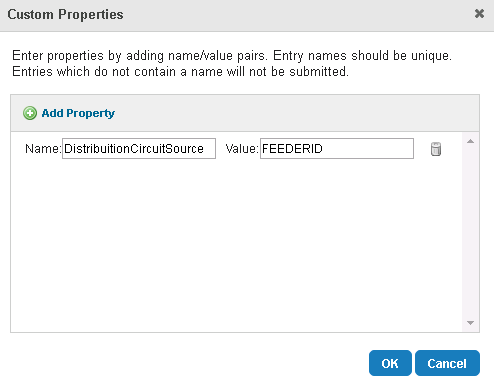 0
0 -
Also what's the proper way to access the value of properties on layers or table layers with multiple custom properties? It looks like the Get Layer Property <T> activity should do exactly this because it asks for the Property Name. 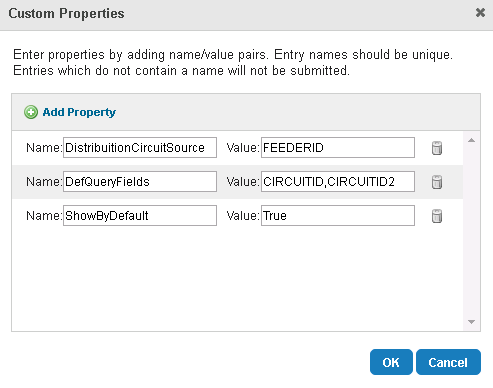 0
0 -
The best way to do that is to delimit them in one field. 0 -
Another hack I just thought of would be to use the Get LayerInfo By Property activity with the OTHER property we need instead of just that "tag" property. Then for each EssentialsLayerInfo just grab the .PropertyValue property to get the VALUE for that OTHER property we are interested in. Does that sound right? 0 -
Also l think the documentation needs to change on the EssentialsLayerInfo class. It says the PropertyValue property returns a Dictionary. I think this needs to change to return just a string of the value for the Property used to find that layer info object, or the "tag". 0
Please sign in to leave a comment.
Comments
7 comments