Word wrap problem HTML 2.9.1

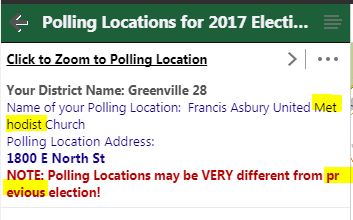
Why is this happening in my HTML5 viewer after upgrading to 2.9.1. I know it wasn't this way before. I see it in these different situations so far.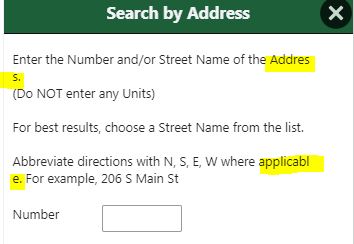
1) From a form in workflow:
2) Within a Feature Description:
Thanks,
Carmen
0
-

Is your viewer is publicly available, then let us know to check it for you?
I would investigate the GVH source using the Browser Developer Tool (F12 on GVH) to invetigate what the HTML5 content really on the Browser to see.
1. Feature Description: which is set on the Essential Manager - So check what the content of the source configuration to what token you are cofigured.
2. Is Search by Address used Worfklow Form? Check if there is any html tag is inserted. Another try is to increate the width of the WF - DisplayForm - Form - Max Width? Did you use non-default value which is 1000.
Moon-10 -
Munhwan,
Sorry for the delayed reply - I was at the Conference in DC!
One application:
https://gis.greenvillesc.gov/Html5Viewer/Index.html?viewer=AddressSearch
(use the Search by Address and Create Report on the Home Panel. First screen after that shows the words being split in the middle)
Another application:
https://gis.greenvillesc.gov/Html5Viewer/index.html?viewer=FindYourElectedOfficials
Use the Find Districts by Clicking on Map and look at the results for "Polling Locations..." and you will see the issue there as well. Any results with long text strings will cause the issue.
When I use developer tools to inspect the items, I am seeing this (2 examples):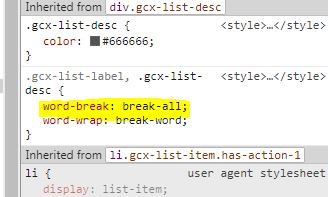
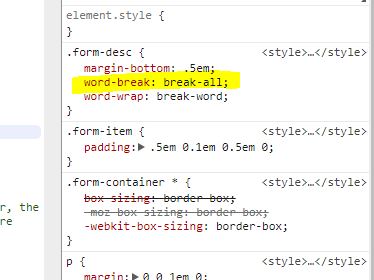
If I remove "word break: break all", the text will appear as it did before the upgrade. Words are not broken.
Thanks,
Carmen0 -
Hi Carmen,
This is a known bug. As a workaround, add the following to the custom css file:
.feature-description { word-break: keep-all; }0 -
Thank you for the workaround! I haven't had time to try to find a workaround, so this is very helpful. I can make this change quickly right now.
CArmen0 -
Ali,
This worked for the feature description. do you happen to know what it would be for the workflow form?0 -
Nevermind....
I used this:
.form-desc {
word-break: keep-all;
}
I was hoping it would work if I added these lines to the custom.css in the inetpub\wwwroot\HtmlViewer location of custom.css. But that didn't work. It would only work if I editing Custom desktop.css in the Site's VirtualDirectory\Resources\Styles\Custom folder for the HTML Viewer.
Is this what you meant? If so, then I guess I will have to go change this for every site I have????
Thanks,
carmen0
Please sign in to leave a comment.
Comments
6 comments