SearchParcelsID Workflow Sample

Hi,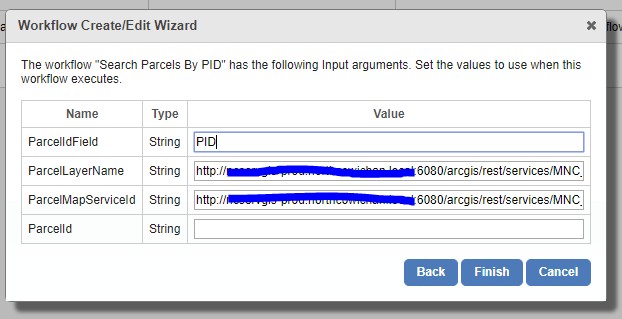
I am having trouble with something basic. I have added the out of the box workflow sample SearchParcelsID.xaml to my site and created a button for it. The button is greyed out in my html viewer, and I receive an 'Object reference not set to an instance of an object' in the workflow simulator when it reaches 'Query Parcel Layer' in the flowchart. I am assuming I only need to set arguments for the GetMapServiceInfo activity to get this to work. When testing via geocortex I do not hard code any arguments in the actual workflow, but in the geocortex add workflow wizard i set the variablesarguments as per the first image attatched. I have tried many permutiations for the ParcelLayerName and ParcelMapServiceId arguments using full map service url (matching published service), map service id, full map service layer url, layer name only, and layer id only.
eg
ParcelIdField: appropriate and case sensitive
ParcelID: Left Blank
ParcelMapServiceId:
http://XXX.local:6080/arcgis/rest/services/MNC_INTERNAL/MapServer
or
11
or
MNC_INTERNAL
ParcelLayerName:
http://XXX.local:6080/arcgis/rest/services/MNC_INTERNAL/MapServer?/1234
or
1234
or
Parcels
So my question is how should I populate the arguments mentioned above, and are they the only arguments i need to pupulate. Perhaps one of my permutations was infact correct and i am infact missing something else?
Thank you in advance for any help!
Don
0
-

ParcelMapServiceId: 11
ParcelLayerName: Parcels0 -

If you have not done so already, add the LA_County site from the "Sample Sites" folder to your GE manager. You will learn much from this site on how to configure things. Open the LA_County site for editing, then open that site's REST endpoint. 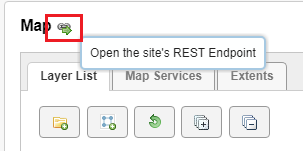
This is how you decifer the inputs for workflows in general.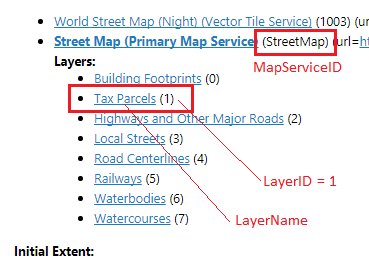
...that coincide with the "Search Parcels By ID" workflow shown below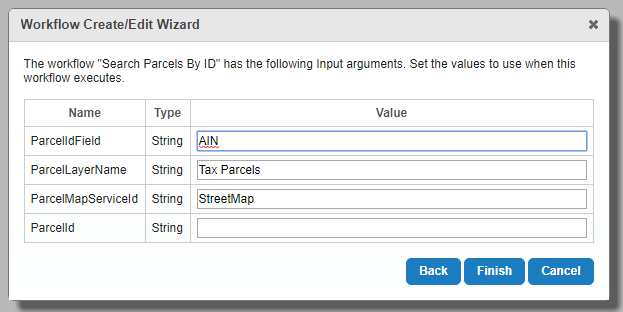
Rick0 -
Nico, thank you. Trouble shooting will be much easier knowing I have filed that out properly.
Rick, thanks for the tips about using the LA County sample site, I just loaded it up and I can see the configs, as well as the work flow sample site. Thank you for the descriptive attachments. Good to see where the information comes from.
Am I able to use the LayerID for the PArcelLayerName, and does that require any configuration to the workflow?
I see I should have split this into two questions, first asking about filling out the arguments, and then about the errors I am receiving which may be unrelated.... using the configurations you both suggested I still have a greyed out button, and receive the same error for object reference not set in the query parcel layer portion of the work flow. Any thoughts on what else might be causing this? Otherwise I will start a new thread.
Thanks!
Don0 -
No you cannot use the layer id for the layer name, then you should change your workflow. 0 -
Ok thanks Nico
I have the workflow arguments set as mentioned above.... Any thoughts on why the workflow might still be greyed out? I've tested with some other layers now too with the same result.
Thanks again0 -
The Workflow ID in the configuration of you button is not correct?
If you use a Mapservice ID from the site, in most cases you cannot test your workflow in the simulator,0 -
For all of those who have made workflow buttons before this is obvious.... but for those that havnt here it is!
The problem with the greyed out button had to do with my putting the workflow ID in the Command text box of the button setup.
The command text box should contain: RunWorkflowById
and the Parameter text box should contain the workflow ID
Thanks nico and Richard, getting the argument parameters correct was still a pivitol!0
Please sign in to leave a comment.
Comments
7 comments