WMS in GE 4.7 for html viewer

Hi everyone
we have had a long running issue with Aerial photography - we have been using 5 year old aerial imagery as we cannot access aerial photography as a WMS layer. When I try to add WMS to our map service we cannot connect to the service.
We tried to get the GE manager to edit the proxy.config however it still doesn't work for us. The feedback we got is that this person can add the imagery to GE 4.9 but not our version - 4.7. They will not let us upgrade to 4.9.
However, before we moved to a new server we were able to add WMS in GE version 4.3 which is what we had, so I am unsure as to why it doesn't work in 4.7
We are using silverlight and html viewer but we cannot get it to work in either and our users have been coming to us for months requesting updated aerial imagery
This is our imagery source http://images.land.vic.gov.au/erdas-iws/ogc
0
-
I should add, I was able to add a public WMS to our silverlight viewer e.g as below
http://sampleserver1.arcgisonline.com/ArcGIS/services/Specialty/ESRI_StatesCitiesRivers_USA/MapServer/WMSServer?version=1.3.0&request=GetCapabilities&service=WMS
but I cannot add a secure WMS layer (our aerial imagery)0 -
Silvia,
We currently have a secured WMS service in our 4.7 sites...
The HTML5 site is configured a little differently to the Silverlight site, and I've provided the site.xml snippet below for comparison with yours...
The proxy.config definition is the same across both sites however..
<serverItem url="http://reg.bom.gov.au/cgi-bin/reg/ws/gis/users/bomw0027/wxs?" matchAll="true" username="xxxx" password="xxxx"></serverItem>
site.xml reference...
<MapService ConnectionString="url=http://reg.bom.gov.au/cgi-bin/reg/ws/gis/users/bomw0027/wxs?;proxy=https://emap2.ffm.vic.gov.au/proxy.ashx;layerMask=Bureau of Meteorology OGC Web Services/Radar/Australia/Radar Rain Rate | Australia | raster,Bureau of Meteorology OGC Web Services/Radar/Australia/Radar Thunderstorm Tracking | Australia" DefaultAllowSymbolization="true" DisplayName="Radar Rain Rate | Australia | raster" Function="Operational" ID="2" ImpersonateWithActor="false" IncludeCopyright="false" IncludeInLayerList="true" InstantSearch="false" InstantSearchAttachments="false" IsExpanded="true" Opacity="1" OverrideTemporalSettings="false" PasswordEncrypted="false" ProviderInvariantName="Geocortex.Gis.Services.Wms" SearchNonTextFields="false" SupportedImageHeight="0" SupportedImageWidth="0" UseHttpAuthentication="false" Visible="true">
<CachedServiceData/>
<Layers>
<Layer CanCopyFeature="false" DisplayName="Radar Rain Rate | Australia | raster" Identifiable="false" IncludeInLayerList="true" IncludeInLegend="true" IsCatalogLayer="false" IsExpanded="true" LayerListID="1327" Name="Radar Rain Rate | Australia | raster" NativeID="IDR00010" Queryable="true" Searchable="false" ShowFeatureHyperlinks="ShowAll" ShowLabels="true" ShowMapTips="false" Snappable="true" SnappingEnabled="false" UnconfiguredFieldsCanSymbolizeClassBreaks="true" UnconfiguredFieldsCanSymbolizeUniqueValue="true" UnconfiguredFieldsSearchable="true" UnconfiguredFieldsVisible="true" UnconfiguredRelationshipsVisible="true" Visible="true">
<ThemeSettings>
<ThemeSetting ID="1" Visible="true"/>
</ThemeSettings>
</Layer>
<Layer CanCopyFeature="true" DisplayName="Radar Thunderstorm Tracking | Australia" Identifiable="false" IncludeInLayerList="true" IncludeInLegend="true" IsCatalogLayer="false" IsExpanded="true" LayerListID="1328" Name="Radar Thunderstorm Tracking | Australia" NativeID="IDR00011" Queryable="true" Searchable="false" ShowFeatureHyperlinks="ShowAll" ShowLabels="true" ShowMapTips="false" Snappable="true" SnappingEnabled="false" UnconfiguredFieldsCanSymbolizeClassBreaks="true" UnconfiguredFieldsCanSymbolizeUniqueValue="true" UnconfiguredFieldsSearchable="true" UnconfiguredFieldsVisible="true" UnconfiguredRelationshipsVisible="true" Visible="true">
<ThemeSettings>
<ThemeSetting ID="1" Visible="true"/>
</ThemeSettings>
</Layer>
</Layers>
</MapService>
hope it helps :)0 -
hi Gareth
We have already changed the proxy.config file with the WMS server and our username/pw
but it still won't connect in GE manager - If I try to add it as a connection I get the below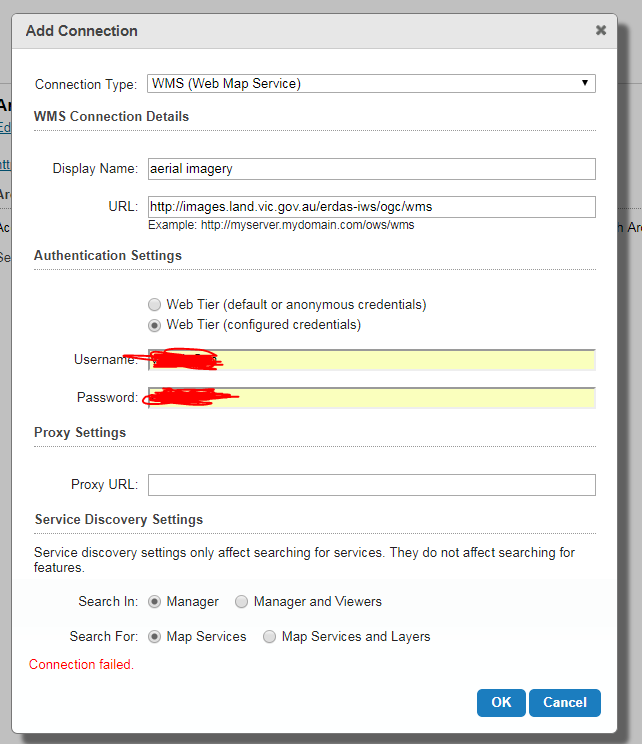 0
0 -

Hi Sylvia
I havent got an answer for you, expect for the fact that I am able to connect to our secured image sevice (http://ourimageserver.env.sa.gov.au/erdas-iws/ogc/wms/) in 4.8 and 4.9 without any issue.
I didn't need to add anything to the proxy file
Therefore your problem may not be at the GXE end??0 -

@Gareth - What proxy are you using that supports authentication? I have a secured WMS service and I've been looking for something like this. Any details are greatly appreciated. 0 -
@Kevin,
my connection parameters are below, and I have the proxy.config file located in my GVH install directory on the geocortex server with the severitem as below..
<serverItem url="http://reg.bom.gov.au/cgi-bin/reg/ws/gis/users/bomw0027/wxs?" matchAll="true" username="xxxx" password="xxxx"></serverItem>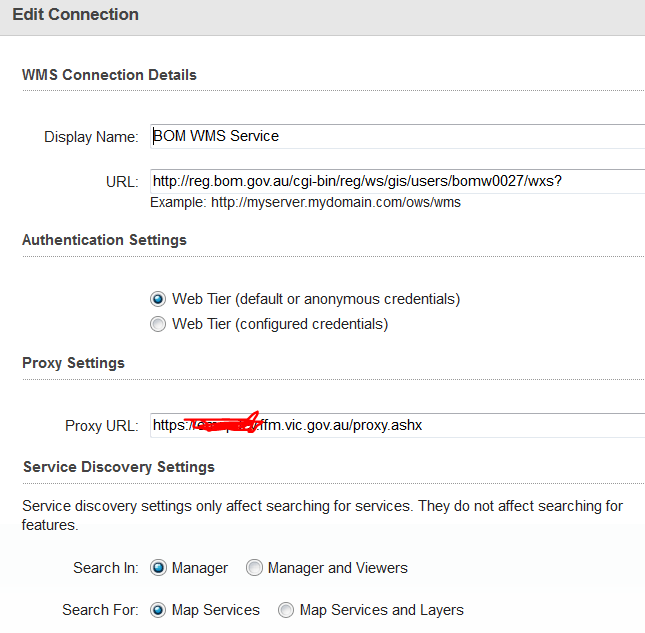 0
0 -
@Gareth - That is not the proxy which is included with GVH is it? I'm just wondering if/how you modified it to support username and password.
Thx
-Kev0 -
Kev,
You're correct. That proxy.ashx file is an older version that I suspect is a legacy of the GVS at soem stage. It's fairly old and I suspect has been updated by some contract programmers to cater for usernames as there is a GetUser() function in this one that the GVH-packaged version does not have.
Apologies for the bum steer.
I'll try to get the contents of this file to you...
GF0 -
@Gareth if it would be possible I would be very interested in this as well. 0 -
@Ludwin,
Just PM me at gareth.finney@delwp.vic.gov.au
I cant fit the file on here...0 -
I cannot get even the public WMS to connect. When I check fiddler it says "proxy authentication required"
is a proxy file url required? does the wms url need to be added even for public WMS layers? We never had this issue on our old server, we could add any WMS and if it required a password the password box would pop up.
I suspect we are being blocked by a firewall or some other security access, as fiddler is showing the generic message I receive from a website that is breach of our internal security access.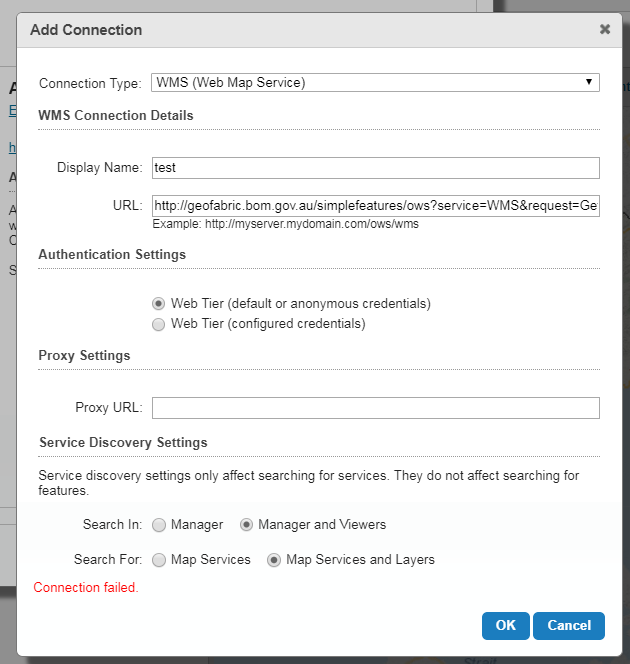 0
0
Please sign in to leave a comment.
Comments
11 comments