Now available: Geocortex Essentials 4.9.1 and Geocortex Viewer for HTML5 2.10.1

This release addresses a number of issues that have affected customers, please check the release notes for full details. The following issues were addressed in this release:
Geocortex Essentials 4.9.1
- GE-8496 Sequence error when reordering and republishing group layers
- GE-9211 Layer list is cleared when adding a layer from a service that is out of sync
- GE-9241 Missing border on webmap secure content tooltip
- GE-9282 Unable to add specific feature layers due to invalid cast
Core
- CORE-2736 Provide ability to select a certificate for Core when enabling SSL on a cluster
- CORE-2750 Shared Secret is deleted when upgrading to Core 3.1.4
- CORE-2518 No results for Instant Search when map in RD_New with Proj.4 library
- CORE-2725 Back Up Tool Fails to restore if folder is missing
- CORE-2741 Update JRE version
Geocortex Viewer for HTML5 2.10.1
- GVH-8803 Smart labeling causes illegible labels
- GVH-14070 'SelectFeatures' task in workflow switches from the workflow view to the results view
- GVH-14768 Action menu styling renders incorrectly on IE11
- GVH-15241 New Feature or Related Record Disappears Until Viewer Extent Change or Reloaded in Safari iOS
- GVH-15292 Page title incorrectly reads "Results List Collection Actions" for several different context menus
- GVH-15539 Border tab indicator needs increased contrast
- GVH-16026 Translating user privileges in Collaboration results in overlapping text
- GVH-16219 Revert to non-grouped results cannot save "Look and feel" changes
- GVH-16314 Simple Query Builder, Simple Filter Builder and Scale box forms have no submit buttons
- GVH-16316 Allow administrator to configure whether highlights appear on map images in reports
- GVH-16366 Datalink values of 0 do not show in the results panel of the viewer
- GVH-16371 OpenStreetMap link doesn't conform to WCAG Guidelines
- GVH-16415 Cannot change library in drawing styles
- GVH-16426 Simple Query Builder has non-unique IDs
- GVH-16427 Date Picker has non-unique IDs
- GVH-16456 First measurement erased on map isn't cleared from Results Table
- GVH-16477 Dragging Bottom Panel view up pushes map widgets above Toolbar
- GVH-16483 Views are overlapped when clicking on add attachment while editing
- GVH-16487 File picker in collaboration does not have description
- GVH-16488 Feature Set Actions can appear outside of the screen when Results Table has many tabs
- GVH-16490 Query Builder displays dropdown menus for field and operator for layers with no visible fields
- GVH-16499 Saved Project Results Table Layer Buttons Missing
- GVH-16509 Union of overlapping features does not work in iOS tablet
- GVH-16515 Cannot export markup to shapefile from saved project
- GVH-16541 Clustering/Heat maps opacity not respected when exported/printed
- GVH-16548 Cut/Union Support for Related Features. Warn users when performing actions that alter features relationships.
- GVH-16592 Highlight cannot be removed when the map tip is open, and a newly created feature is cut or edited.
- GVH-16623 Cut does not work on Polylines
- GVH-16624 Union does not work on Polylines
- GVH-16625 Display Results Picker no longer respects Feature Description and Show Icons configuration
- GVH-16634 Field permissions are not respected on date fields
- GVH-16658 Using a Select Features or Show Results (in Workflow 5) without specifying a Layer Name causes Results Table to appear without tab name
- GVH-16694 Do Not Highlight Any Features is broken when using the Table View
- GVH-16696 Time slider does not show correctly in Firefox 57
- GVH-16714 Insufficient contrast in Footer Menu View
- GVH-16746 Extra request for file that does not exist
- GVH-16782 Double slash in ESRI request results in 404
-
Hi Wayne,
I can't access the release notes you linked.
Our local vendor provides our access to new versions of the software and your link seems to be tied to the downloads page, which is restricted to us and provides the following message:
"You do not currently have download permissions. Please contact your Account Manager for more information."
Are you able to make this page available as has been previously, as a forum post or similar?
Why not post the release notes under your original notice, above? This would save users from having to even navigate to a second location.0 -
Hello Lindsay,
I'm sorry that you aren't able to access that resource! We can certainly post it here for your reference; however your reseller should also provide you with the full release notes along with the software. The release notes contain important items for your reference, that aren't necessarily posted in these types of announcements.
We will update the post shortly.
Best wishes,
Pandora0 -
Hi Wayne,
I gave the Quickstart viewer package for custom development that came with the other Geocortex Viewer for HTML5 2.10.0 contents a try, but I ran into a problem.
My machine has Node 6.10.2 and NPM is working, and I followed the instructions to run the "npm install" and "npm run build" commands in my IDE.
However, when I ran "npm run build", my solution failed to build. I get multiple instances of "error TS2307: Cannot find module 'react'" and "error TS2503: Cannot find namespace 'JSX'"
Can Latitude please patch the Quickstart package to ensure users can compile custom modules on the 2.10.0 platform?0 -
Hello David,
We'll take a look at this and get back to you shortly!
Happy holiday, Pandora0 -
Hi David,
The 2.10.1 release contains an updated QuickStart that should resolve the JSX namespace issue you see. If you download the latest viewer package it should build properly.
If you wish to update your 2.10.0 quick start, you can update the devDependencies in package.json as follows:"devDependencies": { "typescript": "~2.3.4", "@types/react-dom": "^15.5.5", "tslint": "^5.4.2", "eslint": "^3.19.0" },There are also instructions at the bottom of this Community post (https://support.geocortex.com/essentialsGSCForum?id=90660000000GuB0AAK) that should work.
Regards,
-Malcolm0 -
Hi Wayne,
I'm new to Geocortex and have never upgraded before. Are there instructions on how to upgrade my existing Geocortex Essentials and Viewer to this latest version and are there any considerations I need to make before upgrading, such as do I need a new license file?
Thank you,
Lucas.0 -
Hi Lucas,
You only need to license a server once, if it was previously licensed, you will not need to do it again.
For upgrading, I would recommend either following the online documentation -
https://docs.geocortex.com/essentials/latest/install-help/Default.htm#ge/install/upgrading.htm#Geocortex_Essentials_Upgrading%3FTocPath%3DGeocortex%2520Essentials%2520Upgrading%7C_____0
or submitting a support ticket for upgrade assistance. A typical upgrade would take an hour or less and you would learn the upgrade process to allow you to complete it yourself in the future.
Regards,
Wayne0 -
Thank you Wayne. I wasn't aware of the online documentation.
Lucas0 -

Something we've run into with 2.10 is the workflow display results picker. We have serveral sites that have addition links within each picker list item. This worked in 2.9 as the main item elements in "gcx-list-item" were divs. In 2.10 they are now buttons. We used the description format field to include a div with the custom link commands. This no longer works.
The html spec does not allow interactive elements within the button tag. http://w3c.github.io/html/sec-forms.html#elementdef-button
[Button] Content model:
Phrasing content, but there must be no interactive content descendant.
The change from divs to buttons in the display results picker list in 2.10 makes links within the description field unusable in IE 11 and Firefox 59. The links do work in Chrome and Edge.
There is a comment related to the list item template that mentions "DisplayResultPickerTemplateComplexity". Is there a template that would revert back to divs instead of buttons?
display-result-picker
0 -
To resolve the issue of links in the descriptions of some of our workflow picker results lists a custom module is used to move ".display-result-picker .gcx-list-button .gcx-list-desc" outside of the button element. CSS in the module is used to style the description with links. Couldn't find a simple way to change the markup for "ComplexButtonResultTemplateView".
_onSiteInitialized(site) {

        this.app.eventRegistry.event("ViewActivatedEvent").subscribe(this, (args) => {
            this._renderItems(args);
        });
    }

 _renderItems(args)
    {
        if (args.markupResource !== "Mapping/infrastructure/ui/components/FeatureSelector/FeatureSelectorView.html")
            return;

        $(this.targetClass).each(function () {
            var pElement = $(this).parent();
            var mElement = $(this).find(".gcx-list-desc");
            pElement.append(mElement);
        });
    }
0 -
I have installed 4.9 and the HTML5 2.10.1 Viewer (upgrade from 4.6.2 and Viewer 2.7), and added a new blank site. When I add a 2.10.1 viewer to that site, the new Highlight options are not available under Look and Feel. I have reset IIS, I have rebooted the machine. The Post Install config shows the old 2.7 viewer and the new 2.10.1 viewer installed, and I show the option to create a viewer with the 2.10.1 when I make a new one. So, why are the new viewer options not showing up for me? 0 -
This is a picture of my Highlight options when I make a new 2.10.1 viewer: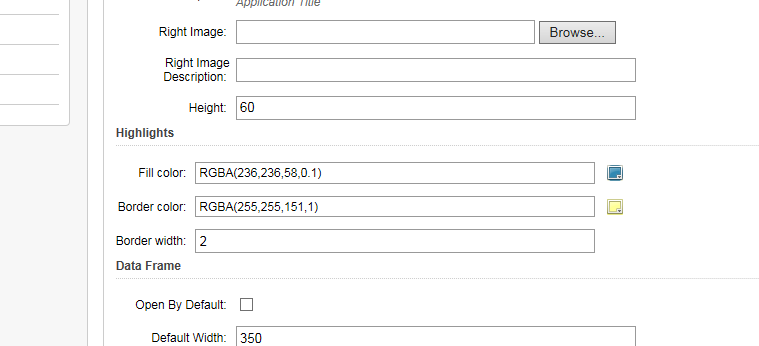 0
0 -
Hi Tami,
That would be part of the "management pack". I would load the Post Installer, go to the "Configure Viewer Templates" page, select the row of the HTML5 viewer and click the "Deploy Management Pack" option.
It sounds like management pack did not get updated. If that fails, feel free to open a support ticket.
Regards,
Wayne Richard
Latitude Geographics Group Ltd.
Head Office: 300 – 1117 Wharf Street Victoria, BC Canada V8W 1T7
Tel: (250) 381-8130 | Fax: (250) 381-8132 | wrichard@latitudegeo.com
Developers of Geocortex web-based mapping software | www.geocortex.com
An Esri Platinum Business Partner0
Please sign in to leave a comment.
Comments
13 comments