Selecting Features through workflow

Hi,
I'm trying to create a selection through a workflow. The points seem to get selected in the map...they show up in the left side 'Details' pane, and also get zoomed to in the map. But, they do not show as selected on the map (ie. they are not highlighted). I have checked everything I can think to check, but no luck.
Some screenshots below show the details of the Workflow element, the Layer details, and the REST. Can anyone see where I am going wrong??
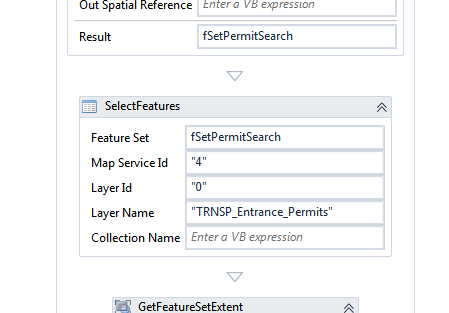
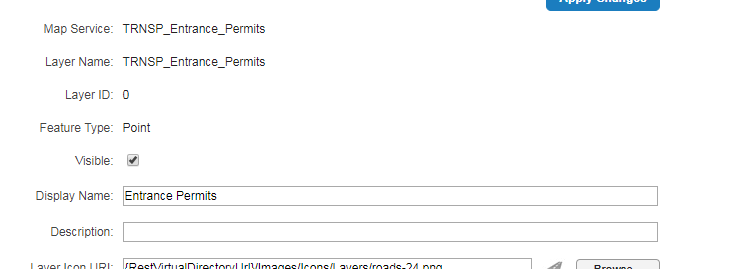
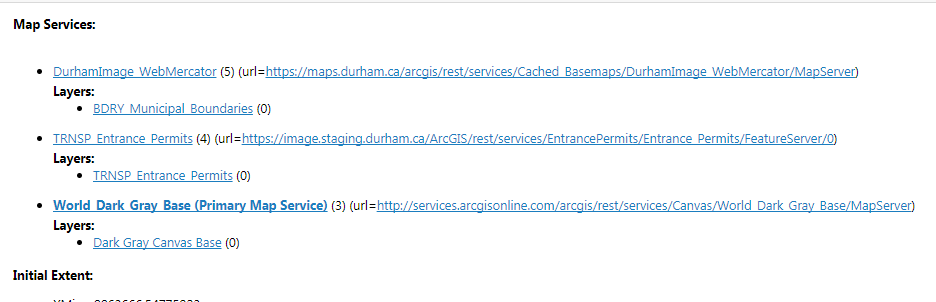
-

You don't need layer name and layer ID. I would try removing layer name. Not sure if that needs to match the service layer name or the site layer name (the display name) anyway. 0 -

I can think of a couple of possible points of issue for you. My first guess would be that you are expecting all of the features to be highlighted by the selection process when your viewer isn't set up to do so, which you can test by using the select tool or checking the "look and feel" section of the viewer config in the rest manager. The next thing I would try would be to simply highlight the featureset (fSetPermitSearch) using the external command activity, which should at least show everything in the viewer. Also make sure that you're not clearing the highlights further down your workflow.
Also I'd like to clarify what Dan said... you need layer name OR id, just not both; the values need to match the layer id and name in the viewer which barring anything unusual means that you can use them as you have been.0 -
Hi Dan, Zack,
Seems like regardless of whether I have the Layer Name and/or Layer ID set, the selection still does not show.
I am relatively new to Geocortex and can't seem to find a 'Select Tool', but when using the 'Identify Tool' the selection seems to show up on the map.
 I also checked the "Look and Feel" section of the viewer, but all seems to be set correctly:
Here is the entire workflow. It's pretty simple and based on one of the workflows I completed in their 'Developing Workflows' course. It seems to work fine on their sample data, but not using my own data. Could there be something on the feature service that needs to set differently??
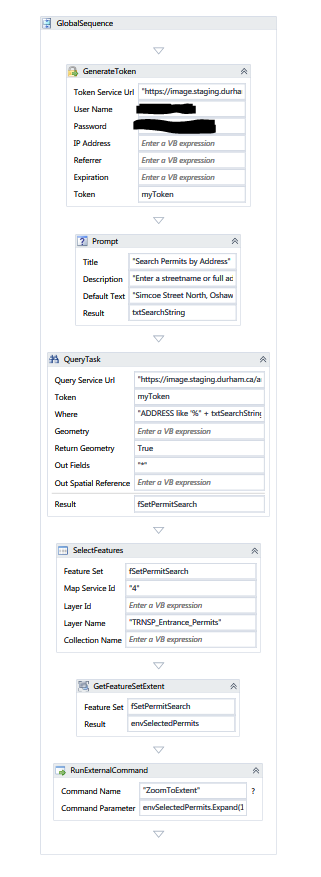 0
0 -

To highlight your results, you can add a RunExternalCommand, command name "HighlightEsriFeatureSet" with fSetPermitSearch as command parameter 0 -
Hi,
Yes, I forgot to mention I did try that as well, but it makes no difference. Still, nothing shows as highlighted in my map after adding the RunExternalCommand with fSetPermitSearch as the command parameter.0 -
I would suspect that the features you are querying don't have a geometry, but since you are able to zoom to the results, that shouldn't be the case. Have you tried to assign an Out Spatial Reference in the query task? You can fetch the spatial reference of your map by using the GetMapInfo activity. 0 -
Jostein,
You're a genius! That seems to have solved it. Adding the Out Spatial Reference is now revealing the selected features.
Thanks!0 -
Glad to help :-) 0 -

I am having asimilar issue here. how do i get to add the 'Out Spatial Reference' for thats the only oprion from this discussion that i am yet to try out.
Please I would appreciate your suggestions.
Thanks0 -

Set the Out Spatial Rerence parameter of the Query task to something like below, use the WKID of your spatial reference. New ESRI.ArcGIS.Client.Geometry.SpatialReference(4326)0 -

This fixed my issue perfectly, thanks Jostein! 0
Please sign in to leave a comment.
Comments
11 comments