How do I zoom to a feature after running the display form - query layer? Also how do I highlight it?

-

Hello Claire,
You can use the feature's geometry as an input to the Set Map Extent activity to zoom to the feature. To highlight the feature, you can use a Run Command with a AddTemporaryMarkupGeometry command, with the feature's geometry as the input to the Command Parameter.
Alternatively, you can use the Item Picker Form Element in a Display Form to display the results of a query. If the geometry is returned by the query and the layer exists on your map, as you are selecting an item within the picker, the geometry will highlight as you select items. Once the item is selected, then you could zoom to the feature, as mentioned above.
Hope this helps.
Thanks, Stefan
0 -
Stefan,
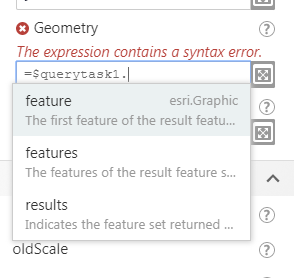
This does not appear to work. As the query layer does not have geometry as an option. I added the Get feature set geometry before this map extent but that did not work either. Also the Run Command in Workflow 5 does not give you all the listings like in Workflow 4. Will this change? How would I know what to type in for this command otherwise?
 0
0 -
The geometry is a property of the selected output type. For example:
Feature: =$query1.feature.geometry
Features: =$query1.features[0].geometry
Results: =$query1.results.features[0].geometry
In the Query Layer, ensure that you have configured 'Return Geometry' to be true.
For the list of commands, could you please add this to the Community's Ideas section, if not already present? For now, you can refer to the list of commands in the WF4 Designer. We have an exhaustive listing of commands in GVH here: http://gedemo.geocortex.com/samplesviewer/#commands but not all of these commands can be run from a workflow.
Thanks, Stefan
0 -
Stefan,
Ok made the changes but still getting errors. Here is the workflow location:
https://nebraska.maps.arcgis.com/home/item.html?id=3f5ae9948d1647fd9f3596315b4361c6
Thanks,
Claire
0 -
Hi Claire,
I don't have access to your workflow since I'm not a member of your organization. If you share the workflow publicly, then I will be able to access it.
If there is private information in this workflow, feel free to send it to me in an email: sschweigert@latitudegeo.com
Thanks, Stefan
0 -
The issue was that I needed a query task tool outside of the display form to then Set Map extent.
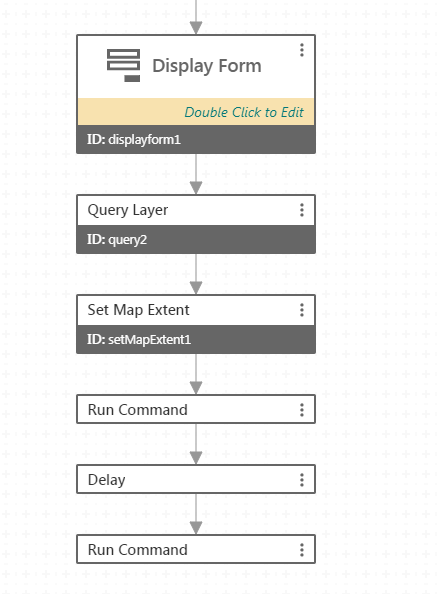
Query Layer task:
Url of my map service layer
Where: =(field_name) = '" +
Return Geometry: true
Out fields: *
Run command:
Command Name: AddTemporaryMarkupGeometry
Command Parameter: =$query2.features[0].geometry
0
Please sign in to leave a comment.
Comments
6 comments