Identify as default MapOnclickBehavior

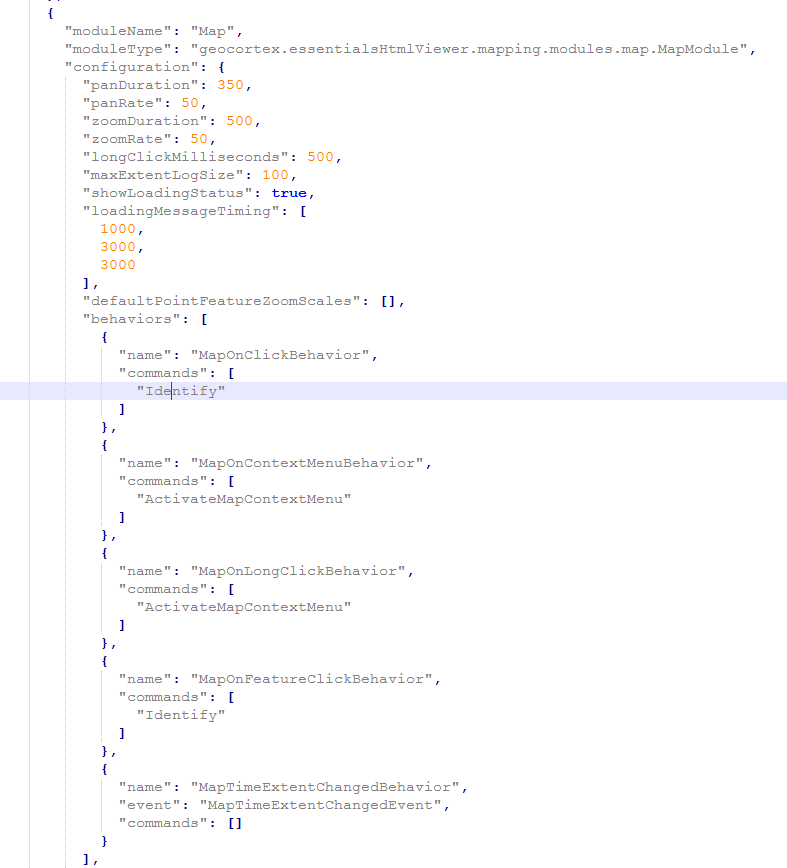
Notice that I also made the same change for the MapOnFeatureClickBehavior, but that also did nothing.
Any tips?
Thanks beforehand!
-
BTW,
I am using GTX 4.8 with GVH 2.90 -
Also, I am wondering if can have more than one command under "MapOnClickBehavior."(?) I assume so, but am wondering if I can combine "InvokeMapTip" AND "Identify" as two commands under "MapOnClickBehavior" and even "MapOnFeatureClickBehavior." 0 -
Hi Michael,
I don't believe this behaviour is possible via configuration of the json. This is because the Identify command requires a command parameter of Geometry type which you can not configure when configuring Map Behaviors.
There is a note about this in the Html5 Viewer documentation here: https://docs.geocortex.com/essentials/gvh/2.10/admin-help/Default.htm#gvh/admin/modules/map-module.htm
"You can add commands to a behavior if the command does not require a parameter, or if the type of the command's parameter matches the parameter of an existing command or the event associated with the behavior. To determine if the parameters are compatible, see the Geocortex SDK for HTML5. Note that private commands and events are not documented."
One thing you could consider as a work-around is to make the Point Identify tool "sticky" so it stays active after performing a successful identify, as well as invoking the identifty tool on load through a start-up workflow. However, depending on the use cases accomplished by your viewer this may not work, considering activating another tool would de-activate the identify tool.Let me know if you have any other questions about this behaviour or any others
Cory Purnell
Latitude Geographics Quality Assurance Team0
Please sign in to leave a comment.
Comments
3 comments