Assign a value to a standalone variable

A very basic question: which activity should I use to assign a new value to a variable that I've created with Create Value.
In my case, I need a global integer counter that I can increment within if statements within multiple form events. Equivalent to:
var a = 0
a = a+1
Thank you,
Helen
-
I'm not sure how to apply the help description to this problem:
Pass Values Out of an Event Subworkflow: You can use Create Value or Evaluate Expression activities to pass values out of an event subworkflow. Put one Create Value (or Evaluate Expression) activity outside the event's Display Form activity and another Create Value activity inside the event. Use the inside activity to assign the values to the outside activity. For example, set the expression input of the Create Value activity in the event to =$outside.result = $inside.result
I created the value outsideA and assigned it 0. Within the event subworkflow I would like to increment $outsideA.result
I created insideA with input =$outsideA.result + 1
How do I assign $insideA.result to $outsideA.result?
=$insideA.result=$outdideA.result did not work
=$outside.result = $inside.result
0 -
Figured it out - in the event expression:
=$outsideA++
A few examples with the double assignment =$...= in an expression would still be helpful. Which javascript construct is =$...= internally using?
0 -
Another way you can assign values (numbers, strings, or otherwise) is using the Set Property activity.
Activities create objects (named using their ID) that have properties for each of the activity's listed outputs. Because the outputs are properties, you can transfer this info into the Set Property activity. For example, if you're using this Create Value activity:
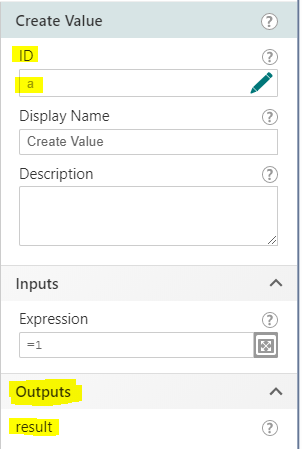
configure this Set Property activity:
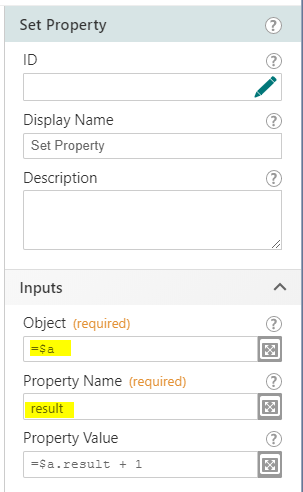
Hope that helps!
-Amanda
0
Please sign in to leave a comment.
Comments
3 comments