Update Graphics Layer Coordinate System

I ran into a snafu with one of my workflows that uses Update Graphics Layer to select and highlight parcels. In one of my apps, the workflow isn't working, and in that particular app, my parcel layer and basemaps are using different coordinate systems.
When I debugged the Update Graphics Layer step, I can see that the activity is reading my parcel's coordinate system in order to create the graphic.:
{"geometryType":"esriGeometryPolygon","spatialReference":{"wkt":"PROJCS[\"HENNEPIN COUNTY\",GEOGCS[\"GCS_User_Defined\",DATUM[\"D_User_Defined\",SPHEROID[\"User_Defined_Spheroid\",...
But since the viewer as a whole is using the coordinate system of my basemaps, it's not showing the graphic. And just to add a fun twist to it, if I use the Print Map tool, you can see the graphic that was created by workflow. So it's just the map view in the Viewer itself that isn't displaying the newly created graphic.
Any idea what the heck is going on? This is in GE 4.6 and the GVH 2.7.
0
-

Wait, you're using the update graphics activity instead of the highlight command? I am curious as to why! The custom renderer?
My guess is that you are getting the geometries from the featureset, queried previously from your arcgis service. That featureset will by default be returned in the spatial reference of the service (your county) but there is a parameter to ge the output reference of your choosing (with some restrictions I understand). You can also use the reproject activity to turn your featureset into something workable.0 -
Yes, I'm using update graphics so I can use the custom renderer as well as create different graphics. Here's an example where I'm using a blue fill for selected parcels and a red outline for a user-specified buffer distance. 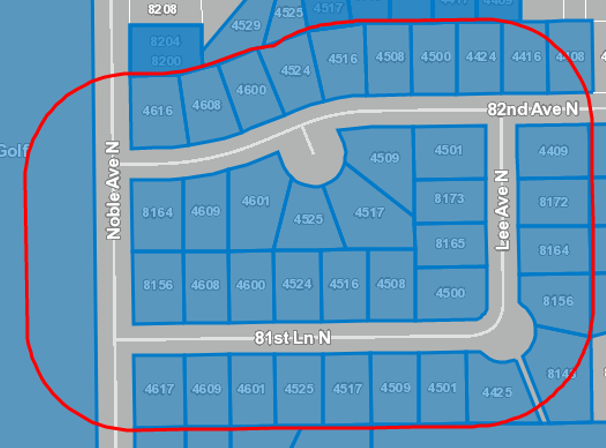
I'm also using update graphics because the mailing labels workflow that uses the activities also gives the user the option to add or remove parcels from the select, so I can run update graphics multiple times to rehighlight the parcels they selected. It also rehighlights the parcels one last time when they export the labels (in case they chose to exclude commercial, vacant, or other properties).
Ah, I'd forgotten about the Out Spatial Reference argument on Query Task. Is that what you're referring to? I haven't use it before, so what do I need to provide (WKID, WKT, something else)?0 -
I think that there' a spatial reference class, so either an object of that class or "New Esri.ArcGis.Client.Geometry.SpatialReference(wkid)" 0 -
Looks like setting the Out Spatial Reference on the Query Task that makes the feature set for my Update Graphics Layer did the trick! (Phew, that was a mouthful.)
Thanks for the tip, Zack!0 -
Just returning the favor! 0
Please sign in to leave a comment.
Comments
5 comments