How to keep Display Form open after submit?

I would like to keep the Display Form open after submit so that I can show progress and an loader images status gif. But the form closes after submit. Is there any way to keep it open and close it only after the workflow ends or when I tell it to close?
-

Hello Carlos,
Yes, the footer (Button Bar) has a submit event that can be configured to include handling logic, or simply a Delay to hold off closing the form.
Thanks, Stefan
0 -
So as long as all my workflow logic is in that event it won't close?
0 -
The form will remain in an open state that cannot be interacted with until the last activity finishes in that event.
0 -
That's the best WF5 trick learnt today🙂 thanks Stefan and Carlos.
0 -

hi Stefan,
Is it possible to share the submit-foorter configuration here please?
I have a Display Form that would like it to stay open after the user has clicked the Submit button and the results has shown.
Thank you
Artiman0 -
Hi Artiman,
The specific logic will depend on your use case but here's a screenshot of the area where this is set.

Thanks, Stefan
0 -
Hi Stefan,
Thanks for your response.
I have not been able to implement your solution. In short I did the following (as per your advice) in my VertiGIS Workflow: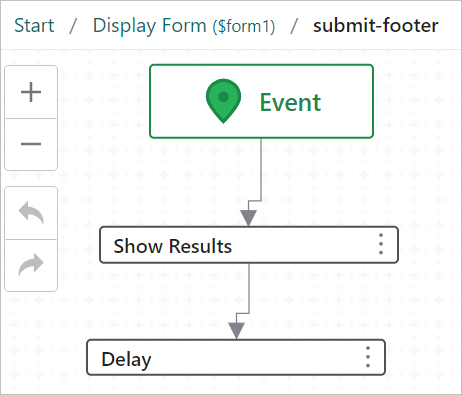
However, when I run it in VertiGIS Studio Web, it does not work.
I noticed in the documentation centre that Delay is compatible with Geocortex Viewer HTML5
However, we are using VertiGIS Studio Web.
Do you think that would be the reason why I have not been able to make it work?Thanks,
Artiman0
Please sign in to leave a comment.
Comments
7 comments