How to hide attachments from a service

I have a service that has attachments enabled. We need to keep them enabled however hide them in our site. Is there anyway to acheive this?
0
-

Hi Ali,
Usually if you go into Geocortex Essentials Manager, edit the Map Service configuration, and head to Fields you can solve the problem there.
Use the Add/Remove Fields option to change the default behavior that shows everything.
Exclude all fields by default, then add only those you want to show up.
Give it a try.
Cam0 -
Thanks Cam!
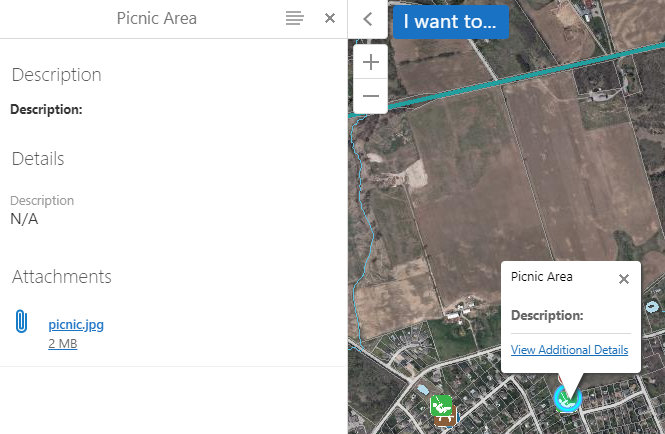
That is currently how I have it configured, but it doesn't seem to work. The attachements are pulled using the globalID field. I have this field set to not show and to not include in global search but it still shows:

 0
0 -

Hi Ali,
You could try some css. Add this to your viewer custom.css and see if that works. It will hide all your attachments in case you needed some visible.
div.view.FeatureAttachmentsProviderView.active {
display: none;
}
Thanks,
Marion.0 -
Thanks Marion!
That worked like a charm!
0
Please sign in to leave a comment.
Comments
4 comments