Multiline regex validation in HTML viewer displayform

I added a TextArea to a DisplayForm with with this validation:
(?s)^.{1,100}$
This should test for a maximum of 100 characters, inclusding newlines. It works in the DisplayForm designer, and also when I run the workflow from the designer, but the HTML viewer does not detect text with more than 100 characters.Am I missing something here?
0
-

...looks like I need to test some forms... 0 -
Here's what I'm using with success: ^.{0,100}$0 -
Zack,
That does not work if the textarea contains newlines.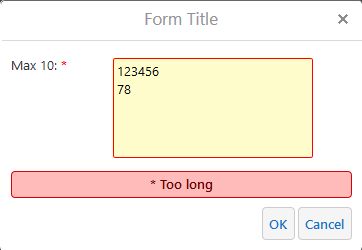 0
0 -

Hi Berend
I have used this for a textarea formelement, that max could recive max. 1000 chraracters.
(\s\|.){0,999}$
0 -
Sebastian,
Are you sure that's the exact regex you're using? I copied it, and just replaced 999 with 10, but when I try it, any input is accepted, both in de Workflow Designer and in the HTML viewer.
Or are you using the new workflow 5? I'm still at 4.80 -
How about ^(.|\s){0,1000}$0 -
Thanks, that works perfectly! 0 -
It had better! You just saved me from a future bug hunt. 0 -

I've been trying to build a similar check in a text area form - no more than 750 characters and allow newlines.
I had been using
^.{0,750}$
until a user pointed out that newlines break this. I've tried
^(.|\s){0,750}$
But when I hit submit, my page returns unresponsive warnings and can take two minutes or more to tell me that my input is invalid.
I'm running this form in workflow 4 in Essentials 4.14.4 and tested it in both Edge and Chrome and both get the slow response times.
0
Please sign in to leave a comment.
Comments
9 comments