Workflow Report Activity Text Fields does not work

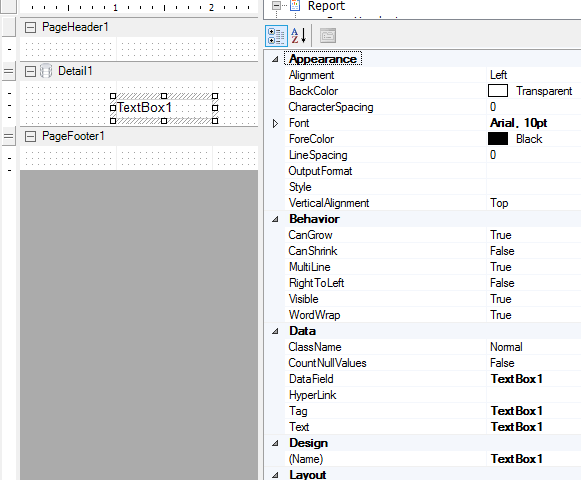
I have tried almost every way to get the Text Fields property to work in the Report activity for a layer in workflow with no success. I have seen a lot of threads with no definitive answer, so is this functionality broken? In the screen captures below I demonstrate that I have built the dictionary in the workflow and passed it to the report activity, and then added a TextBox control to my form with the appropriate naming. Still I am unable to get anything to display. What is going on here?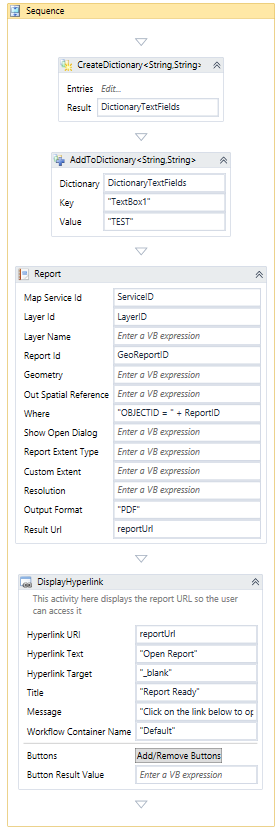
0
-

Hi Andrew,
Unfortunately, the custom text fields property was implemented for a specific services project and thus is very difficult for anyone to use.
I do see that we had a case for you and the outcome was to improve the documentation. In addition, I'd like to make sure we have captured your use case for development of the new Reporting tools; if possible, can you post to the Ideas section in the Reporting 5 community with a description of your use case, so we can get some people thinking about it?
Thanks!
-Malcolm0
Please sign in to leave a comment.
Comments
1 comment