Map Context Menu Width

Does anyone know how to make the Map Context Menu wider? I'd like my text 'Open Google Streetview Here' to fit on one line.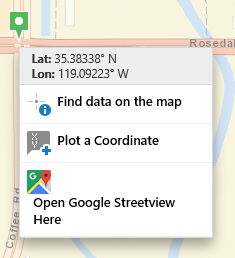
Thanks!
0
-
By default, the width is controlled by the following CSS in the common.css file. .context-menu-region .MapContextMenuView { width: 22em; }
You can add this style to the custom css for your site (..\VirtualDirectory\Resources\Styles\Custom\desktop.css) and adjust the width as necessary.0 -
Perfect! Thank you so much! 0 -
Hi Lisa,
You should be able to do this using custom CSS by adding -
.ContextMenuView .context-menu-region > div {
width: fit-content;
}
As with all CSS changes I would make sure you do lots of testing after the change to make sure something wasn't inadvertently affected.
Regards,
Wayne Richard
Latitude Geographics Group Ltd.
Head Office: 300 – 1117 Wharf Street Victoria, BC Canada V8W 1T7
Tel: (250) 381-8130 | Fax: (250) 381-8132 | wrichard@latitudegeo.com
Developers of Geocortex web-based mapping software | www.geocortex.com
An Esri Platinum Business Partner0 -
Peter beat me to it, either should work. 0 -
Thank you both! 0
Please sign in to leave a comment.
Comments
5 comments