Data Link not working

I have configured numerous data links with no problems, however I cannot get my most recent data link to work...
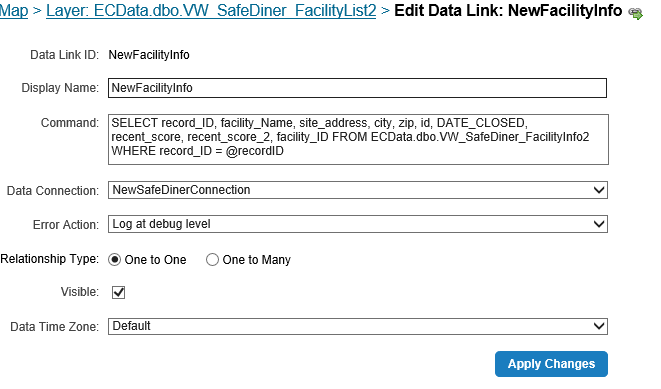

I've created a Data Connection to the SQL database which connects successfully.
I have the Data Link set up on the layer...
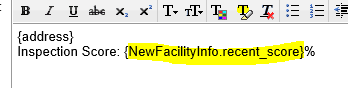
And I have the syntax correct in the feature description...
However, I am not seeing the data displaying in the map...
What am I missing?!?
0
-

Does the datalink return results on the REST endpoint?
Is the query syntax correct (test in SQL Server Management Studio)
How is the recordID parameter defined?
Can the user defined in the data connection view the tables (select grant)?0 -

Nico's last item "Can the user defined in the data connection view the tables (select grant)?" is the most likely culprit in your scenario. Did someone alter the table recently and maybe not reapply permissions? 0 -
To answer Nico's questions:
Does the datalink return results on the REST endpoint? - Yes
Is the query syntax correct (test in SQL Server Management Studio) - YEs
How is the recordID parameter defined?
I'm not sure if this is the correct why to define the parameter but this is how I've always done it in the past and it's always worked...
Can the user defined in the data connection view the tables (select grant)? - Yes, I believe the user defined in the data connection can view the tables. I'm unsure of what you mean when you say 'Select grant'0 -
The screenshot did not come out very clear at all. The Parameter Name, Default Value, and Feature FIeld are all set to recordID. 0 -
Lisa, SELECT GRANT is SQL slang. It refers to granting the user account SELECT permissions (read only).
If you are getting results from the REST, then the issue is in the viewer. I would look at the logs and developer console to see what it is doing. I honestly have never seen Data Connection not work, if results are being returned in the REST endpoint unless "Visible" is unchecked (which it is checked visible).
Could this be a specific browser issue? Have you tried other browsers or workstations?0
Please sign in to leave a comment.
Comments
5 comments