Global Search over HTML5 Map instead of in banner

I'm looking for some advice on how to move the Global Search box from the banner to a position over the map. I understadn this was possible in the Silverlight viewer using the viewer.xml file in the sites directory. I'm using the HTML5 viewer, and have the banner hidden/disabled due to our sites design.
What I'd like to be able to do is float the search box over the map, in either the top left, or top right corner (eg next to the toolbox icon, or "I want to" menu.
I'm guessing that I need to be hunting in the Dekstop.json.js file, but am not entirely sure what I'm looing for, or need to change/modify/create to achieve the desired result.
0
-

I moved my search bar to above the I Want To menu. 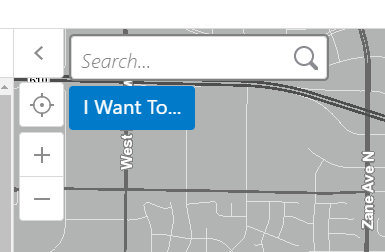
It moves when you open a map tip, but I haven't had any complaints from my users.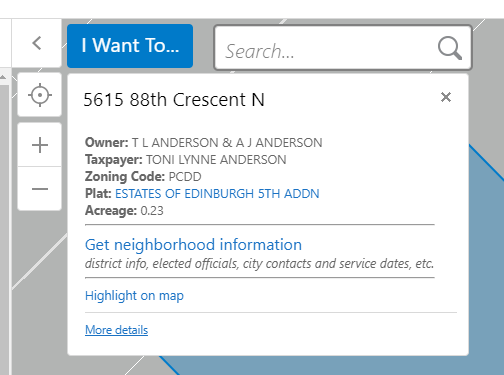
Here's the code in the config to change (in bold).
{
"id": "SearchView",
"viewModelId": "SearchViewModel",
"visible": true,
"title": "@language-search-title",
"iconUri": "Resources/Images/Icons/Toolbar/search-32.png",
"markup": "Mapping/modules/Search/SearchView.html",
"type": "geocortex.essentialsHtmlViewer.mapping.modules.search.SearchView",
"region": "NavigationMapRegion",
"configuration": {}
},
I also updated the search bar text size with a little CSS to make it more prominent:
.global-search {
font-size: 1.25em;
}0 -
This is very helpful. Thanks for posting this reply. I was looking to do this for some of my sites. 0 -
That's great. Thanks! 0 -
We did something similar but altered it slightly for desktop and handheld. It took quite a bit of tweaking to get it how we wanted it and I'm happy to share the code if you'd like.
Scott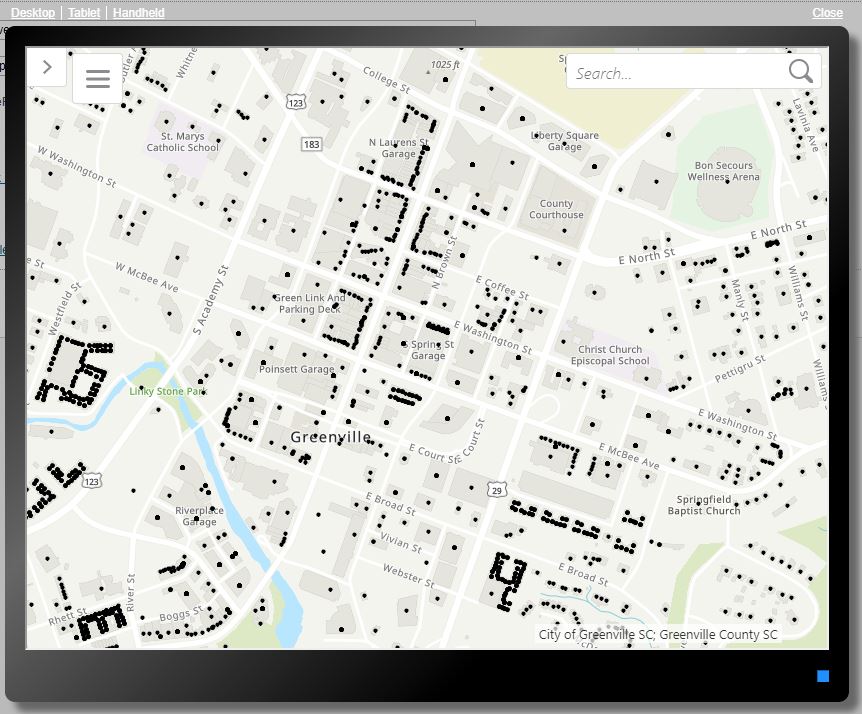
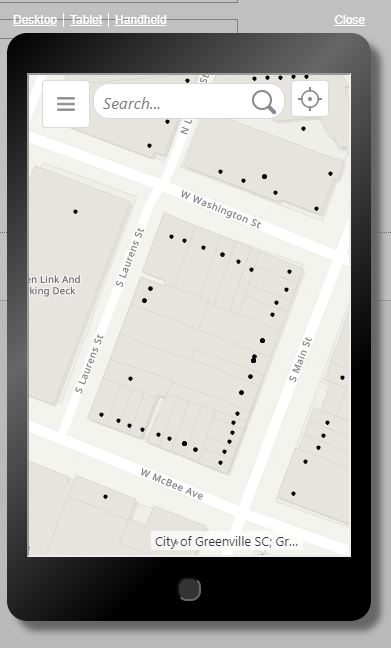 0
0 -
Scott if you are willing to share that...that would be great. This is something that I would really like to try.
thanks
Larisa0 -
Hi John,
I achangd the code and it moved my search bar to the map region, but it did not put it anywhere near the I want to menu. Am I missing something? Not sure if I am. Could you help me out?
Thanks
Larisa 0
0 -
-For the json.js files you can search for the parameters.
-The .css portions can be copied and pasted as is. Feel free to download and use the images if you'd like<u><b>Desktop.json.js</b></u> "id": "ZoomInView" set visible to false "id": "ZoomOutView" set visible to false "id": "CompactToolbarView" set visible to false "id": "SearchView" set region to TopRightMapRegion<u><b>Desktop.css</b></u> /* Edits I Want To Button */ .wtm-button { width: 2.5em; height: 2.5em; background: #fff url("https://gis.greenvillesc.gov/Geocortex/Essentials/REST/sites/Template_Minimal/viewers/viewer/virtualdirectory/Resources/Images/Custom/hamburger-32.png") center center no-repeat !important; border: 1px solid #D9D9D9; } /* Edits I Want To Button when clicked */ .wtm-active .wtm-button, .wtm-active .wtm-button:hover { color: #1a72c400; } /*Edits the filter widget on both layer list and legend*/ .panel-filter-widget { display: none; } /* Removes the gap where the filter widget existed*/ .layer-list { top: 0em; }<u><b>Tablet.json.js</b></u> "id": "ZoomInView" set visible to false "id": "ZoomOutView" set visible to false "id": "CompactToolbarView" set visible to false "id": "SearchView" set region to TopRightMapRegion<u><b>Tablet.css</b></u> /* Edits I Want To Button */ .wtm-button { width: 2.5em; height: 2.5em; background: #fff url("https://gis.greenvillesc.gov/Geocortex/Essentials/REST/sites/Template_Minimal/viewers/viewer/virtualdirectory/Resources/Images/Custom/hamburger-32.png") center center no-repeat !important; border: 1px solid #D9D9D9; } /* Edits I Want To Button when clicked */ .wtm-active .wtm-button, .wtm-active .wtm-button:hover { color: #1a72c400; } /*Edits the filter widget on both layer list and legend*/ .panel-filter-widget { display: none; } /* Removes the gap where the filter widget existed*/ .layer-list { top: 0em; }<u><b>Handheld.json.js</b></u> "openMinimized" set to false, "bottomPanelHeightPercent" set to 35 "id": "SearchView" set region to TopCenterMapRegion "id": "IWantToMenuButtonView" set region to TopLeftMapRegion "id": “NavButtonView" set visible to false "id": "GeolocateButtonView"set region to TopRightMapRegion<u><b>Handheld.css</b></u> /*Removes header region*/ .header-region { display: none; } /*Makes sure that the map fills the whole screen*/ #map_root { height: 100%; } /*Makes sure that the screen region remains 100% of full screen*/ .screen-region { top: 0 !Important; Height: 100% !Important; } /*Sets up the search bar in middle of screen*/ .map-top-center { width: 60%; position: fixed; left: 20%; } /*Edits the search box*/ .shell-small .search-box input { text-align: left; border-radius: 1rem; border: 1px solid #D9D9D9; padding: 3px 30px 4px 9px; margin: 0.38em 0.4em 0.4em 0em; } /*Centers the status bubble*/ .status-window { margin-right: 0em; } /* Edits I Want To Button */ .shell-small .wtm-button { width: 2.5em; height: 2.5em; left: 0.4em; background: #fff url("https://gis.greenvillesc.gov/Geocortex/Essentials/REST/sites/Template_Minimal/viewers/viewer/virtualdirectory/Resources/Images/Custom/hamburger-24.png") center center no-repeat !important; border-radius: 0.25rem; border: 1px solid #D9D9D9; position: relative; } /*Edits I Want To Menu Header*/ .wtm-list h2 { padding: 1em 1em; background: #fff url("https://gis.greenvillesc.gov/Geocortex/Essentials/REST/sites/Template_Minimal/viewers/viewer/virtualdirectory/Resources/Images/Custom/close-24.png") center center no-repeat !important; border: 2px solid #D9D9D9; } /* Edits Geolocation button */ .zoom-control-btn button { width: 106%; height: 106%; } /*Edits location of Geolocation button*/ .region.map-top-right { width: 4.5em; } /*Edits the filter widget on both layer list and legend*/ .panel-filter-widget { display: none; } /* Removes the gap where the filter widget existed*/ .layer-list { position: fixed; } /*Removes log and home panel text at bottom of I Want To Menu*/ .wtm-list .menu { display: none; }
Scott0 -
WOW! Scott....thank you so much! I can't wait to try it out. I really appreciate this. 0 -
Larisa, for the desktop config use the NavigationMapRegion specifically.
Also, FYI, I set this up in GE 4.6 and the GVH 2.7, so if it's still not working then settings might have changed in a newer version.0
Please sign in to leave a comment.
Comments
9 comments