Query Builder Error after GE4.10 and GHV5 2.11 upgrade

Hi, we recently upgrade to GE4.10 and GHV2.11 and noticed the Query Builder tool on the toolbar not working. 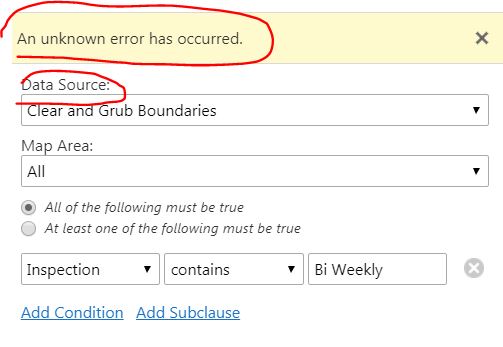
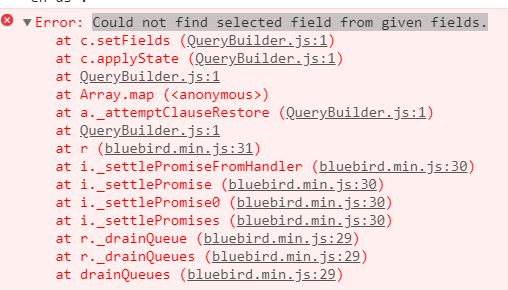
Basically, when launch the query builder tool. It can pick up the fields of the first layer in the Data Source list, and the query builder works fine. But when I change the data source to other layers in the list, it failed to refresh the fields and throw out error saying “Could not find selected field from given fields.” Tried on both Chrome and Firefox same error. Has anyone noticed this?
0
-

Hello Jack,
This issue will be fixed in GVH 2.11.1, which will be available in late August.
The issue is caused by having field permissions configured for that particular user. Removing this setting, if possible, will allow you to query on this layer.Thanks, Stefan
0 -
Thanks Stefan. 0 -
It also occurs when field permissions are set using the anonymous user. 0 -
And also when the specific layer has no field permissions set, though we have to many field permission to remove them from all layers if that is what you meant. 0 -
Hi All,
I am trying to use the query/filter tool for layers from the layer catalog. Ive tried granting field permissions but still no luck.
Do these tools just not work until the next update?0 -
Hi Adam,
Until 2.11.1 is released, which is currently planned for before the end of August, setting field permissions will cause errors to occur.
Thanks, Stefan0 -
Hi Stefan,
Thank you for the update. So is there any solution to get it to work before 2.11.1?
Thanks0 -
Hi Adam,
Please submit a support case to support@latitudegeo.com and we will see what we can do.
Thanks,
Wayne0 -
I have tested this on a fresh install of 4.10.3 & 2.11.2 and can confirm this is no longer an error. 0
Please sign in to leave a comment.
Comments
9 comments