autocomplete box in workflow form - look changed

We just upgraded to the latest GCE and HTMLViewer and noticed the autocomplete box dropdown list in the workflow form has "condensed" the options.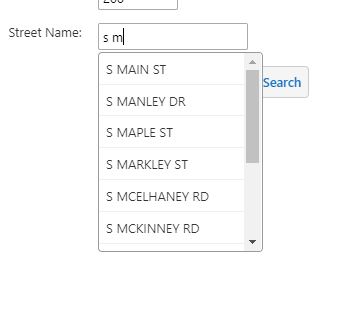
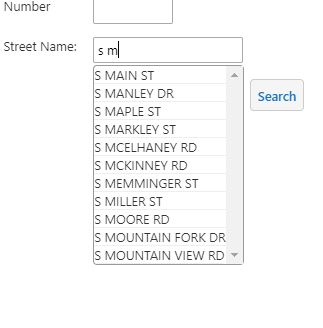
Before upgrade:
AFter upgrade:
Has anyone else seen this and/or know where to change it? People using touchscreen laptops would prefer the larger spacing.
Thanks,
Carmen
0
-

Hi Carmen,
You can use custom CSS to get the spacing you are looking for, the CSS would look like -
.list-menu-item {
padding: 3px;
}
but you would need to test it to see if it had an undesirable effect on other lists within the viewer.
Regards,
Wayne0
Please sign in to leave a comment.
Comments
1 comment